

vntg:ai: tags. The same keys, like vntg:ai:model, vntg:ai:model_provider, and vntg:ai:token_type, appear regardless of which supported provider the spend came from, so you can build Cost Reports, Virtual Tags, Budgets, and Cost Alerts on the same dimensions across your AI stack.
Each AI provider exposes different fields: the model name may be the service on one integration and a tag on another, and user identity may be an email, a user ID, or an API key depending on the vendor.
Managed AI Tags are metadata-only and included with Vantage at no additional cost for accounts with supported AI cost integrations. Vantage only normalizes fields your providers already report in cost and usage data; it does not collect prompt or completion content.
How It Works
Managed AI Tags are applied automatically during each provider’s cost ingestion. Vantage reads the provider’s billing and usage fields, maps them to the normalized schema, and writes the resulting tags, prefixed withvntg:ai: by default, onto the cost rows. No configuration is required: once you connect a supported AI integration, the tags appear on that provider’s costs and become available anywhere tags are supported in Vantage.
Not every provider supplies every field. Vantage only writes a tag when the source data provides a reliable value for that key, so the set of vntg:ai: tags you see depends on which providers you have connected and what each one reports.
The Managed AI Tag Schema
The following keys make up the canonical Managed AI Tag schema. Each key is shown with thevntg:ai: prefix.
Not every provider supplies every field. Vantage only writes a tag when the source data provides a reliable value for that key.
When Custom LLM Enrichment is enabled, Vantage also writes request metadata into the same schema, including
vntg:ai:endpoint and, for AWS Bedrock, vntg:ai:operation (inference or streaming) and vntg:ai:inference_scope (global or regional). AWS Bedrock LLM Enrichment populates the same two Bedrock keys from your Model Invocation Logs. These keys come from per-request telemetry rather than native provider billing. See Managed AI Tags vs. Custom LLM Enrichment.vntg:ai:inference_speed (its service speed tier) alongside the canonical keys.
Supported Providers
Managed AI Tags are emitted automatically for supported AI cost integrations. The keys each provider populates depend on the fields that provider reports.For the hyperscalers, Managed AI Tags apply only to the AI portion of spend: Amazon Bedrock cost rows on AWS, Azure OpenAI, Foundry, and Marketplace Anthropic cost rows on Azure, and Vertex AI Gemini and Marketplace Claude cost rows on Google Cloud. Non-AI costs on those providers are unaffected.
OpenAI Codex costs currently use provider-specific
openai: tags and do not receive Managed AI Tags. The OpenAI row above applies only to OpenAI Platform costs imported with an Admin API key.How Managed AI Tags Coexist with Provider Tags
Managed AI Tags add a cross-provider layer on top of the provider-specific tags Vantage already creates. Provider-specific native tags, such ascursor:user, openai:api_key_id, or anthropic:model, continue to exist and capture fields unique to that integration, while the managed vntg:ai: keys give you a single, consistent dimension that works across providers.
Managed AI Tags are also additive to your existing configuration: they do not modify your Virtual Tags, Billing Rules, or reports. You can start using them in new reports and filters immediately alongside everything you already have.
Renaming or Standardizing Managed AI Tags
Vantage maintains the canonical Managed AI Tag definitions with the setvntg:ai: prefix so the schema stays consistent across every account. If you want to present these tags under different key names, use Tag Key Collapsing to map one or more vntg:ai: keys into a Virtual Tag with your preferred naming.
Backfill and Data Freshness
Managed AI Tags are applied as part of each provider’s cost ingestion, so they follow that provider’s refresh cadence. See the provider data refresh documentation for per-provider timing. Normalizedvntg:ai: tags are available from August 2026 onward. Vantage does not backfill managed tags onto earlier historical data.
Use Managed AI Tags in Cost Reports
Once a supported AI integration is connected and its costs are processed, thevntg:ai: keys appear in the Tag Key dropdown wherever tags are supported. To analyze AI spend with them:
- To group: open the Group By menu on a Cost Report, select Tag, and choose a key such as
vntg:ai:model(values likegpt-4o) orvntg:ai:model_provider. - To filter: open the Filters menu, add a new rule, select Tag, choose the Tag Key (for example,
vntg:ai:user_email), then pick an operator and one or more values.
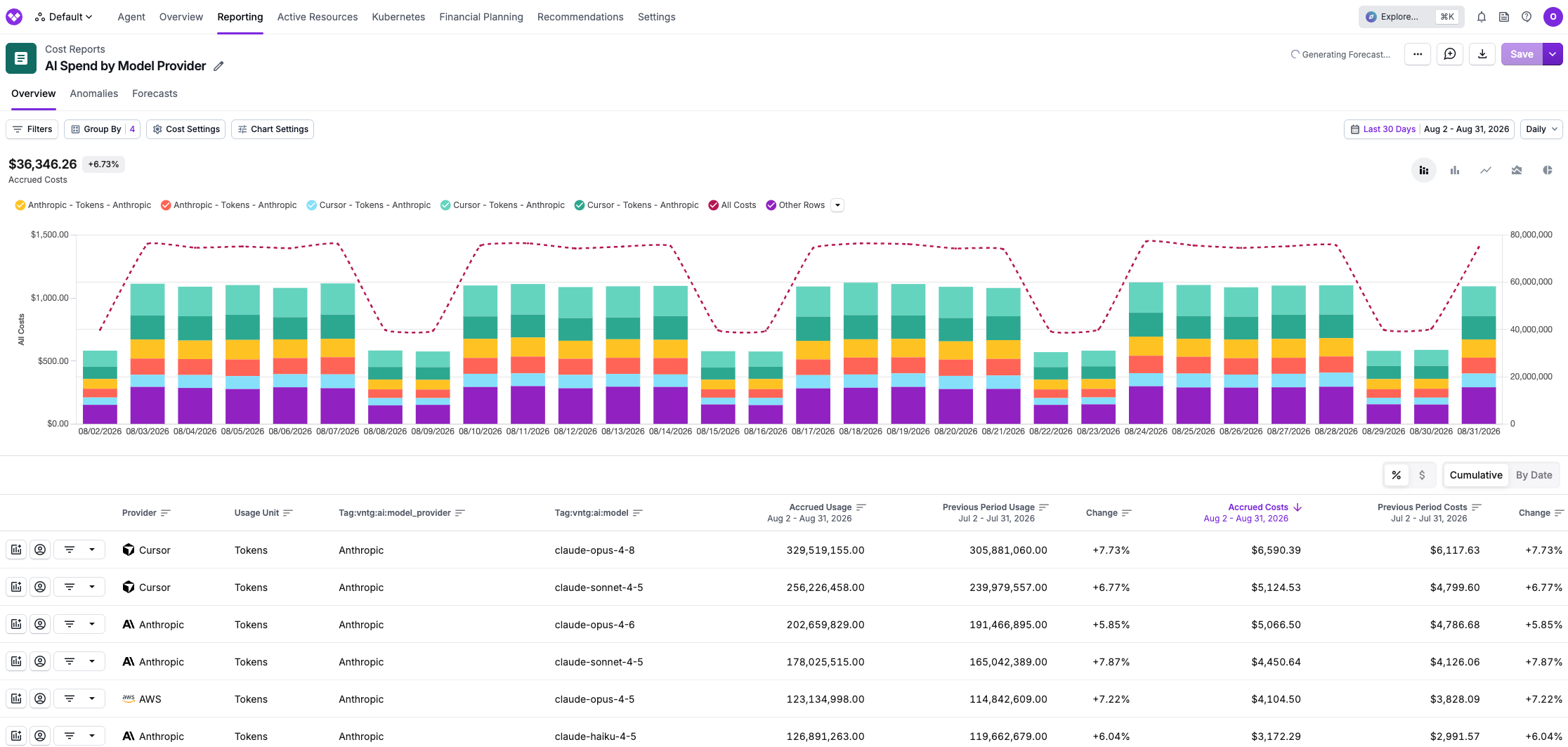
vntg:ai:model_provider and vntg:ai:model. Because vntg:ai:model_provider reflects who built the model rather than who billed for it, the same Anthropic models roll up under one provider value whether they were purchased through Cursor, through Anthropic directly, or through AWS Bedrock, with normalized model names, token counts, and costs lined up side by side.
Managed AI Tags vs. Custom LLM Enrichment
Managed AI Tags and Custom LLM Enrichment are complementary features that share thevntg:ai: vocabulary but solve different problems.
In short, Managed AI Tags standardize what providers already send, while Custom LLM Enrichment enriches what providers leave out. Use them together for the most complete view of AI spend.