Vantage integrates with Metronome to bring billing revenue and product usage data into Vantage as Business Metrics. You can then analyze Metronome revenue and usage alongside Vantage cost data to understand customer profitability, cost per unit, gross margin, and pricing efficiency. Metronome is connected from the Apps section of Vantage. It does not import Metronome as a cost provider. Instead, Vantage imports Metronome data as labeled business metrics that can be assigned to Cost Reports, used in Canvas, and queried with the FinOps Agent.

How It Works

Vantage connects to the Metronome API with a bearer token, discovers revenue and usage data, and imports the selected data into Vantage business metrics. Each imported row is daily and can be labeled by customer so you can compare cost, usage, and revenue at the same level of detail. Vantage can import two kinds of Metronome business metrics:
Metric typeMetronome sourceUse it for
Daily invoice revenueMetronome invoice breakdownsRevenue, gross margin, customer profitability, and cost as a percentage of revenue
UsageMetronome billable metricsCost per compute hour, API request, storage GB-hour, AI token, seat, transaction, or other product usage unit
Labels identify the customer associated with the metric value. When configuring the import, you can choose one of the following label sources:
Label sourceBest for
Customer nameHuman-readable customer profitability and usage analysis
Ingest aliasCleaner or external customer identifiers already maintained in Metronome
Customer IDStable joins and troubleshooting when names or aliases are not available
Metronome business metrics sync daily. Initial imports and reimports can take time to finish, especially when importing historical data across many customers or billable metrics.

Connect Metronome

Prerequisites

Before you connect Metronome to Vantage, make sure you have:
  • A Vantage role that can manage integrations, such as Organization Owner or Integration Owner. See Role-Based Access Control.
  • Access to create or retrieve a Metronome API token.
  • A Metronome token that can access customers, invoice breakdowns, usage queries, and billable metrics.
Metronome API tokens use bearer authentication. See Metronome’s API authentication documentation and RBAC documentation for details on creating and scoping API tokens.
If your Metronome workspace uses RBAC roles for API tokens, use an Administrator, Writer, or custom role that can access customer records, invoice breakdowns, usage data, and billable metrics. Metronome roles cannot be changed after token creation, so create a new token if the current one is too limited.

Create the Connection

1

Open the Metronome integration

In Vantage, navigate to Settings > Metronome. You can also open Settings, select Integrations, then choose Metronome from the Apps section.
2

Enter connection details

Click Add API Key. Enter a descriptive account name and paste your Metronome API token.
3

Connect the account

Click Connect Account. Vantage validates the token by checking that it can read Metronome customers and query usage data.
4

Create your first business metric

After the account is connected, create one or more Metronome-backed business metrics from Financial Planning > Business Metrics. See Import from Metronome for the full workflow.
Store your Metronome API token securely. Do not paste the token into Canvas, the FinOps Agent, Slack, or any client-side application.

Validate the Setup

After connecting Metronome, create one revenue metric and one usage metric before building reports (see Import from Metronome for details). This gives you a quick way to confirm the connection, metric discovery, labels, and imported values are working.
1

Create a revenue metric

Create a new business metric, select Import via Metronome, choose your connected Metronome account, and select Daily invoice revenue. Use a clear name like Metronome Revenue.
2

Create a usage metric

Create a second business metric, select the same Metronome account, and choose a billable usage metric such as Compute Hours, API Requests, Storage GB-Hours, AI Tokens, or Virtual Machine Hours.
3

Check labels and values

Open the Imported Metrics tab for each business metric. Confirm that rows appear by date and that labels match the customer naming style you expected.
4

Assign the metrics to Cost Reports

Assign the metrics to Cost Reports only after the imported values look correct. For example, assign Metronome Virtual Machine Hours to a COGS Cost Report to calculate cost per VM hour.

Example Workflows

The examples below assume you already created Metronome-backed business metrics in Vantage and that you have at least one Cost Report that represents COGS or product infrastructure cost. Replace the metric and report names with the names in your account.

Top Customers by Usage

Use this when you want to find which customers are driving the most product usage before you look at cost or revenue.

Show my top customers by Metronome usage over the last 30 days. Use the "Metronome Virtual Machine Hours" business metric, group by customer label, include total usage, daily average usage, and share of total usage, and sort descending.
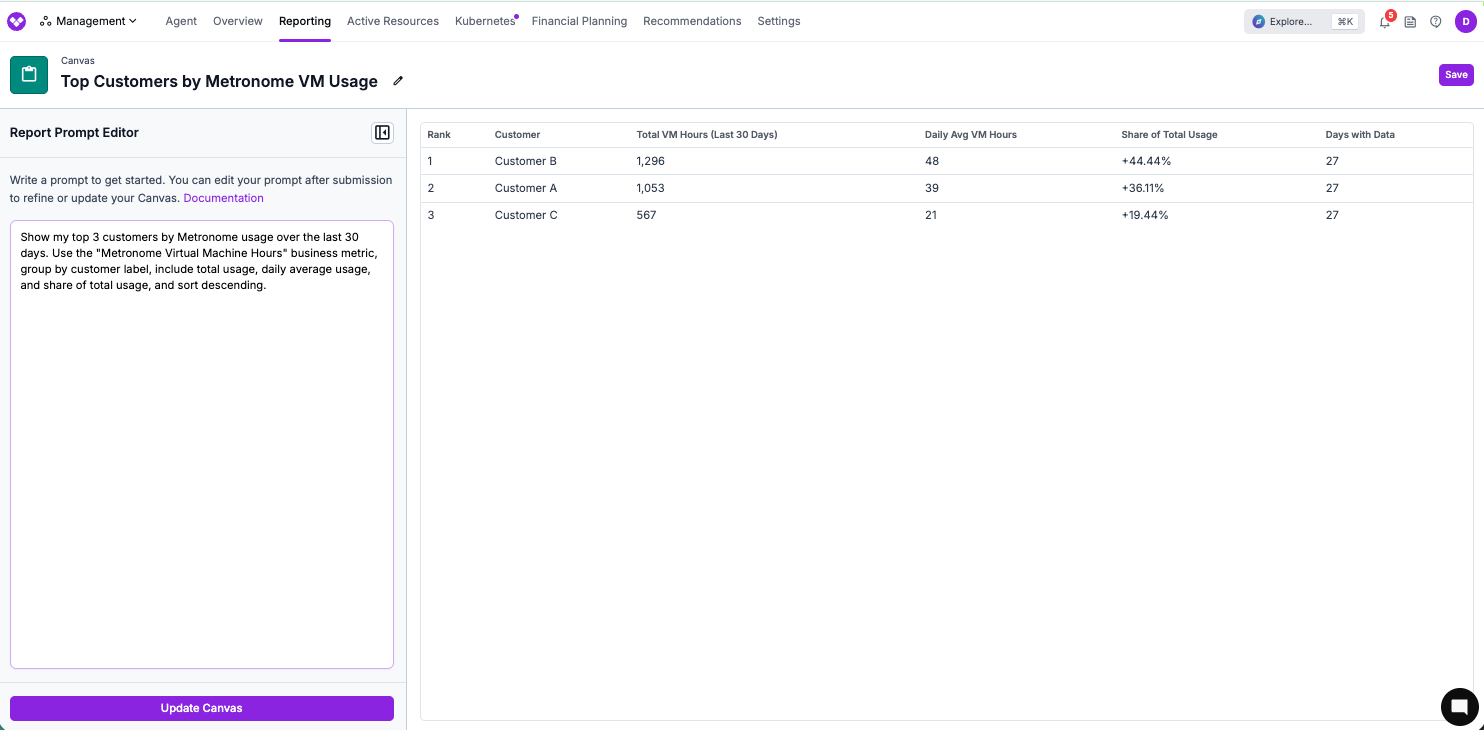
Expected output: one row per customer with usage totals and share of usage. Use this to identify the customers that should be reviewed first for unit cost, margin, or pricing analysis.
Canvas table showing top customers by Metronome usage

COGS and Unit Cost by Customer

Use this when you have a Cost Report for product COGS and a Metronome usage metric with customer labels.

Using my "COGS" Cost Report and the "Metronome Virtual Machine Hours" business metric, calculate cost per VM hour by customer for the last 30 days. Include total COGS, total VM hours, cost per VM hour, and rank customers by total COGS.

Expected output: one row per customer with cost, usage, and cost per unit. Use this to find customers whose usage is disproportionately expensive.

Gross Margin by Customer

Use this when you import Metronome revenue and want to compare it with Vantage COGS for the same customer labels.

Compare "Metronome Revenue" to my "COGS" Cost Report for the last month. Group by customer label and include revenue, COGS, gross margin dollars, and gross margin percent.

Expected output: a customer profitability table. Review low or negative margin customers first, then inspect the underlying Cost Report filters and usage metric labels.

Pricing Targets from Current Unit Cost

Use this when you know the current cost per product unit and want to evaluate price points for target margins.

Use my current cost per VM hour from the "COGS" Cost Report and "Metronome Virtual Machine Hours" business metric to suggest prices that would produce 20%, 40%, and 60% gross margin. Show the formula and include one row per target margin.

Expected output: a table with current cost per unit and suggested price per unit for each target margin. Use the result as a pricing input in Metronome.

Usage-Based Cost Allocation

Use this when a shared platform cost should be allocated to customers based on their share of Metronome usage.

Allocate shared cloud and platform costs in my "COGS" Cost Report to customers based on the "Metronome Virtual Machine Hours" labels, then show COGS by customer and cost per VM hour for the last 30 days.

Expected output: customer-level cost allocation based on usage share. If you want the allocation to be reusable across reports, create a Virtual Tag that uses the Metronome business metric as the allocation basis.

Product Usage Portfolio

Use this when you import several Metronome usage metrics and want to see which product dimension is growing fastest.

Show daily Metronome usage for Compute Hours, API Requests, Storage GB-Hours, and AI Tokens for the last 30 days. Include one row per product metric and day, and call out the fastest-growing metric.

Expected output: daily usage by product metric. Use this to decide which usage unit should be paired with a Cost Report first.

Ask the FinOps Agent

You can also ask the FinOps Agent one-off questions about Metronome-backed business metrics in the Vantage console. Name the relevant business metric and Cost Report so the agent can scope the analysis. Try prompts like:
  • Which customers had the highest Metronome usage last month, and how did their COGS compare?
  • Use my Metronome Revenue business metric and my COGS Cost Report to find customers below 30% gross margin.
  • Explain why cost per VM hour increased last week for my Metronome Virtual Machine Hours metric.
  • Create a Cost Report that uses my COGS filters and assign the Metronome API Requests business metric to show cost per thousand requests.
The Vantage integration uses these Metronome concepts and APIs:

Troubleshooting

Confirm that your Vantage user has permission to manage integrations. You need a role such as Organization Owner or Integration Owner.
Vantage validates the token by checking customer and usage access. If the token is rejected, create a new Metronome API token with access to customers, invoice breakdowns, usage queries, and billable metrics.If your Metronome account uses RBAC for API tokens, assign an Administrator, Writer, or custom role with access to those endpoints. See Metronome’s RBAC documentation.
The usage metric dropdown is populated from Metronome billable metrics. If it is empty, confirm that the token can access GET /v1/billable-metrics and that your Metronome account has active billable metrics.After confirming permissions, refresh the metric list or try reconnecting with a new token.
Initial imports and daily refreshes can take time to finish. Check again after the import completes or after the next daily sync.If the metric remains pending, confirm that the Metronome connection is still active and that the business metric is connected to the intended Metronome account and metric type.
Check the label source selected for the business metric. If you selected Customer ID, Vantage uses the raw Metronome customer ID.If you selected Ingest alias or Customer name, Vantage can fall back to the customer ID when that value is not available in Metronome. Edit the business metric configuration if you want a different label source.
If two Metronome customers have the same name, Vantage disambiguates the labels with an ID suffix. This is expected and helps prevent two customers from being merged into one labeled metric.
Usage can exist before a customer is billed or before a product has billable revenue configured in Metronome. In that case, usage metrics appear in Vantage, but revenue may be zero or missing for the same customer and date range.Confirm that the customer has invoice data in Metronome for the selected period, then rerun the analysis for a date range that includes billed revenue.
Compare the Canvas or FinOps Agent prompt against the Cost Report. Make sure the prompt uses the same workspace, report, date range, cost settings, and business metric labels.For unit cost analysis, also confirm that the Cost Report contains the COGS or product costs you want to divide by the Metronome metric. If the report contains all company costs, the cost per unit may be inflated.
This is expected. Metronome is connected from Apps and imports revenue and usage as business metrics. It does not import provider costs into Vantage.To analyze Metronome data with costs, assign the Metronome business metric to a Cost Report or reference it in Canvas or the FinOps Agent.