

Vantage Tokenomics is in Private Preview for select Vantage design partners and will open in Beta to existing customers soon. To request access, contact support@vantage.sh or your Vantage account team. Not a Vantage customer? Contact sales@vantage.sh or book a demo.
Roster
Everyone generating token spend, with the tasks they completed and what each cost.
Classifier
Your organization’s tagging strategy, applied to every request as it happens.
Tokenomics Report
Custom reports on cost, usage, and efficiency to find workflows worth optimizing.
How Vantage Tokenomics Works
- Your AI tools send OpenTelemetry logs to Vantage. Coding tools and AI gateways export usage over OTel with an ingest token from Vantage. Provider admin APIs supplement this when a tool’s native export is not available.
- The Classifier tags each request. Hooks in your coding tools or gateway fetch your organization’s tagging skill from Vantage and apply it as work happens, so developers never tag by hand.
- Usage appears in the Roster and Tokenomics Reports within minutes. Vantage estimates the gross cost of each request and calculates efficiency metrics across users, models, and tags.
Supported Tools and Gateways
Any AI tool that supports OpenTelemetry is compatible with Vantage Tokenomics, so support grows as the industry adopts open standards. Most common tools support OpenTelemetry today:
If you use a tool that isn’t listed, submit a feature request through your Vantage account team or by emailing support@vantage.sh.
Get Started
Users with the Organization Owner or Integration Owner role can turn on Tokenomics for an account. See Role-Based Access Control for details.1
Turn on Tokenomics
In the Vantage console, open Tokenomics and turn it on for your account.
2
Connect your sources
Connect your coding tools, your organization-wide AI gateway, or a mix of both, depending on your coverage. Vantage provides onboarding instructions for each source. See Set Up with an AI Gateway and Set Up Coding Tools Without a Gateway.
3
Open the Roster
Once logs begin to populate, the Roster is your default Tokenomics page. From there, open Tokenomics Reports to build custom views of who is spending, what they are spending on, and the outcomes.
Set Up with an AI Gateway
An administrator can set up a gateway once for the whole organization, with nothing installed on developer laptops.- Add the gateway from Tokenomics onboarding or the Vantage Integrations page, and create an OpenTelemetry ingest token.
- Add the ingest token to the gateway’s OpenTelemetry configuration.
- Configure the hook that imports your organization’s tagging skill. Do this once per gateway. Skill URLs are static, so you don’t need to change the configuration when you update your tagging strategy.
Set Up Coding Tools Without a Gateway
Coding tools connect through the Vantage Tokenomics plugin in the finops-as-code GitHub marketplace.- Enterprise subscriptions: An administrator installs the plugin once for the organization in Claude Code, Codex, or Cursor. In Cursor, mark the plugin Required for the team.
- Team and individual subscriptions: Vantage MCP users can call
setup_vantage_tokenomicsto have their agent install and configure the plugin, andcheck_vantage_tokenomicsto verify setup at any time. You can also share a setup prompt for each developer to run in their coding agent. See Vantage MCP.
Roster
The Roster is the homepage of Tokenomics. It lists everyone in your organization generating token spend over the trailing 30 days, sorted by estimated gross spend, alongside tokens consumed and the GitHub pull requests and Linear issues they completed. You can also sort by the number of pull requests and issues completed. Select a name to see the tasks that person completed and the cost of each.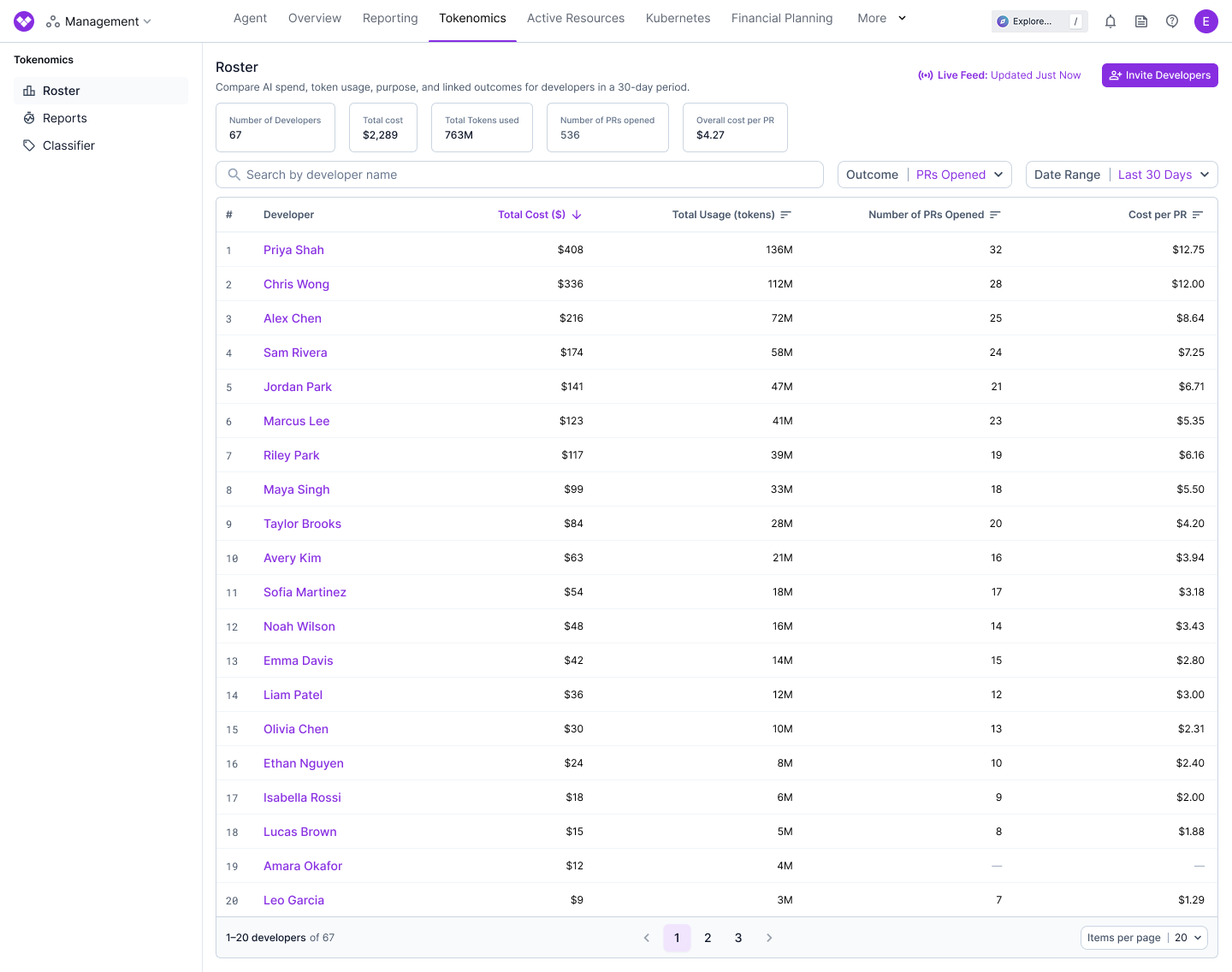
Classifier
The Classifier applies your organization’s tagging strategy to each request as it happens, including requests that arrive through a gateway, so developers never tag by hand. Classifier tags supplement tags already on your data and do not override them by default.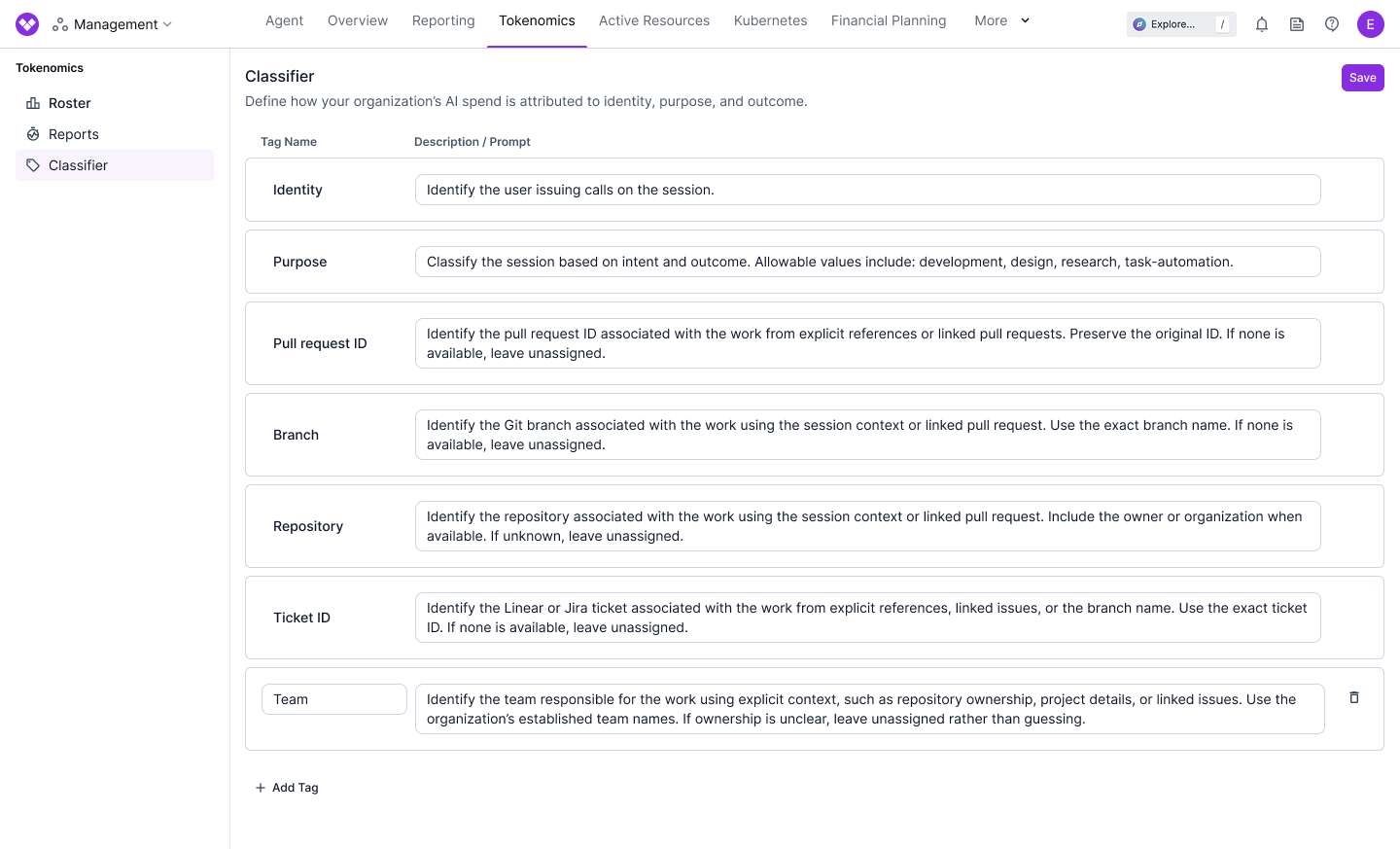
- Identity: The user the spend belongs to.
- Purpose: What the tokens are used for, such as development, research, design, or bug fixes.
- Outcome: The result of the spend, including pull request ID, branch, repository, and ticket ID from systems like Jira or Linear.
Tokenomics Report
Tokenomics Reports show estimated cost, usage, and efficiency within minutes, attributed to the user, purpose, and outcome behind them. Chart tokens consumed, estimated gross cost, cost per 1M tokens, cache hit rate, or input-to-output ratio. Group or filter by model, provider, source, token type, or any tag, including the Classifier’s default tags and the tags your organization adds.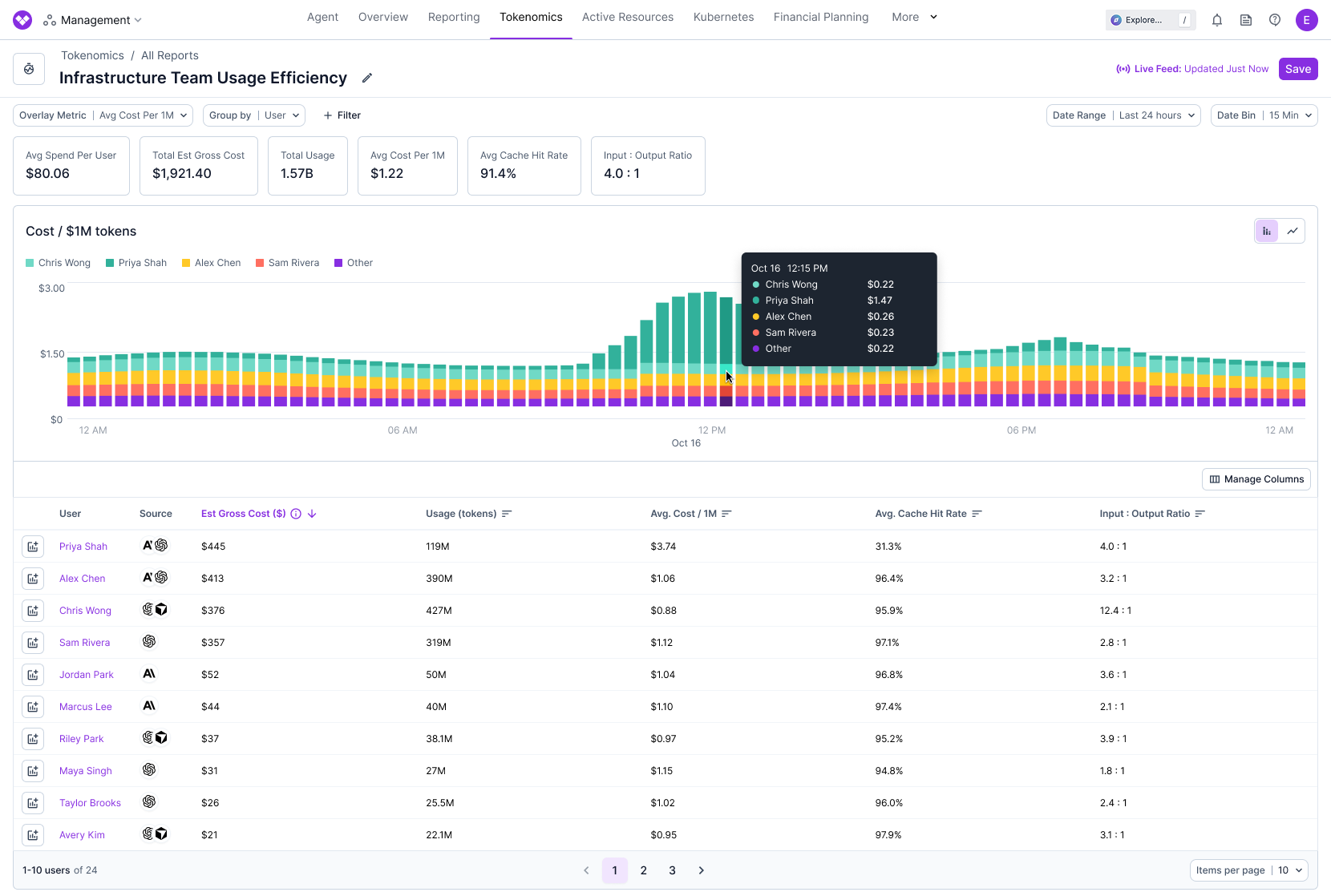
Frequently Asked Questions
The Introducing Vantage Tokenomics announcement answers common questions:- How much does this cost?
- What tools and gateways are supported?
- Does Vantage install anything on developer laptops?
- What can I group and filter by?
- How are efficiency metrics calculated?
- How are estimated costs calculated?
- How fresh is the data, and how long is it retained?
- Can I backfill historical data?
- Does Vantage collect prompts and completions?
- How does this relate to Cost Reports and LLM Enrichment?