

- OpenAI Platform: programmatic OpenAI usage accessed through the OpenAI Platform Costs API, broken down by operation (e.g., Chat and Completions, Images, or Embeddings) and model (e.g., gpt-4o). Connected with a read-only Admin API key.
- OpenAI Codex: Codex usage from a ChatGPT workspace, broken down by Codex client (e.g., Codex CLI, Codex Web, or Codex VS Code), model, and token type. Connected with a Codex Analytics API key and workspace ID.
openai:billing_source value (admin for OpenAI Platform or codex_analytics for OpenAI Codex), so you can filter, group, and allocate costs by data source. See OpenAI Reporting Dimensions for details.
Codex Analytics is available only for OpenAI Enterprise customers with a ChatGPT Enterprise workspace. The OpenAI Platform data source has no such requirement.
To attribute OpenAI spend to teams, users, applications, and features by your own per-request dimensions, see Custom LLM Enrichment, which joins per-request token telemetry you deliver to S3 with your OpenAI Platform costs.
OpenAI Data Sources
The table below summarizes the two data sources, what each captures, and what you need to connect them. In Cost Reports, you can filter by theopenai:billing_source tag to see which data source is associated with a given cost row.
The two data sources fill the shared dimensions differently. On OpenAI Platform rows, Account is the project and Resource is the API key ID. On OpenAI Codex rows, Billing Account (Organization) is the workspace ID, Account is the account name you set at connect, and Resource is the user’s email. Service is an operation on Platform rows and a Codex client on Codex rows. Filter on the
openai:billing_source tag to keep a report focused on one data source.This integration covers OpenAI costs billed directly by OpenAI. OpenAI models accessed through Azure OpenAI are captured under your Azure cost integration instead.
OpenAI Permissions
Vantage cannot perform cost-incurring actions and only ever reads cost and usage data from OpenAI.OpenAI Platform Permissions
OpenAI requires a read-only Admin API key to access the Costs API endpoint. The Costs endpoint is not available to non-admin API keys. Vantage only reads from this endpoint and never performs any action that incurs costs. You must be an Organization Owner in your OpenAI organization to create an Admin key.OpenAI Codex Permissions
Codex Analytics is available only for OpenAI Enterprise customers with a ChatGPT Enterprise workspace. OpenAI requires a dedicated Codex Analytics API key scoped tocodex.enterprise.analytics.read to access the Codex Analytics API. The key’s Platform organization must match the organization associated with the ChatGPT workspace you connect. Vantage reads only aggregated Codex analytics data for that workspace; it does not ingest prompts, generated code, or raw audit-event content, and it cannot run Codex tasks or change workspace settings.
Vantage stores only usage metadata (e.g., token consumption). The imported daily aggregates can include user email and user ID, which Vantage uses for Resource and tag-based reporting.
Connect Your OpenAI Account
You can connect the OpenAI Platform, OpenAI Codex, or both. Each data source has its own key and its own connection flow in Vantage. Both appear under the OpenAI provider in Cost Reports.Prerequisites
- You must have a Vantage Organization Owner or Integration Owner role to add or remove this integration. See the Role-Based Access Control documentation for details.
- For the OpenAI Platform, you must be an Organization Owner in your OpenAI organization to create a read-only Admin key.
- For OpenAI Codex, you must be an OpenAI Enterprise customer with a ChatGPT Enterprise workspace that has Codex Analytics API access, and be able to provision a dedicated Codex Analytics API key whose Platform organization matches the organization associated with the workspace.
- Create a free Vantage account, then follow the steps below to integrate OpenAI costs.
If your organization restricts access to the provider by IP address, add the following Vantage IP addresses to your provider’s allowlist:
Connect the OpenAI Platform
Use this data source to track programmatic OpenAI usage from the Platform Costs API.1
Navigate to the Admin Keys page of the OpenAI console, and log in using your company email.
2
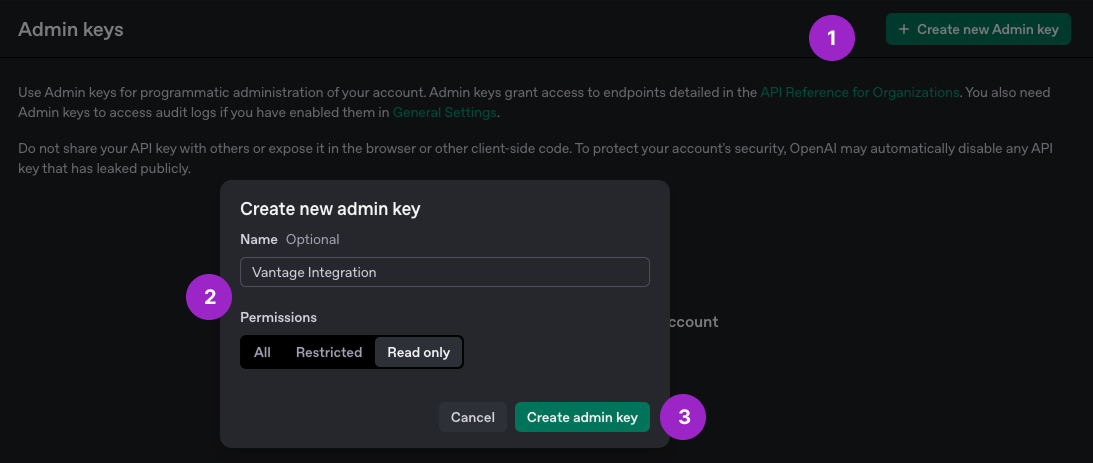
At the top, click + Create new Admin key.
3
For Name, add an identifiable name, like Vantage Integration.
Click to view example image
Click to view example image
4
For Permissions, select Read only.
5
Click Create admin key and copy the generated key. Admin keys start with
sk-admin-.6
Navigate to the Connect tab of the OpenAI Settings page in the Vantage console. In the OpenAI Platform section, click Add Admin API Key.
7
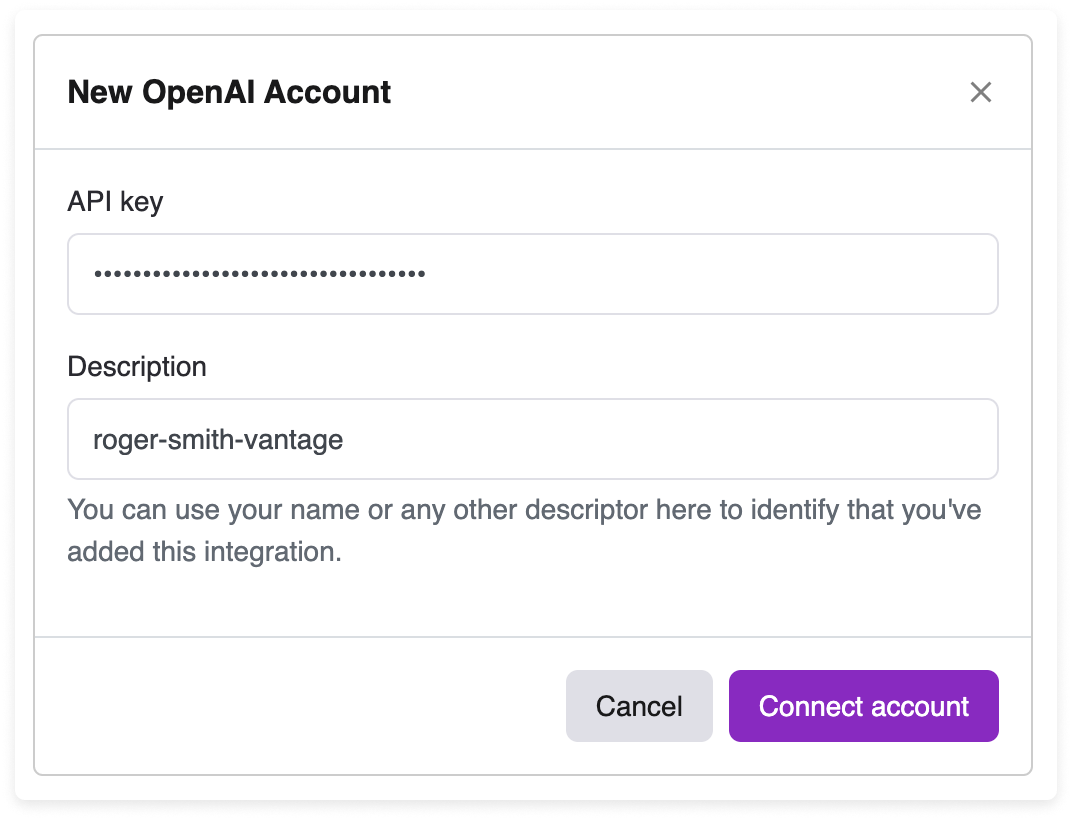
The New OpenAI Account modal is displayed. For API key, paste your previously generated Admin Key. For Description, enter any descriptor to identify that you’ve added this integration, such as your name.
Click to view example image
Click to view example image
8
Click Connect Account.
Connect OpenAI Codex
Use this data source to track Codex usage across clients like Codex CLI, Codex Web, and Codex VS Code. You connect a single ChatGPT workspace per integration; connect multiple workspaces as separate integrations if needed.Codex Analytics is available only for OpenAI Enterprise customers. Confirm your organization is on OpenAI Enterprise before you begin; Codex Analytics is not available for non-Enterprise plans.
1
Log in to the OpenAI Admin Console, then go to Credentials > Admin keys.
2
Click Create new admin key. Select the ChatGPT workspace you want Vantage to report on.
The key’s Platform organization must match the organization associated with the ChatGPT workspace you plan to connect.
3
Enter a Name, then set Permissions to Restricted or Custom.
4
Enable the Codex Analytics: Read (the
codex.enterprise.analytics.read scope).5
Click Create admin key, then copy the key.
It’s best practice to use a dedicated key for Vantage, store it in your organization’s secret-management system, and rotate it according to your security policy.
6
From the Workspace details in the ChatGPT Admin Console, copy your Workspace ID.
7
Navigate to the Connect tab of the OpenAI Settings page in the Vantage console. In the OpenAI Codex section, click Add Analytics API Key.
8
The New OpenAI Codex Account modal is displayed. Paste your Codex Analytics API Key, enter your Codex Workspace ID, and enter an Account Name to label this connection in Vantage.
The Analytics API does not expose an account name, so the Account Name you enter is used to identify this connection in the Vantage UI and as the Account dimension on Codex cost rows.
9
Click Connect Account.
As soon as costs are processed, they will be available on your All Resources Cost Report. If you remove an OpenAI integration from Vantage, all costs associated with that OpenAI key are removed from the Vantage console.
Next Steps - Manage Workspace Access
Once the import is complete and the integration status changes to Stable, you can select which workspaces each integration is associated with. See the Workspaces documentation for information.Data Refresh
See the provider data refresh documentation for information on when data for each provider refreshes in Vantage. Both OpenAI data sources refresh once daily.OpenAI Reporting Dimensions
On OpenAI Cost Reports, you can filter and group across several dimensions. The values available for each dimension depend on the data source, as shown below.When OpenAI Platform appends billing qualifiers to a line item, the token type is retained ahead of the qualifier in the Subcategory, such as “input, long context”.
Vantage also applies Managed AI Tags to OpenAI Platform costs. This is a normalized
vntg:ai: schema shared across supported AI providers, so you can analyze AI spend with consistent dimensions. OpenAI Platform rows can include vntg:ai:model, vntg:ai:raw_model, vntg:ai:model_provider, vntg:ai:provider_region, vntg:ai:service_tier, vntg:ai:token_type, vntg:ai:user_id, and vntg:ai:api_key_id. OpenAI Codex rows currently use the provider-specific openai: tags listed above and do not receive Managed AI Tags. See Managed AI Tags for the full schema.
Usage data is available for OpenAI, measured in tokens, when usage enrichment data is available.
Notes on OpenAI Codex costs:
- Codex client- and token-type dollar amounts are allocation estimates. Vantage allocates OpenAI’s model-level estimated costs across clients and token types so the resulting rows reconcile to OpenAI’s imported model-level estimated cost. Model-level estimated cost and speed originate from OpenAI’s model breakdown.
- Tax is not included. OpenAI’s Codex Analytics API reports estimated cost that does not include tax.
View OpenAI Codex Spend by User
For OpenAI Codex spend, cost rows use the user’s email as the Resource ID and include theopenai:user_email tag, so you can group a Cost Report by Resource or filter and group by the openai:user_email tag. The stable user identifier is also available as the openai:user_id tag. Codex spend that OpenAI reports at the workspace level but does not attribute to a specific user appears on a reconciliation row tagged openai:cost_attribution = unattributed.