

The Vercel integration requires a Vercel Enterprise or Pro plan. The Billing Role needed to install the integration is only available on these plans. Accounts with the Owner role can also install the integration.
Vercel Permissions
The Vantage application uses theread:billing scope and cannot deploy, modify, or delete projects, settings, or resources in Vercel. The integration requires the following permissions:
- Read
- Installation
- Team
- User
- Billing
- Projects
- Read and Write
- Integration Resources
Connect Your Vercel Account
Prerequisites
- You must have the Owner role or Billing role in Vercel to install the Vantage community integration.
- Your Vercel account must be on an Enterprise or Pro plan.
- You must have a Vantage Organization Owner or Integration Owner role to add or remove this integration. See the Role-Based Access Control documentation for details.
- Create a free Vantage account, then follow the steps below to integrate Vercel costs.
If your organization restricts access to the provider by IP address, add the following Vantage IP addresses to your provider’s allowlist:
Create the Connection
1
From the top navigation in Vantage, click Settings.
2
On the left navigation, select Integrations > Vercel.
3
The Vercel integrations page is displayed. Ensure you are on the Connect tab.
4
At the bottom of the page, click Connect with Vercel.
5
The Vercel integration page opens in a new window. Click Connect Account.
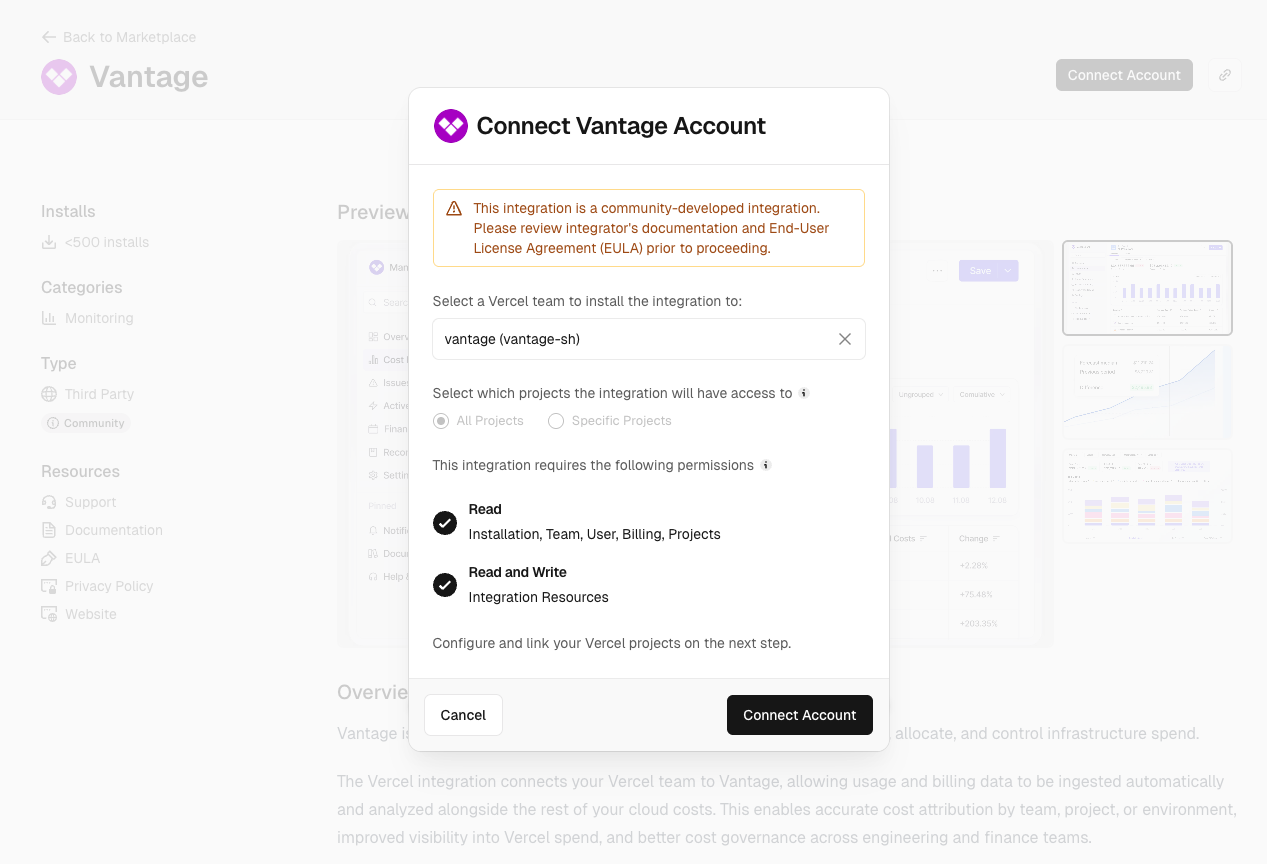
- Select a Vercel team to install the integration on.
- Select all or specific projects.
- Review the permissions and click Connect Account to authorize the integration.
Click to view example image
Click to view example image
6
Once complete, you can return to the Vantage console.
As soon as costs are processed, they will be available on your All Resources Cost Report. If you decide to remove your Vercel integration from Vantage, all costs associated with that community integration will be removed from the Vantage console.
Next Steps - Manage Workspace Access
Once the import is complete and the integration status changes to Stable, you can select which workspaces this integration is associated with. See the Workspaces documentation for information.Edit Project Access
You can specify which projects to include in a team’s integration via Vercel’s Manage Access UI. To add or remove specific projects:1
In the top navigation of your Vercel dashboard, select Integrations.
2
Select the Vantage integration.
3
On the top right, click Manage Access.
4
Edit the projects the integration has access to and click Save.
Data Refresh
See the provider data refresh documentation for information on when data for each provider refreshes in Vantage.Vercel Reporting Dimensions
On Vercel Cost Reports, you can filter and group across several dimensions:- Billing Account (Team)
- Account (Project ID)
- Service (e.g., Vercel Functions, Delivery Network, Observability)
- Category (e.g., Function Invocations)
- Charge Type (e.g., Usage)
- Region (e.g.,
iad1) - Tags: Includes Virtual Tags created in Vantage for this provider. The following provider tags are automatically created by Vantage from Vercel data and are available for filtering and grouping:
vercel:region_name: The human-readable region name (e.g., Washington, D.C., USA), allowing you to filter and group costs by region name.vercel:ProjectName: The Vercel project name, allowing you to filter and group costs by project.