

Redis Permissions
Vantage uses your Redis API keys to generate and download cost reports only. Vantage does not create, modify, or delete Redis databases, subscriptions, or account settings.Connect Your Redis Account
Prerequisites
- You must have a Vantage Organization Owner or Integration Owner role to add or remove this integration. See the Role-Based Access Control documentation for details.
- You must be an Account Owner in order to create API Keys in Redis.
- You should use a dedicated user with the Viewer role in order to create User API keys. The Vantage integration will still work with any role higher than Viewer, such as Owner, but this is not recommended.
- It’s best practice to create a dedicated User API Key for Vantage and rotate it according to your security policy.
- Create a free Vantage account, then follow the steps below to integrate Redis costs.
Create the Connection
Step 1 - Get Redis API Keys
1
Log in to the Redis console.
2
From the left navigation, open Access Management and select the API Keys tab.
3
If Redis shows an Enable API button for your account, click it to enable REST API access.
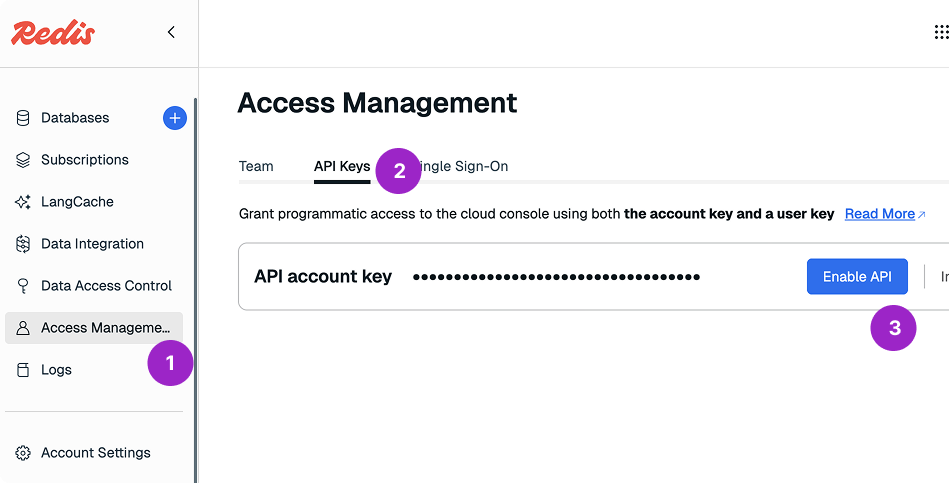
Click to view example image
Click to view example image
4
In the API account key section, copy the Account API Key.
5
In the API user keys section, click Add to create a new User API Key.
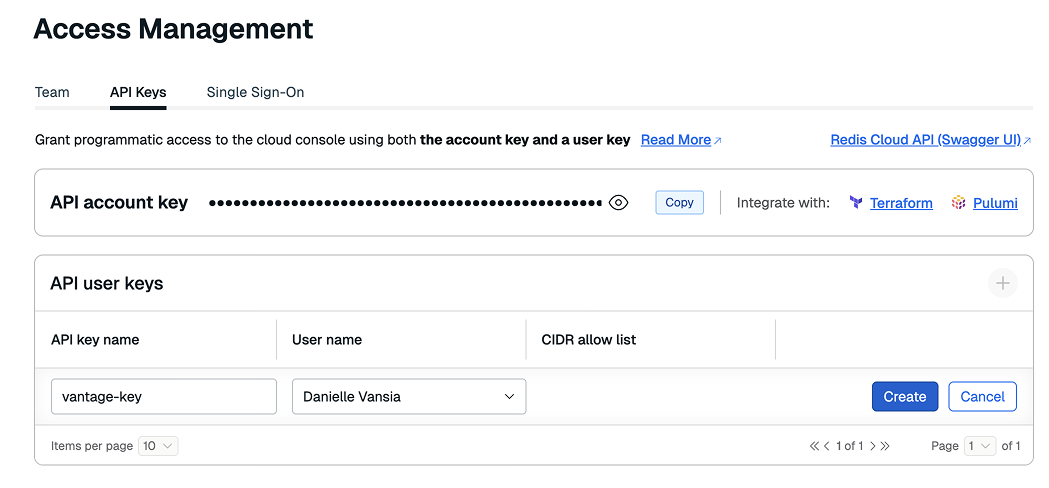
Click to view example image
Click to view example image
6
Enter a key name and select the user the key should be associated with.The selected user should have an Owner or Viewer role so the key can be used to generate cost reports.
7
Click Create, then copy the generated User API Key.
If you use a CIDR allow list on the User API Key, you will need to add each of the following Vantage IPs to ensure connectivity:
Step 2 - Add the Keys to Vantage
1
From the top navigation in Vantage, click Settings.
2
On the left navigation, select Integrations > Redis.
3
The Redis integrations page is displayed. Ensure you are on the Connect tab.
4
At the bottom of the page, click Add API Keys.
5
Enter the following values:
- Description: A friendly name for this Redis connection
- Account API Key: The Redis account key
- User API Key: The Redis user key
6
Click Connect Account.
As soon as costs are processed, they will be available on your All Resources Cost Report. If you remove the Redis integration from Vantage, all associated Redis costs will be removed from the Vantage console.
Next Steps - Manage Workspace Access
Once the import is complete and the integration status changes to Stable, you can select which workspaces this integration is associated with. See the Workspaces documentation for information.Data Refresh
See the provider data refresh documentation for information on when data for each provider refreshes in Vantage.Redis Reporting Dimensions
On Redis Cost Reports, you can filter and group across several dimensions:- Billing Account (the Redis account name shown in billing data)
- Account (the Redis account ID)
- Service (e.g., Redis Pro, Redis Essentials)
- Category (e.g., Databases)
- Subcategory (e.g., Caching)
- Region (e.g., us-east-1)
- Resource (the Redis resource or subscription name associated with the charge)
- Charge Type (e.g., Usage, Purchase, Adjustment, Discount)
- Tags: Includes native Redis tags, Virtual Tags created in Vantage for this provider, and the following provider tags that Vantage automatically creates from Redis billing data:
redis_cloud:charge_description: The billing line-item descriptionredis_cloud:resource_type: The type of billed Redis resourceredis_cloud:resource_id: The underlying Redis resource ID when presentredis_cloud:resource_name: The Redis resource name when presentredis_cloud:availability_zone: The availability zone when present in the source dataredis_cloud:billing_period_start: The start date of the billing period