

Contact Sales (or support@vantage.sh/your account team) to enable LLM Enrichment for your account and discuss availability.
This integration enriches the costs of the downstream model providers your gateway proxies. It is not the same as the Cloudflare cost integration, which imports Cloudflare’s own billing. You do not need a Cloudflare cost integration to use enrichment.
Enrichment is metadata-only. To read the provider, model, token counts, and the custom metadata you emit, Vantage transiently decrypts each record’s encrypted fields (including the request and response bodies) in memory, but it extracts only those values. Vantage does not store your prompt or completion content, and it is never written to a Vantage-owned artifact. This data is not used to train any models.
How It Works
Cloudflare AI Gateway writes one encrypted Logpush record per request to an S3 bucket you own. Vantage decrypts those records with the private key you provide, normalizes them into a common usage index, and joins that index to your provider costs during each provider’s cost ingestion. See How LLM Enrichment works for the shared indexing, join, split, and tag pipeline.How Cost Rows Are Split
Vantage splits each matching provider cost row into enriched rows, allocated proportionally by token share. Splits are additive, so the enriched rows always reconcile to the original total: usage your logs do not cover stays on a leftover row, and cost rows with no matching usage, along with tax line items, pass through unsplit. Enabling enrichment never changes your totals.How Cost Splitting Works
See the allocation formula, a worked example, and how leftover rows keep totals reconciled.
Data Freshness and Backfill
Enrichment runs as part of each provider’s existing cost ingestion, so it follows that provider’s refresh cadence. Recent days are reprocessed within a rolling three-day window so late-arriving logs are picked up. See the provider data refresh documentation for per-provider timing. A billing period is enriched whenever it is processed while an active source exists, for as long as the matching logs remain in your bucket. Late-arriving logs for recent days are picked up automatically within the rolling three-day window. For older periods, Vantage re-enriches a day when the set of log objects for that day changes (files are added or removed) or when a full rebuild is triggered; replacing the contents of an existing object under the same key does not, on its own, re-trigger enrichment. Re-enrichment reads the already-normalized cost data, so it does not require a full cost re-import.Prerequisites
Before you begin, make sure:- An active cost integration exists for at least one supported provider: OpenAI, Anthropic, or Azure.
- An active AWS integration (cross-account IAM role) exists for the account that owns the S3 bucket. Vantage reads the bucket through this role, so it is required even when the model-provider costs you enrich are not themselves on AWS.
- Cloudflare AI Gateway Workers Logpush is available to you (it requires the Workers Paid plan), and logging is enabled on the gateway whose traffic you want to attribute.
- You have an S3 bucket you own where Cloudflare AI Gateway delivers (or will deliver) your Logpush logs.
- You have an RSA key pair for Workers Logpush encryption: the public key is uploaded to your AI Gateway settings, and you have the matching PEM-encoded private key to provide to Vantage.
- You have a Vantage Organization Owner or Integration Owner role. See Role-Based Access Control.
Set Up Cloudflare AI Gateway Enrichment
Setup has two steps: configure Cloudflare AI Gateway Logpush to your S3 bucket and connect the source in Vantage, where you select the bucket, provide your decryption key, grant Vantage read access, and then review which providers Vantage detected.Step 1: Configure Cloudflare AI Gateway Logpush
In Cloudflare, turn on logging for the gateway, then create a Logpush job for your AI Gateway that delivers logs to your S3 bucket. When you create the job, select the AI Gateway dataset so Vantage receives gateway logs rather than another log type.- Destination: point the job at the S3 bucket you own, and enable Organize logs into daily subfolders in the destination setup (or include
{DATE}in the destination path if you configure the job through the API). This produces the day-partitioned path Vantage requires; without it, Vantage cannot discover your logs. Vantage expects the day partition and gzip log objects at the end of the path:
- Timestamp format: in the Logpush job’s advanced options, keep the timestamp format as RFC3339 (the default). Unix (epoch seconds) is also accepted, but do not use UnixNano. Vantage reads those values as seconds, which produces invalid dates, so those records will not be enriched.
- Encryption: generate an RSA key pair and upload the public key to your AI Gateway settings, as described in Workers Logpush. Uploading the public key is what enables Workers Logpush; Cloudflare then encrypts the
Metadata,RequestBody, andResponseBodyfields of each record, and Vantage decrypts them with the private key you provide in Step 2. The private key is required. - Custom metadata: attach custom metadata to your gateway requests to drive allocation. Cloudflare saves up to five metadata entries per request (extra entries are dropped), accepts only string, number, and boolean values, and reserves keys beginning with
cf.. Each saved entry that Vantage considers safe becomes a tag on the enriched costs (see the Enrichment Tag Reference). Prefer stable keys with a limited set of values, such asteam,environment, andpurpose.
Vantage normalizes model identifiers on both sides so gateway logs and provider billing join even when they differ. For example, OpenAI billing always uses dated model names (
gpt-5.2-2025-12-11) while your gateway logs may use dated or undated names (gpt-5.2); Vantage prefers the dated form and normalizes undated names to match.Step 2: Connect the Source in Vantage
In Vantage, go to the Integrations page. Under LLM Enrichment, add Cloudflare AI Gateway, then select the S3 bucket (or buckets) that hold your Logpush logs and paste your decryption key. The connect screen walks you through granting read access and validating it, and connecting then scans your recent logs so you can review which providers were found. Connecting reuses your existing AWS cross-account IAM role, adding read-only access to the bucket that holds your logs. It does not create a new role or require new credentials.You can connect one or more buckets per account. After the first source is connected, click Add Sources on the integration page to connect more. After you connect a bucket, Vantage scans your recent logs and you choose which of your supported provider cost integrations should receive enrichment from that bucket; you can change that selection later from the source’s Manage tab. Provider cost integrations you connect after setting up a source are not enriched automatically; open the source’s Manage tab and enable the new integration there.
1
Select the bucket and provide your decryption key
Select the S3 bucket (or buckets) that receive your Logpush logs, and paste the PEM-encoded private key that matches the public key you configured in Cloudflare. Vantage uses this key only to decrypt your records; it does not decrypt without it.
There is no prefix field to fill in: Vantage discovers the log path from where your objects actually live. To narrow where Vantage looks (for example, if the permission check reports too many objects), point the Logpush job at a dedicated bucket or a more specific destination path rather than sharing the bucket with unrelated data.
If your bucket does not appear in the list, it may not be synced into Vantage’s inventory yet. Newly created buckets can take up to 24 hours to appear.
2
Grant Vantage read access
The connect screen offers three ways to grant access, each prefilled for your account.Whichever method you use, Vantage needs the following read-only access to validate and ingest logs:
- AWS Console
- AWS CLI
- Terraform
The connect screen provides a CloudFormation quick-create link that opens the AWS Console with the stack name, template URL, and parameters prefilled. Acknowledge that CloudFormation may create IAM resources, then create the stack.The stack applies the Vantage-published template with two parameters:
VantageCrossAccountRole: the name of your existing Vantage cross-account IAM role.CustomLlmEnrichmentBuckets: a comma-separated list of bucket ARNs, each asarn:aws:s3:::your-bucket/*.
Your existing Vantage cross-account role already grants
s3:ListBucket and s3:GetBucketLocation. The grant above adds only object read on the log bucket (s3:GetObject, and the generated policy always includes s3:GetObjectAcl).The CloudFormation, CLI, and Terraform options above grant S3 read access only. If your log bucket uses SSE-KMS encryption, you must grant
kms:Decrypt separately. See KMS-Encrypted Buckets. This is separate from Cloudflare Logpush log encryption, which Vantage handles with the private key you provide.3
Check permissions and connect
Click Check Permissions. Vantage validates that it can resolve the bucket Region, list objects, and read a sample object, and that your private key can decrypt a sample log record. Blocking problems (for example, objects that are not under the
YYYYMMDD/*.log.gz layout, or a private key that cannot decrypt the sample) are shown as errors you must resolve before connecting. If the bucket doesn’t contain any logs yet, you can still connect: Vantage shows a notice that the bucket looks empty and runs the sample-object and decryption checks once logs arrive. Then click Connect. Vantage confirms the source and immediately scans your recent gateway logs, from the first day of the previous calendar month through today, to detect which providers and provider accounts appear in the bucket. You are taken to a Scanning gateway logs page that refreshes on its own; a large bucket can take several minutes.A success message confirms the source is connected and scanning has begun. When the scan finishes, a Review action appears for the source. See the Troubleshooting section for any errors that are displayed.
4
Review detected providers and confirm
When the scan finishes, select Review for the source. This opens the Manage tab of the source’s details page. The review screen has one row per enrichable connected cost integration, grouped by provider, and shows each row’s Valid rows and Invalid rows counts. Providers found in your logs that you have not connected a cost integration for appear as non-selectable rows. The Notes column shows Success when rows were found, No rows found when none were, and flags such as gateway logs missing
resource_account_id (the Metadata.resourceAccountId value after decryption) or Account identifiers not found: … when account IDs could not be matched to a cost integration. Logs found for unsupported providers appear in a separate banner, not the Notes column. If more than 75% of the scanned rows failed validation, a warning (“N% of scanned log rows failed validation”) suggests confirming that your objects use the expected YYYYMMDD/*.log.gz format and contain provider, model, usage, and status data.Choose which connected cost integrations should receive token enrichment from this bucket, then select Confirm. Vantage enriches costs for the selected integrations on each provider’s next data refresh. You can change the selection later from the source’s Manage tab.Manage Cloudflare AI Gateway Enrichment Sources
Manage your connected buckets from the Cloudflare AI Gateway integration page. The sources table lists each bucket with its AWS account, creation date, and Status (for example, Pending before an import starts, Importing while one runs, Stable once all imports succeed, Warning if only some imports fail, Error if a scan or all imports fail, or Paused if the source is stopped). A shared-bucket warning icon appears next to the bucket name when sibling integrations requireresourceAccountId; error details appear beneath the status. To connect additional buckets, click Add Sources.
Select the bucket name to open that source’s details page, which has two tabs:
- Import History, the default tab, shows every enrichment run for the source. See View Import History.
- Manage is where you choose which cost integrations receive enrichment. See Choose Which Integrations Are Enriched.
Choose Which Integrations Are Enriched
After a scan finishes, select Review on the source to choose which connected cost integrations receive enrichment (see Step 2: Connect the Source in Vantage). To change that selection later, select the bucket name and open the Manage tab. The Manage tab lists each provider integration with its import status (for example, Stable, Pending, Importing, Warning, Error, Paused, or Unenriched), and for a provider with multiple accounts shows a count like 2 of 3 accounts enabled. It lets you enable or disable enrichment per integration. Disabling an integration here stops going-forward enrichment for it but leaves its existing enriched history in place.View Import History
In the sources table, select the bucket name to open that source’s details page, which shows the Enrichment Runs table for that bucket. The Enrichment Runs table lists one row per provider cost integration and billing period that ran enrichment, newest first, with columns for the Integration (and its account), Status, Tokens Kept, Log Lines Kept, Bill Match, Billing Period, and Last Run At. Lifecycle changes appear as their own rows: Added when enrichment is first enabled for an integration, and Paused or Resumed when you stop, disable, resume, or re-enable it. The three percentages look similar but measure different things at different stages, so a low number in one column means something very different from a low number in another:
A low percentage does not change your totals. Usage Vantage cannot attribute stays on a leftover row, the unallocated remainder of the original cost row, so the enriched rows always add back up to what the provider billed.
Select the Tokens Kept percentage on any run to open Token Metrics, which breaks that run down by disposition across the two stages and lets you view sample records for anything that did not make it through.
LLM Enrichment Import History
Full reference for the Import History screen: every column and status, how to read the three percentages, the Log Scan and Join dispositions with a fix for each, sample record fields, and a troubleshooting table.
Stop a Source
To stop a source, click the ellipses (…) next to the row and select Stop, then confirm in the Stop enrichment source dialog. This is a soft deactivation, not a hard delete: Vantage stops enriching new cost data for that bucket, but your existing enriched history is left unchanged, and the source stays visible in the list so you can bring it back at any time.Stopping a source does not re-import or roll back already-enriched costs. Going-forward enrichment simply pauses for that bucket until you resume it.
Resume a Source
To resume a stopped source, select Resume in its row. Resuming restarts going-forward enrichment for the integrations that were active when you stopped the source (integrations you had already disabled individually stay disabled) and opens the Manage tab so you can adjust the selection. A stopped bucket cannot be re-added through Add Sources; use Resume instead.View Enriched Costs on Cost Reports
Once enrichment runs, a single provider cost line is split into multiple rows, each carrying enrichment tags. You can filter and group by these tags anywhere tags are supported: Cost Reports, Virtual Tags, Budgets, and Cost Alerts. Because enrichment splits (allocates) your provider costs, enrichment tags behave like Vantage’s cost allocation tags: you can build a Virtual Tag on them, but a cost can be allocated only once, so an enrichment tag can belong to only one allocation chain.Enrichment Tag Reference
Your own metadata keys are normalized to snake_case and, unless they are reserved, appear without a provider prefix. The fields Vantage derives and adds itself, such as the model identifier, carry a
vntg:ai: prefix (for example, vntg:ai:model); this keeps them distinct from your keys and consistent with the AI tags Vantage applies to provider costs. Because a key like team is not provider-namespaced, it lines up across OpenAI, Anthropic, and Azure, so you can group your entire AI stack by one team tag.
Two normalization rules are worth knowing when you choose metadata key names:
- Keys are lowercased and snake_cased before they become tags. So
userEmail,UserEmail, anduser_emailall collapse touser_email, and any keys that normalize to the same string are merged into one tag. - Keys that normalize to a Vantage-managed name are re-emitted under
vntg:ai:instead of staying bare. Those names aremodel,provider_region,service_tier,user_email,user_name,user_id,endpoint, andapi_key_id(andresource_account_idandis_batch, which are dropped rather than tagged). For example, theuserkey in the Use Cases table below stays bare asuser, but auserIdkey would silently move tovntg:ai:user_id. - A metadata key can overwrite a gateway-context tag. The
gateway,cached, andrate_limitedtags come from the top-level gateway fields, but a metadata key that normalizes to one of those names replaces the gateway-derived value. Avoid reusing those names in your metadata. Metadata.timestampdoes double duty. It is used to pick the billing day and, because it is not a reserved key, also becomes atimestamptag. Since a timestamp is high-cardinality, avoid emitting it as metadata unless you want it as a tag.
- To group: open the Group By menu, select Tag, and choose the tag key, for example
vntg:ai:model, or one of your own keys such asteam. - To filter: open the Filters menu, click New Rule, select Tag, choose the Tag Key, then pick an operator and one or more values.
Enriched rows retain the provider’s existing tags and add the Vantage-managed
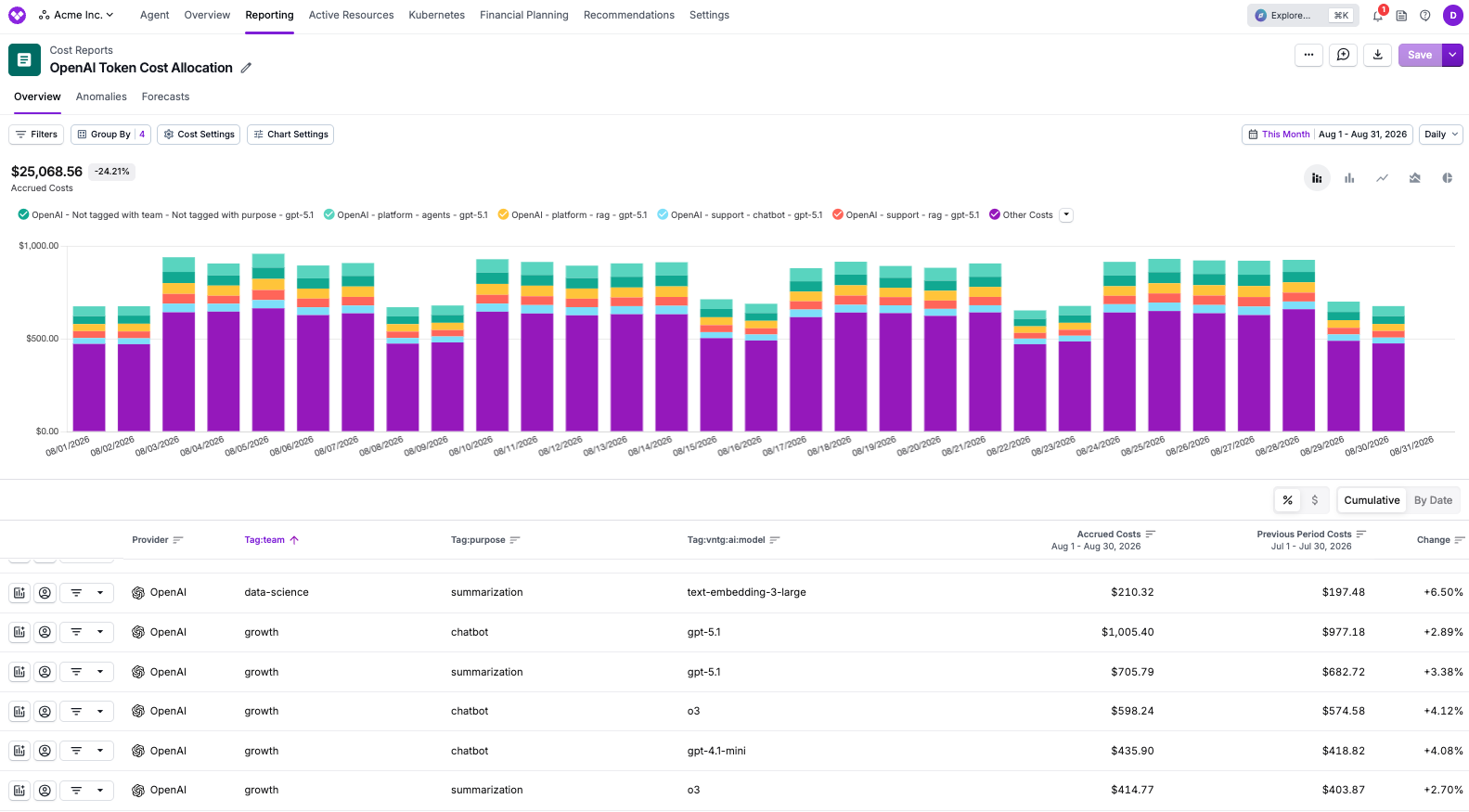
vntg:ai:* tags (such as vntg:ai:model); split rows also carry the tags from their usage slice. When a slice tag and an existing tag use the same key, the enrichment value wins. The leftover row (usage not covered by logs) keeps the provider’s existing tags and the applicable vntg:ai:* tags but carries none of the slice tags. Request identifiers and resourceAccountId are never turned into tags.team and purpose metadata attached at the gateway, alongside vntg:ai:model, so the same model can be compared across teams and workloads. The chart legend also shows a Not tagged with team - Not tagged with purpose series: that is the leftover row described above, covering the portion of the bill your gateway logs did not account for.
Troubleshooting
Most errors are displayed when you click Check Permissions or Connect. The tables below list the messages you may see, their cause, and how to resolve them. Expand a section for the relevant category.Permission and access errors
Permission and access errors
Confirm the permissions were deployed in the AWS account that owns the bucket, and that the bucket ARN in the policy matches the connected bucket.
Decryption errors
Decryption errors
Bucket and log errors
Bucket and log errors
My source stays on Pending
My source stays on Pending
Pending means Vantage has not run an enrichment import for this source yet. Enrichment runs during each provider’s regular cost ingestion, so a newly connected source shows Pending until the next data refresh of a provider it enriches. See the provider data refresh documentation for per-provider timing. If the status is still Pending after that refresh, check the following:
- If a Review button appears in the source’s row, the scan finished and is waiting on you: select Review, choose the cost integrations to enrich, then select Confirm (see Step 2).
- If you already confirmed, open the source’s Manage tab and confirm that at least one integration is enabled.
- Confirm your Logpush job is still delivering logs to the bucket under the
YYYYMMDD/*.log.gzlayout.
My costs are not being split
My costs are not being split
Enrichment can only split costs by dimensions present in your logs. Costs pass through without allocation splits when any of the following is true:
- There is no active Cloudflare AI Gateway source for the account, or the logs have not been ingested for that billing period.
- The cost row’s model or token type could not be matched to a logged request for that provider, date, and token kind.
- Records were skipped during ingestion because the decrypted
Metadatawas missing or not an object, theProviderwas blank or unsupported, the model was blank or could not be matched to your provider cost data, the request was not successful (a missing or empty response body, a non-2xx status, a rate-limited request, or a response error), or no usage value was a positive integer.
I can't tell which costs were enriched
I can't tell which costs were enriched
Enrichment tags appear in the console as regular provider tags. To confirm what was enriched:
- Check coverage in Import History: Open the source’s Import History and review Tokens Kept (the share of your logged tokens Vantage attached to a cost row) and Bill Match (the share of eligible provider cost rows that received logged usage) for each integration and billing period.
- Check a Cost Report: Filter to the provider, then group by one of your own tag keys. Costs from requests that carried that key show its values. The leftover row (the portion of the bill your usage did not cover) and any usage sent without that key appear as Not tagged with the key name.
My totals changed after enabling enrichment
My totals changed after enabling enrichment
Totals should not change. Splits are additive and always sum to the original cost row to the cent, even when multiple sources are connected. If a total appears different, this is not expected behavior; contact Vantage Support.
KMS-Encrypted Buckets
If the bucket you connect is encrypted with AWS Key Management Service (KMS), Check Permissions reports a decryption error until Vantage can read the objects. Either remove encryption on the bucket, or grant the cross-account rolekms:Decrypt for the encrypting key and allow that role in the KMS key policy.
The CloudFormation, CLI, and Terraform options in Step 2 grant S3 read access only, so KMS access must be added separately. This is distinct from Cloudflare Logpush log encryption, which Vantage handles with the private key you provide.
Use Cases
Each row below shows example metadata to emit on your gateway requests and what that attribution enables in Vantage. The key names are examples; you choose your own, and Vantage surfaces whatever metadata you send. All rows assume logs are delivered to a connected bucket.Frequently Asked Questions
Which providers are supported?
Which providers are supported?
OpenAI, Anthropic, Amazon Bedrock, Azure OpenAI, Google Vertex AI, Google AI Studio, Cloudflare Workers AI, xAI, ElevenLabs, and Baseten. Azure support covers direct Azure integrations; Azure CSP billing accounts are not supported.
Do I need a Cloudflare cost integration?
Do I need a Cloudflare cost integration?
No. This integration enriches the costs of the model providers your gateway proxies, not Cloudflare’s own billing. You only need a supported model-provider cost integration and an AWS integration for the account that owns the log bucket. The Cloudflare cost integration is separate and optional.
Do I still need Custom LLM Enrichment?
Do I still need Custom LLM Enrichment?
Not for traffic captured by Cloudflare AI Gateway; native enrichment removes the need to transform those logs into the common schema yourself. Custom LLM Enrichment remains the right choice for non-Cloudflare sources, mixed pipelines, and teams that already emit the Token Cost Allocation Specification from their own collectors.
What Vantage permissions do I need to enable this?
What Vantage permissions do I need to enable this?
You need the Organization Owner or Integration Owner role to connect the source. Viewing the enriched costs does not require a special role; the resulting tags follow the same access rules as other cost data. See Role-Based Access Control.
What access does Vantage gain in my AWS account?
What access does Vantage gain in my AWS account?
Read-only access to the bucket you connect:
s3:GetObject, s3:ListBucket, s3:GetBucketLocation, and kms:Decrypt for KMS-encrypted objects (generated policies may also include s3:GetObjectAcl). The policy attaches to your existing cross-account role; no new role is created. See Step 2: Connect the Source in Vantage.Does Vantage have write access to Cloudflare or my S3 bucket?
Does Vantage have write access to Cloudflare or my S3 bucket?
No. Vantage does not use a Cloudflare API token for this integration, does not modify your gateway configuration, and does not write to the connected S3 bucket; it only reads the encrypted log objects. This path is separate from the Cloudflare cost integration, which imports Cloudflare platform spend (such as Workers) through the Cloudflare API.
Why does Vantage need a private key?
Why does Vantage need a private key?
Cloudflare AI Gateway Logpush encrypts the
Metadata, RequestBody, and ResponseBody fields of each record with your public key. Vantage decrypts those fields with the matching private key you provide so it can read the provider, model, token counts, and your custom metadata. The private key is stored securely and used only for decryption.Will this change my totals or break existing reports?
Will this change my totals or break existing reports?
No. Splits are additive and always sum to the original cost row. Existing provider-level reports continue to show the same totals; enrichment only makes new dimensions available on the underlying rows.
Does Vantage store my prompt content?
Does Vantage store my prompt content?
No. Enrichment is metadata-only. To read request identifiers, the provider and model, usage counts, and the custom metadata you emit, Vantage transiently decrypts each record’s encrypted fields (including the request and response bodies) in memory, but it extracts only those values. Prompt and completion text are never collected, stored, or written to a Vantage-owned artifact.