> ## Documentation Index
> Fetch the complete documentation index at: https://docs.vantage.sh/llms.txt
> Use this file to discover all available pages before exploring further.
# VQL for Cost Reports
> Learn how to use VQL when querying Cost Reports in the API or using the Terraform Provider.
If you need help constructing a VQL query, navigate to a [**Cost Report**](https://console.vantage.sh/reporting) and open the **Filters** menu. Create a filter and click **View as VQL** at the top of the **Filters** menu to see a filter's VQL representation. You can also [edit VQL directly](/vql#edit-vql-in-the-console) and click **Apply** to update the filter.
## Cost Reports VQL Schema
VQL comprises two namespaces: `costs` and `tags`, which represent the available [filters](/cost_reports#filter-cost-reports) on Cost Reports in the Vantage console. To reference a filter, use the following syntax: `namespace.field` (e.g., `costs.provider` or `tags.name`).
| Namespace | Field | VQL Example |
| --------- | --------------------- | ------------------------------------------------------------------------------------------------------------------------------------------------- |
| `costs` | `provider` (optional) | [Filter across all providers](/vql_cost_report#filter-across-all-providers) or [combine specific providers](/vql_cost_report#combining-providers) |
| `costs` | `allocation` | [Cost allocation example](/vql_cost_report#cost-allocation) |
| `costs` | `region` | [Region example](/vql_cost_report#costs-from-a-list-of-regions) |
| `costs` | `marketplace` | [Marketplace example](/vql_cost_report#get-marketplace-transactions) |
| `costs` | `account_id` | [Account ID example](/vql_cost_report#costs-by-account-id) |
| `costs` | `provider_account_id` | [Provider account ID example](/vql_cost_report#costs-by-provider-account-id) |
| `costs` | `service` | [Service example](/vql_cost_report#per-resource-costs-and-costs-by-service) |
| `costs` | `category` | [Category example](/vql_cost_report#costs-by-specific-category) |
| `costs` | `subcategory` | [Subcategory example](/vql_cost_report#costs-by-specific-subcategory) |
| `costs` | `resource_id` | [Resource example](/vql_cost_report#per-resource-costs-and-costs-by-service) |
| `costs` | `charge_type` | [Charge Type example](/vql_cost_report#cost-by-charge-type) |
| `tags` | `name` | [Tags name/value example](/vql_cost_report#filter-by-tag) |
| `tags` | `value` | [Untagged example](/vql_cost_report#filter-for-untagged-resources) |
`costs.provider` is optional. Omit it to filter across every connected provider in a single query—see [Filter Across All Providers](/vql_cost_report#filter-across-all-providers). Provider-specific fields (such as AWS `costs.marketplace`) only apply when `costs.provider` is included for that provider.
Availability of the fields listed above varies among different cloud providers. For a comprehensive list of available fields per provider, including the source billing field each one maps to, see the [Data Dictionary](/data_dictionary).
## Keywords
VQL includes a set of keywords to create complex filter conditions. These keywords function similar to their SQL equivalents.
| Keyword | Description | VQL Sample | Explanation |
| ------- | ---------------------------------------------- | ----------------------------------------------------------------------------------- | ------------------------------------------------------------------------------------------------------------------------------------------------------------------------------------------------------------------------------------------------------------------------------------------------------------------------------------------------------------------------------------------------------------------------------------------------------------------------------------------------------------ |
| `AND` | Logical AND operator | `costs.provider = 'aws' AND costs.service = 'EC2'` | This example filters AWS costs for the EC2 service, where both conditions must be true. |
| `OR` | Logical OR operator | `costs.provider = 'azure' OR costs.provider = 'aws'` | This example retrieves costs from either Azure or AWS. At least one condition must be true. |
| `IN` | Used to compare against an array list | `costs.provider = 'azure' AND costs.account_id IN ('account-1', 'account-2')` | This example filters based on a list of account IDs, returning data for the specified accounts.
You can also use `IN` along with a special syntax for filtering by multiple tags. See [Filter by Multiple Tags](/vql_cost_report#filter-by-multiple-tags) for details.
`costs.provider IN (...)` is supported and is expanded into one filter set per provider. `costs.provider NOT IN (...)` is not supported. |
| `LIKE` | Performs string comparisons | `costs.provider = 'gcp' AND tags.name = 'environment' AND tags.value LIKE '%prod%'` | This example selects data where the tag value contains `prod`, such as `production-1`. |
| `NOT` | Represents negation | `costs.provider = 'aws' AND costs.region NOT IN ('us-east-1', 'us-east-2')` | This example filters out data from both specified regions, providing all AWS costs *not* in these regions. Use `NOT IN` to specify a list of single or multiple values.
You can also use the `!=` or `<>` operators for "is not."
`costs.provider = 'aws' AND costs.region != 'us-east-1'`
You can use `NOT LIKE` to perform string comparisons:
`costs.provider = 'gcp' AND tags.name = 'environment' AND tags.value NOT LIKE '%prod%'` |
| `~*` | Flexible match operator for tag values | `costs.provider = 'aws' AND (tags.name = 'teams' AND tags.value ~* 'Team A')` | Searches for all items where the tag value loosely matches `Team A`, ignoring case, whitespace, hyphens, and punctuation. |
| `!~*` | Negated flexible match operator for tag values | `costs.provider = 'aws' AND (tags.name = 'teams' AND tags.value !~* 'Team A')` | Filters out all items where the tag value loosely matches `Team A`, ignoring case, whitespace, hyphens, and punctuation. |
With these keywords, you can construct complex filter conditions in VQL, providing flexibility and precision when querying and analyzing cloud cost data.
## Syntax
You can think of VQL in its current iteration as the `WHERE` clause of a SQL query. By combining the schema and keywords above with parentheses, you can form complex filter operations, such as:
```vql theme={null}
(costs.provider = 'mongo' AND costs.allocation = 1.0 AND (costs.service = 'REALM' AND costs.resource_id IN ('s3'))) OR (costs.provider = 'aws' AND costs.allocation = 1.0 AND costs.account_id IN ('123456798'))
```
## VQL Examples
The following examples cover common use cases for VQL.
### Filter Across All Providers
You can omit `costs.provider` to filter across every connected provider in a single query. This is useful for multi-cloud questions where the same filter logic should apply regardless of where the cost was incurred—for example, finding all costs tagged with a specific team across AWS, Azure, GCP, and any other connected providers.
```sql theme={null}
tags.name = 'Team' AND tags.value = 'Data Engineering'
```
The query above returns costs from every connected provider that has a matching tag, without you having to repeat the filter for each one. The same pattern works for any field in the [Cost Reports VQL Schema](#cost-reports-vql-schema).
You can still include `costs.provider` when you want to scope a filter to a single provider; this feature only removes the requirement to do so. Provider-specific fields (such as AWS-only `costs.marketplace`) still need `costs.provider` to be set for that provider.
An entirely empty filter (no rules at all) is also valid VQL and is equivalent to filtering across every connected provider with no constraints. This is the representation used for the default unfiltered All Resources Cost Report and for any other report whose filter set spans all providers with no rules applied. If you click **View as VQL** on such a report, the query string will be empty.
Filtering across all providers queries data from every connected provider, which is more work than filtering by a single provider. The impact is most pronounced on tag-heavy queries and Virtual Tag rules. For guidance on scoping providerless filters efficiently, including granular filters, exact-match operators, and when to prefer per-provider `OR` over a fully providerless query, see [Best Practices for Filtering Across All Providers](/tagging#best-practices-for-filtering-across-all-providers) in the Tagging documentation.
### Combining Providers
To reference a [Custom Provider](/connecting_custom_providers) in VQL queries, navigate to the [**Integrations** page](https://console.vantage.sh/settings/custom_providers). Use the displayed **Provider ID** (e.g., `custom_provider:accss_crdntl_123a45bfdaf38765`).
Filter for provider costs associated with either MongoDB Atlas or AWS.
```sql theme={null}
costs.provider = 'mongo' OR costs.provider = 'aws'
```
### Cost Allocation
Set cost allocation to `0.5`.
```sql theme={null}
costs.provider = 'gcp' AND costs.allocation = 0.5
```
### Costs from a List of Regions
Filter for Snowflake costs in two regions. Note that you will need to use the region code, such as `us-east-1` in the case of AWS, or `AWS_US_EAST_1` in the case of Snowflake, below.
```sql theme={null}
costs.provider = 'snowflake' AND costs.region IN ('AWS_US_EAST_1', 'AWS_US_EAST_2')
```
### Get Marketplace Transactions
Retrieve costs associated with the AWS Marketplace.
```sql theme={null}
costs.provider = 'aws' AND costs.marketplace = true
```
### Costs by Account ID
Costs for a specific set of services and account ID.
```sql theme={null}
costs.provider = 'aws' AND costs.account_id = '123456758' AND costs.service IN ('Amazon Relational Database', 'Amazon Elastic Compute Cloud - Compute')
```
### Costs by Provider Account ID
The following example represents costs from a specific AWS billing account or costs from a specific Azure subscription.
```sql theme={null}
(costs.provider = 'aws' AND costs.provider_account_id = 'abcd1234') OR (costs.provider = 'azure' AND costs.provider_account_id = 'abcd1234')
```
### Per-Resource Costs and Costs by Service
Resource costs require both `provider` and `service` in addition to the `resource_id`.
```sql theme={null}
costs.provider = 'aws' AND costs.service = 'Amazon Relational Database Service' AND costs.resource_id = 'arn:aws:rds:us-east-1:123456789:db:primary-01'
```
#### Multiple Resource IDs
```sql theme={null}
costs.provider = 'aws' AND costs.service = 'Amazon Relational Database Service' AND costs.resource_id IN ('arn:aws:rds:us-east-1:123456789:db:primary-01', 'arn:aws:rds:us-east-1:123456789:db:primary-02')
```
### Costs by Specific Category
Filter costs to see a specific cost category. Category costs require `provider`, `service`, and `category`. To filter across all services, use `costs.service = '*'` as a wildcard.
```sql theme={null}
costs.provider = 'fastly' AND costs.service = 'CDN' AND costs.category = 'Data Transfer'
```
Filter by category across all services for a provider:
```sql theme={null}
costs.provider = 'aws' AND costs.service = '*' AND costs.category = 'Data Transfer'
```
### Costs by Specific Subcategory
Filter costs by a specific service and subcategory. Subcategory costs require `provider`, `service`, and `subcategory`. To filter across all services, use `costs.service = '*'` as a wildcard.
```sql theme={null}
costs.provider = 'aws' AND costs.service = 'AWS Certificate Manager' AND costs.subcategory = 'USE1-PaidPrivateCA'
```
Filter by subcategory across all services for a provider:
```sql theme={null}
costs.provider = 'aws' AND costs.service = '*' AND costs.subcategory = 'DataTransfer-Out-Bytes'
```
### Cost by Charge Type
Filter costs by a specific charge type.
```sql theme={null}
costs.provider = 'aws' AND costs.charge_type = 'Usage'
```
### Filter by Tag
#### Filter by Single Tag
Filter costs based on a specific tag, such as `environment`, with the value `production`, in AWS.
```sql theme={null}
costs.provider = 'aws' AND tags.name = 'environment' AND tags.value = 'production'
```
#### Filter for Multiple Values from a Single Tag Key
If you want to filter for multiple tag values that are tied to one tag key (e.g., costs tagged with the `team` tag of `mobile` and `data`), use the below syntax.
```sql theme={null}
costs.provider = 'aws' AND tags.name = 'team' AND tags.value IN ('mobile', 'data')
```
#### Filter by Multiple Tags
If you want to filter for resources that have more than one tag associated, you can use the syntax shown in the example below.
```sql theme={null}
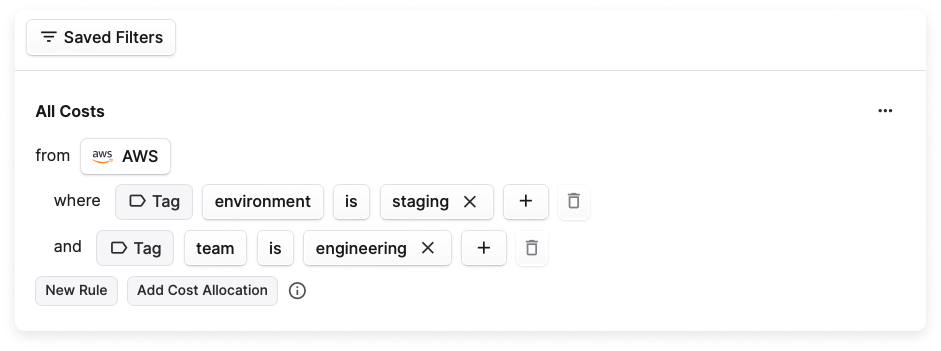
costs.provider = 'aws' AND (tags.name, tags.value) IN (('environment', 'staging'), ('team', 'engineering'))
```
This example filters for resources that are tagged with the `environment` tag with a value of `staging` as well as the `team` tag with a value of `engineering`. This filter is the same as creating the following manual filter in the console.
#### Filter for Matching Tags Using `LIKE`
```sql theme={null}
costs.provider = 'azure' AND (tags.name = 'environment' AND tags.value LIKE '%prod%')
```
#### Filter for Tags Using Flexible Matching
```sql theme={null}
costs.provider = 'azure' AND (tags.name = 'Team' AND tags.value ~* 'Team A')
```
Matches on applied tag values, such as `TeamA`, `team-a`, and `team_a` to a single `Team A` tag value. See the [Flexible Match](/cost_reports#flexible-match) documentation for details.
### Filter for Untagged Resources
On providers that have a **Not Tagged**/**Not Labeled** filter option in the console, you can use the below VQL to see untagged resources across every connected provider.
```sql theme={null}
tags.name = NULL
```
If you only want to check a specific subset of providers, list them explicitly with `OR`:
```sql theme={null}
(costs.provider = 'aws' AND tags.name = NULL) OR (costs.provider = 'azure' AND tags.name = NULL) OR (costs.provider = 'gcp' AND tags.name = NULL)
```
## Troubleshooting
If you are receiving an error when trying to complete a query, check the following troubleshooting tips.
* Each provider exposes certain names to the API. Those names are normalized within the schema. Check the [Data Dictionary](/data_dictionary) for normalized field names.
* Query parameter values should be wrapped in single quotes.
**THIS WORKS**
```sql theme={null}
costs.provider='aws'
```
**THIS DOES NOT WORK**
```sql theme={null}
costs.provider="aws"
```
* Currently, there is a limitation where `AND` and `OR` are not supported together in a single "query group."
**THIS WORKS**
```sql theme={null}
(costs.provider = 'aws' AND tags.name = 'environment' AND tags.value = 'dev') OR (costs.provider = 'aws' AND tags.name = 'environment' AND tags.value = 'prod')
```
**THIS DOES NOT WORK**
```sql theme={null}
costs.provider = 'aws' AND ((tags.name = 'environment' AND tags.value = 'dev') OR (tags.name = 'environment' AND tags.value = 'prod'))
```
* The `costs.provider` field is optional. Omit it to filter across every connected provider in a single query, or include it to scope the filter to a specific provider. See [Filter Across All Providers](/vql_cost_report#filter-across-all-providers) for details and performance considerations.
**BOTH WORK**
Filter across every connected provider:
```sql theme={null}
costs.service = 'CDN'
```
Filter for a specific provider:
```sql theme={null}
costs.provider = 'fastly' AND costs.service = 'CDN'
```
* Provider-specific fields only apply when `costs.provider` is set for that provider. For example, AWS exposes `costs.marketplace`, but it has no effect when used without an AWS provider scope.
**THIS WORKS**
```sql theme={null}
costs.provider = 'aws' AND costs.marketplace = true
```
**THIS DOES NOT WORK**
```sql theme={null}
costs.marketplace = true
```
`costs.marketplace` is only meaningful for AWS, so it must be paired with `costs.provider = 'aws'`.
* The `costs.provider` field supports `IN` (which is expanded into one filter set per provider), but does not support `NOT IN`.
**THIS WORKS**
```sql theme={null}
costs.provider IN ('aws', 'azure')
```
Vantage expands `costs.provider IN ('aws', 'azure')` into the equivalent of two filter sets, one per provider. You can also combine `IN` on `costs.provider` with provider-specific filters using `OR`:
```sql theme={null}
(costs.provider = 'aws' AND costs.account_id IN ('123456789', '987654321')) OR (costs.provider = 'azure' AND costs.account_id IN ('account-1', 'account-2'))
```
**THIS DOES NOT WORK**
```sql theme={null}
costs.provider NOT IN ('aws', 'azure')
```
* Resource costs require both provider and service in addition to the resource ID.
**THIS WORKS**
```sql theme={null}
costs.provider = 'aws' AND costs.service = 'Amazon Relational Database Service' AND costs.resource_id = 'arn:aws:rds:us-east-1:123456789:db:primary-01'
```
**THIS DOES NOT WORK**
```sql theme={null}
costs.provider = 'aws' AND costs.resource_id = 'arn:aws:rds:us-east-1:123456789:db:primary-01'
```
* Category and subcategory costs also require provider and service. To filter across all services, use `costs.service = '*'` as a wildcard.
**THESE WORK**
```sql theme={null}
costs.provider = 'fastly' AND costs.service = 'CDN' AND costs.category = 'Data Transfer'
```
```sql theme={null}
costs.provider = 'aws' AND costs.service = 'AWS Certificate Manager' AND costs.subcategory = 'USE1-PaidPrivateCA'
```
```sql theme={null}
costs.provider = 'aws' AND costs.service = '*' AND costs.category = 'Data Transfer'
```
**THESE DO NOT WORK**
```sql theme={null}
costs.provider = 'fastly' AND costs.category = 'Data Transfer'
```
```sql theme={null}
costs.provider = 'aws' AND costs.subcategory = 'USE1-PaidPrivateCA'
```