> ## Documentation Index
> Fetch the complete documentation index at: https://docs.vantage.sh/llms.txt
> Use this file to discover all available pages before exploring further.
# Usage-Based Reporting
> Track cloud infrastructure consumption with Vantage Usage-Based Reporting.
To get started with Usage-Based Reports, you can also watch a video demo on [Vantage University](/vantage_university_cost_reporting) .
Usage-Based Reporting provides infrastructure consumption in non-monetary metrics, such as virtual machine running hours, stored gigabytes of data, and read/write units consumed. These reports are available within Cost Reports, where you can toggle between viewing consumption by spend or by usage.
Usage-Based Reporting is currently available for AWS, GCP, Azure (including Azure CSP), CircleCI, Oracle, Grafana, ClickHouse Cloud, Temporal Cloud, Twilio, Vercel, Anthropic, Anyscale, Cursor, Elastic, and Redis. Vantage plans to add support for other providers. Please contact [support@vantage.sh](mailto:support@vantage.sh) with other providers you'd like to see added.
## Create Usage-Based Reports
Navigate to any Cost Report, or create a new report. By default, the report displays **Spend**.
Apply any desired filters and **Group By** criteria. Then, open the **Chart Settings** menu and select **Usage** for the **Y Axis**.
To get the most value from these reports, create a filter that represents a single unit of measure, comparing like resources (e.g., GB or Hours).
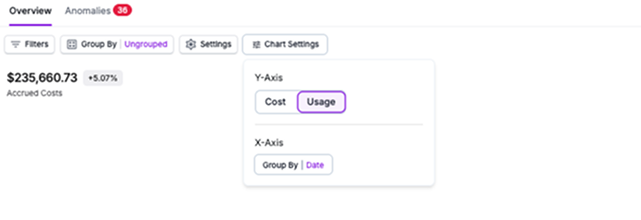
The following elements are displayed on the **Usage** view:
* The graph and chart display usage over the selected timeframe.
* The total cost is displayed as a trendline on the chart.
* In the table below the graph, the **Usage Unit** (e.g., GB-Hours or Metrics) and **Accrued Usage (a numerical value of calculated usage for that unit)** columns are displayed to show accrued usage for each grouping. The **Usage Unit** column is normalized for consistency across usage type for spelling, abbreviation, and capitalization.
* **Accrued Usage**, **Previous Period Usage**, **Accrued Cost**, **Previous Period Cost**, and **Change** between these cost values are also displayed. Click the **By Date** option above the table to see the usage data split out by date.
Save the report.
Usage data refreshes daily in the Vantage console. At this time, you cannot view retroactive usage metrics. Contact [support@vantage.sh](mailto:support@vantage.sh) if you want to view historical usage data.
### Export Usage Reports
To export usage reports, [follow the steps](/cost_reports#export-cost-reports) provided in the Cost Reports documentation. Ensure you are on the **Usage** view and **Usage Unit** is selected.
### View Usage Data for Custom Costs
When you create a [Custom Provider](/connecting_custom_providers), you can add usage data to your CSV upload files. Ensure you complete the `ConsumedQuantity` and `ConsumedUnit` columns. See the [Custom Providers documentation](/connecting_custom_providers#data-format) for information on the required schema.
## Understand Usage Units
The Usage Units displayed on Usage-Based Reporting include any dimension that a supported provider (e.g., AWS) meters and bills. Vantage standardizes these dimensions for inconsistencies in unit case and spelling across providers. For example, Vantage standardized `Hours`, `hrs`, `Hrs`, and `hours` to `Hours`.
If a provider does not have usage data, the Usage Unit column is empty and the Accrued Usage column displays 0.00.
## Use Virtual Tags with Usage-Based Reporting
[Virtual Tags](/tagging) work across both cost and usage consumption for supported providers. If you created Virtual Tags based on cost, the associated usage consumption will inherit the same Virtual Tag. You can use Virtual Tags within your filter criteria to apply Virtual Tags based on usage.
## Usage-Based Reporting on Dashboards
You can add Usage-Based Reports to dashboards. Ensure you are on the **Usage** toggle, save the report, and then add it to a dashboard. Follow the [Dashboards](/dashboards) documentation for details on how to add a report to a dashboard.
## Usage Reports Examples
The following examples provide some common use cases for working with Usage-Based Reporting.
### Understand EC2 Running Hours
As an Engineering Manager, you want to view your Amazon EC2 usage by instance hours, so that you can get a profile of your compute usage. This is important because it helps you identify patterns in compute resource consumption. This type of report can help you create more efficient resource planning and cost optimization based on your team's workload needs.
You create the following Usage-Based Report in Vantage:
* Filter: All costs from **AWS** where Category **Amazon Elastic Compute Cloud - Compute** is **Compute Instance**
* Group By: **Subcategory**
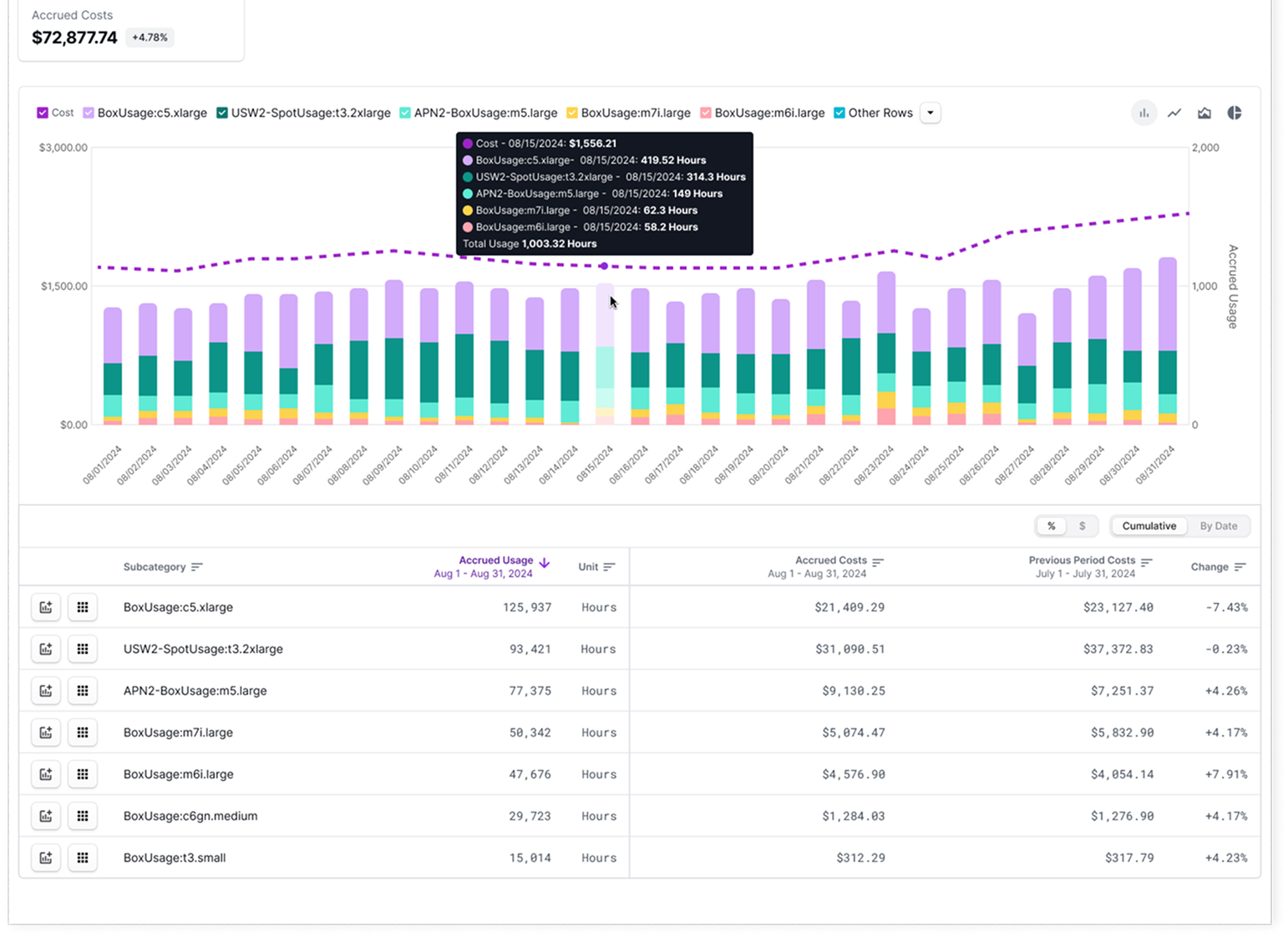
The table below the chart includes the accrued usage and the unit of measure for each line item being viewed, such as EC2 instance bill code. To get the most value from this report, focus on identifying high-usage instance families and regions to optimize compute resources and explore opportunities for cost-saving strategies, like instance rightsizing or transitioning to Savings Plans.
### View S3 Storage by Tier
As a Storage Admin or Engineering Manager, you want to view detailed storage metrics across specific AWS services, such as the total data stored in S3 by tier. With this report, you can better understand the overall profile and efficiency of stored assets and potentially determine whether additional storage policies are required to optimize storage usage and growth.
You create the following Usage-Based report to see total data stored in S3 in Vantage:
* Filter: All costs from **AWS** where Category **Amazon Simple Storage Service** is **Storage**
* Group By: **Subcategory**
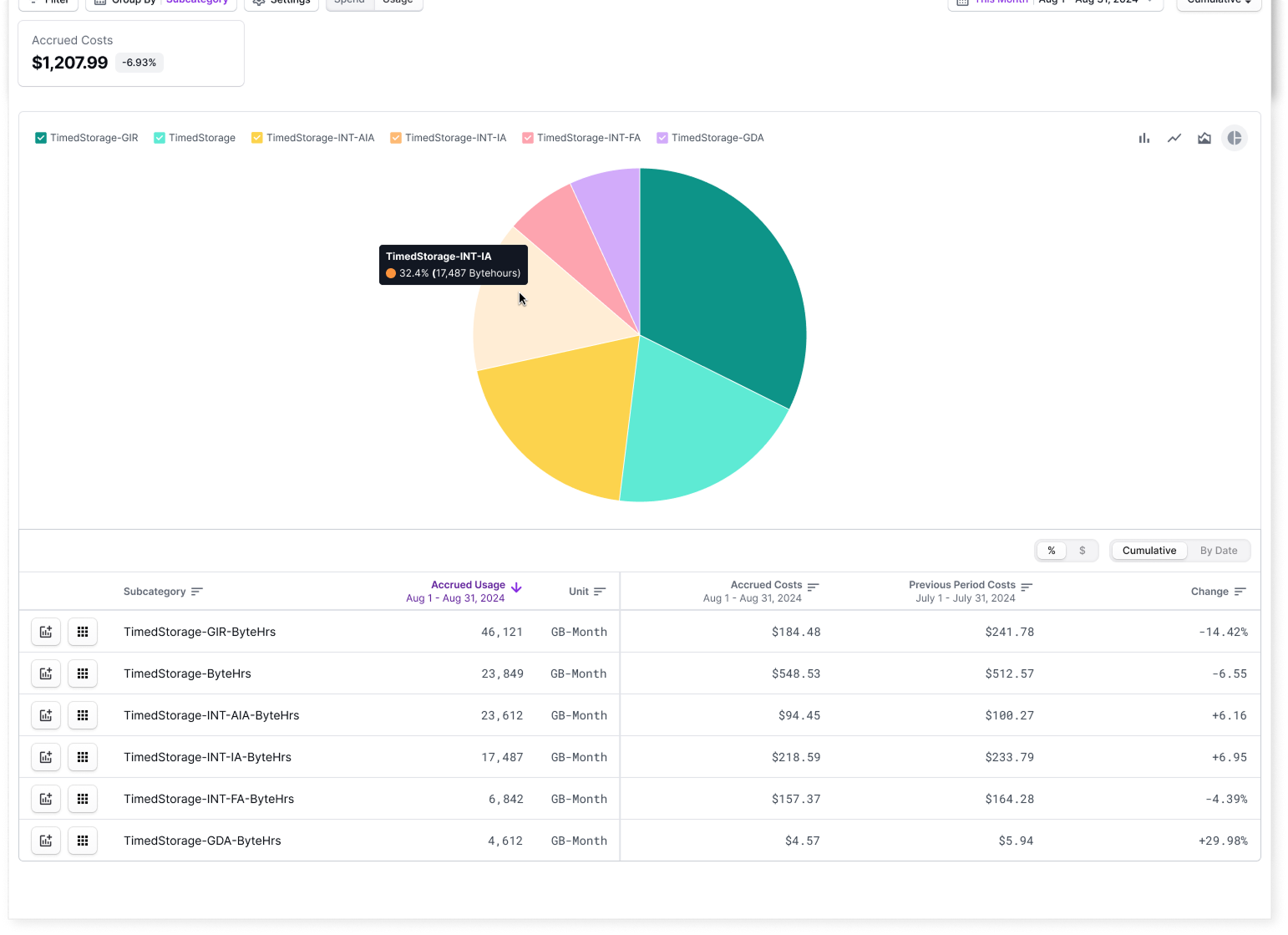
In the table below the graph, usage data is displayed in GB-Months for subcategories like:
* **TimedStorage-INT-AIA-ByteHrs** (Infrequent Access Tier)
* **TimedStorage-INT-IA-ByteHrs** (Intelligent Tiering)
* **TimedStorage-ByteHrs** (Standard Tier)
These metrics provide an overview of how data is distributed across different S3 storage tiers. Next steps could include analyzing whether data in the **Infrequent Access** and **Intelligent Tiering** categories is optimally stored, or you could decide whether more aggressive lifecycle policies are needed to move infrequently accessed data to cheaper storage tiers, like Glacier. You could also use this usage information to identify potential cost savings by reducing the storage volume in higher-cost tiers, such as the **Standard Tier**.