> ## Documentation Index
> Fetch the complete documentation index at: https://docs.vantage.sh/llms.txt
> Use this file to discover all available pages before exploring further.
> ## Agent Instructions
> If the person you are helping needs a new Vantage account, read https://docs.vantage.sh/auth.md before you register one.
# Inference Allocation
> Allocate the time-billed GPU and compute costs of models you host on Modal, Baseten, Together AI, AWS, Azure, or Google Cloud to the teams, applications, and customers behind the requests, using the same tagged request logs you send for token allocation.
> [!NOTE]
>
> Contact Sales (or [support@vantage.sh](mailto:support@vantage.sh)/your account team) to enable LLM Enrichment for your account and discuss availability.
Inference allocation splits the compute costs of models billed by the hour, such as GPU, CPU, and memory time, across the teams, applications, and customers that sent requests to those models. That includes models you self-host on dedicated deployments, such as Baseten and Together AI Dedicated Inference, and models you run on hosted inference platforms, such as Modal and Amazon Bedrock. It uses the same request logs you already send to Vantage for [LLM Enrichment](https://docs.vantage.sh/llm_enrichment.md). Each allocated row carries the tags from the requests behind it, so you can see hourly-billed inference spend by team, application, customer, or feature in [Cost Reports](https://docs.vantage.sh/cost_reports.md), [Virtual Tags](https://docs.vantage.sh/tagging.md), [Budgets](https://docs.vantage.sh/budgets.md), and [Cost Alerts](https://docs.vantage.sh/cost_alerts.md), next to your token-billed model costs.
> [!NOTE]
>
> Like token allocation, inference allocation is metadata-only. Vantage reads the provider, model, timestamp, token counts, and the tags you attach to each request. It does not collect or store prompt or completion content or credentials, and this data is not used to train any models.
## Token Bills vs. GPU Bills
If you already use token allocation, the main question is why a GPU bill needs a different method. The short video below walks through it, and the rest of this section covers the same ideas.
[https://www.youtube.com/embed/3JhD7EsEKrY](https://www.youtube.com/embed/3JhD7EsEKrY)
A model API bill, such as OpenAI or Anthropic, charges for tokens. Your request logs count tokens too, so Vantage can line each token on the bill up with the requests that used it. That is [token allocation](https://docs.vantage.sh/llm_enrichment.md).
A GPU bill, such as Modal or Baseten Dedicated Inference, charges for the time a deployment runs, whether it serves ten requests or ten million, and whether the GPU is busy or idle. There are no tokens on the bill to line up against.
| | Model API bill | GPU bill |
| - | - | - |
| **Examples** | OpenAI, Anthropic, Baseten Model APIs | Modal, Baseten Dedicated Inference, Together AI Dedicated Inference |
| **You pay for** | Tokens, by model and token type | Hours a deployment runs: GPU, CPU, or memory time |
| **Idle time** | Not billed | Billed |
| **What your logs match on** | Tokens, by token type | The day, the model, and the provider |
| **How Vantage splits it** | Token allocation: each tag's share of the tokens | Inference allocation: each tag's share of the work units |
### Same Logs, Two Matches
Your request logs don't change. Model API costs keep matching on tokens, exactly as they do today. For a GPU bill, Vantage uses what the logs and the bill have in common: the day, the model, and the provider. Every request that ran on a model that day is grouped together and matched to that model's GPU cost for the day.
### Token Weights Decide the Split
Once a day's requests are grouped, Vantage splits the day's cost across the tags in the group. Each tag gets credit for its requests, plus its tokens, weighted by token type. You choose the **token weights**. Output tokens usually take more compute to serve than input tokens, so they usually get a higher weight. The shares always add back to the full bill, idle time included. See [Work Units and Token Weights](#work-units-and-token-weights) for the formula and a worked example.
For example, if two teams sent requests to `gemma-3-27b` on the same day, that day's `$480` GPU bill is split by each team's share of the work units:
```mermaid theme={null}
flowchart LR
Bill["gemma-3-27b GPU bill
Nov 18: $480"]
Support["team=support
$325.71"]
Search["team=search
$154.29"]
Bill -->|"19,000 work units (68%)"| Support
Bill -->|"9,000 work units (32%)"| Search
```
## Supported Providers and Log Sources
Inference allocation supports these cost providers:
| Provider | Costs allocated | How a cost row is matched to requests |
| - | - | - |
| [Modal](https://docs.vantage.sh/connecting_modal.md) | CPU, memory, and GPU compute for each Modal App | The App name on the cost row (the **Resource** dimension and the `modal:description` tag) is matched to the `model` on your requests. |
| [Baseten](https://docs.vantage.sh/connecting_baseten.md) | **Dedicated Inference** deployment hours | The model name on the Dedicated Inference cost row (the **Category** dimension) is matched to the `model` on your requests. |
| [Together AI](https://docs.vantage.sh/connecting_together_ai.md) | **Dedicated Inference** GPU hours, on-demand and reserved | The endpoint name on the Dedicated Inference cost row is matched to the `model` on your requests. |
| [AWS](https://docs.vantage.sh/connecting_aws.md), [Azure](https://docs.vantage.sh/connecting_azure.md), and [Google Cloud](https://docs.vantage.sh/connecting_gcp.md) | Cost rows metered in hours, GPU-hours, core-hours, or GiB-hours for the models you host in those accounts. On AWS, EC2 instance hours aren't included. | The model on the cost row is matched to the `model` on your requests. |
Per-token costs from these providers aren't part of inference allocation. Baseten **Model APIs**, and per-token model costs on AWS, Azure, and Google Cloud, such as Amazon Bedrock on-demand usage, keep using [token allocation](https://docs.vantage.sh/llm_enrichment.md#how-cost-rows-are-split). Together AI **Serverless Inference** is also billed per token and isn't part of inference allocation.
### Allocation Types by Provider
Each cost integration can use token allocation, inference allocation, or both, depending on how the provider bills. The provider selection table disables the checkbox for any allocation type a provider doesn't support.
| Provider | Token allocation | Inference allocation |
| - | - | - |
| OpenAI, Anthropic, SpaceXAI | Yes | No |
| Modal, Together AI | No | Yes |
| Baseten, AWS, Azure, Google Cloud | Yes | Yes |
SpaceXAI bills only per token, so it has no time-billed costs for inference allocation to split. Leave **Inference allocation** cleared for SpaceXAI integrations.
When a provider supports both and you select both, use the `inference` tag to tell Vantage which requests belong to which. See [Use Token and Inference Allocation Together](#use-token-and-inference-allocation-together).
### Log Sources
Send request logs through any of these sources:
* [Custom LLM Enrichment](https://docs.vantage.sh/custom_llm_enrichment.md)
* [LiteLLM Enrichment](https://docs.vantage.sh/litellm_enrichment.md)
* [Cloudflare AI Gateway Enrichment](https://docs.vantage.sh/cloudflare_ai_gateway_enrichment.md)
* [Bifrost Enrichment](https://docs.vantage.sh/bifrost_enrichment.md)
* For AWS only, [AWS Bedrock LLM Enrichment](https://docs.vantage.sh/aws_bedrock_enrichment.md), using the Bedrock model invocation logs you've already connected
Each request must report a `provider` value that names the cost provider, such as `modal`, `baseten`, or `together`. For AWS, Azure, and Google Cloud, use the values listed in the [Custom LLM Enrichment provider reference](https://docs.vantage.sh/custom_llm_enrichment.md). Vantage only matches a request to a provider's costs when the request's `provider` names that provider. If your gateway reports Modal traffic under a different provider, for example as a generic OpenAI-compatible endpoint, those requests can't match your Modal costs. In that case, send them through [Custom LLM Enrichment](https://docs.vantage.sh/custom_llm_enrichment.md) and set `provider` to `modal`.
## How It Works
Inference allocation runs during each provider's normal cost import. For each time-billed cost row, Vantage finds the requests that model served that day and splits the row across them:
1. **Index:** Vantage indexes your request logs by UTC day, provider, and model, the same way it does for [token allocation](https://docs.vantage.sh/llm_enrichment.md#how-it-works).
2. **Route:** If a cost integration has both token and inference allocation selected, requests tagged `inference` = `true` go to inference allocation and all other requests go to token allocation. Each request is used once, so usage is never counted twice.
3. **Convert to work units:** Vantage converts each tag combination's requests and tokens for that day into work units, using your [token weights](#work-units-and-token-weights).
4. **Match and split:** Vantage matches each time-billed cost row to the requests for the same provider, model, and day, then splits the row's cost by each tag combination's share of the work units.
5. **Tag:** Each allocated row carries the tags from its requests, plus [Managed AI Tags](https://docs.vantage.sh/managed_ai_tags.md) such as `vntg:ai:model`.
### How Requests Match Hourly Costs
Your provider bills compute by the hour, and Vantage ingests that spend as daily cost rows per App, deployment, endpoint, or model. Vantage matches cost rows to requests **by UTC day and model**, not by individual hour. All of a model's requests on a given day share all of that model's compute cost for the day. Matching by day is what lets idle hours be included: an hour with no requests isn't tracked separately from the rest of the day.
The model on the cost row doesn't have to be an exact copy of the `model` in your logs. Vantage compares the App, deployment, or endpoint name on the bill against the models that appear in your logs that day and picks the closest match. For the most reliable matches, name your Modal Apps, Baseten deployments, and Together AI endpoints after the model they serve, and log that same model name on each request.
### Work Units and Token Weights
GPU time isn't measured per request, so Vantage estimates each tag's share of a model's compute with **work units**. A work unit is a stand-in for serving effort: every request takes some effort to handle, and more tokens take more effort, depending on their type.
$$
\text{work units} = \text{requests} + \sum_{\text{token type}} \frac{\text{tokens}}{1{,}000} \times \text{token weight}
$$
Each request counts as one work unit, plus one weighted unit per 1,000 tokens of each type. You set a separate token weight for each of the four token types: **input**, **output**, **cache read**, and **cache write**. Token weights reflect how much compute each token type takes to serve on your hardware. They're unrelated to the model weights in "open-weight models."
Token weights apply to the whole Vantage account. Every source that has inference allocation turned on uses the same token weights.
> [!NOTE]
>
> Consider the below example: one Baseten Dedicated Inference cost row for a `gemma-3-27b` deployment is `$480` for the day, covering 24 GPU hours. Your token weights are `0.25` for input and `1` for output. These requests have no cache read or cache write tokens, so those two token weights don't change the result. That day's requests for the model fall into two tag combinations:
>
> | Tag | Requests | Input tokens | Output tokens | Work units |
> | - | - | - | - | - |
> | `team=support` | 10,000 | 20M | 4M | 10,000 + (20,000 × 0.25) + (4,000 × 1) = **19,000** |
> | `team=search` | 2,000 | 4M | 6M | 2,000 + (4,000 × 0.25) + (6,000 × 1) = **9,000** |
>
> The two combinations total 28,000 work units, so the single `$480` row becomes two rows:
>
> | Amount | Usage | `team` |
> | - | - | - |
> | `$325.71` | 16.29 hours | support |
> | `$154.29` | 7.71 hours | search |
>
> The total is unchanged at `$480` and 24 hours. Because each request counts as a work unit, a team that sends many short requests can carry a larger share than its token volume alone would suggest.
#### Choose Token Weights
A common starting point is how API-based LLM providers price the same token types:
* Output tokens are generated one at a time and usually cost several times more to serve than input tokens. A token weight of `0.25` on input and `1` on output counts each output token as four input tokens.
* Cache reads usually cost less than uncached input.
If you don't have a basis for different token weights yet, enter `1` for every token type to weight them equally. If your team benchmarks its own hardware, for example by measuring GPU time per token type in load testing, use those ratios instead. You can change token weights at any time, and Vantage re-allocates past periods to match. See [Data Freshness and Backfill](#data-freshness-and-backfill).
### How Cost Rows Are Split
Splits are additive: the allocated rows always add up to the original cost row, so provider-level totals in your existing reports don't change.
* **Idle time is included:** A model's full compute cost for the day is split across the requests that model served that day, including hours when the deployment was running but idle. This lets you charge back or show back the full cost of your hourly-billed inference.
* **Quiet and busy days:** On a quiet day, a small number of requests carry the whole day's cost. On a busy day, the same cost is spread across many more requests.
* **Days without requests aren't split:** If no requests for a model match a cost row on a given day, that row passes through unchanged, with its original cost and usage, the provider's existing tags, and no request tags. It still counts toward your provider totals, and it appears as untagged when you group by one of your request tag keys.
* **Incomplete logs:** If your logs cover only part of a model's traffic on a given day, the logged requests carry that day's full cost. Send logs for all of a model's traffic for the most accurate split.
* **Leftover rows:** If part of a cost row can't be attributed to matching requests, for example because `resource_account_id` limits the requests to a different provider account, that part stays on a leftover row. The leftover row carries the `vntg:ai:model` tag and the provider's existing tags, but no request tags.
* **Credits:** Credits and other negative charges are allocated in the same proportions as positive charges for the same model and day, and keep their negative sign. Each tag combination's net cost reflects its share of the credit. If no requests match, the credit passes through unallocated.
* **Usage amounts follow the cost:** When the provider reports a usage quantity on the cost row, such as Baseten Dedicated Inference hours or Together AI GPU hours, Vantage splits that quantity in the same proportions as the cost. The total stays the same, and each allocated row carries its share. Modal cost rows don't include a usage quantity, so only their cost is split.
Inference allocation estimates each tag's share of shared compute from request telemetry. It does not measure the actual GPU time any individual request used.
### Data Freshness and Backfill
Inference allocation runs as part of each provider's existing cost import, so it follows that provider's refresh cadence. Modal and Baseten costs refresh once daily. Recent days are reprocessed within a rolling three-day window, so late-arriving logs are picked up, including logs for a day that initially had no matching requests. See the [provider data refresh documentation](https://docs.vantage.sh/provider_data_refresh.md) for per-provider timing.
You don't need to trigger a re-import for past periods. Vantage backfills automatically, back to the start of your account's data retention, for as long as the matching request logs remain available:
* **First save:** Saving token weights for the first time allocates past billing periods that have matching request logs.
* **Token weight changes:** Vantage re-allocates only the billing months whose effective token weights changed. Changes that apply only to future dates take effect going forward.
* **Allocation selection changes:** Switching a cost integration between token and inference allocation, or clearing one of two selected types, re-runs billing periods that already had a successful run for that source.
Totals never change during a backfill. Only the split between tag combinations does.
## Use Token and Inference Allocation Together
Some providers bill both ways. A Baseten account, for example, can have Model APIs costs billed per token and Dedicated Inference costs billed by the hour. You can select both **Token allocation** and **Inference allocation** for the same cost integration and allocate both kinds of cost from a single stream of request logs.
When both are selected, Vantage uses the `inference` tag on each request to decide where it goes:
* Requests tagged `inference` = `true` are allocated against time-billed inference costs.
* All other requests are allocated against token-billed costs.
Each request is used once, so usage is never counted twice across the two. If an integration only has **Inference allocation** selected, such as a Modal integration, you don't need to add the tag.
### Inference Tag Format
Add an `inference` key to the `tags` object of each request record, with the string value `"true"` (case-insensitive) or the boolean `true`. When both allocation types are selected, requests without the tag, or with any other value, are treated as token requests.
Records follow the [Token Cost Allocation Specification](https://docs.vantage.sh/custom_llm_enrichment.md). The `event_id`, `timestamp` (UTC, with a `Z` suffix), `provider`, and `model` fields are required, along with a `usage` object that has at least one positive token count. For example, a request served by a Baseten Dedicated Inference deployment looks like this:
```json theme={null}
{
"event_id": "req_01JC8Z4K2M",
"timestamp": "2026-11-18T17:59:06.235Z",
"provider": "baseten",
"model": "gemma-3-27b",
"usage": {
"input_tokens": 2129,
"output_tokens": 412,
"cache_read_input_tokens": 0,
"cache_write_input_tokens": 0
},
"tags": {
"inference": "true",
"team": "support",
"customer": "acme"
}
}
```
Every other key in `tags`, such as `team` and `customer`, becomes a tag on the allocated cost rows. If you send logs through LiteLLM, Cloudflare AI Gateway, or Bifrost, add `inference` alongside the other request metadata you already use for tags.
### When Only One Type Is Selected
If a cost integration has only one allocation type selected, untagged requests go to that type. Requests explicitly tagged for the other type are skipped:
* **Only Inference allocation selected:** requests tagged `inference` = `false` are skipped.
* **Only Token allocation selected:** requests tagged `inference` = `true` are skipped.
Skipped requests don't count against your match rates. If requests you expected to allocate are missing, check that the `inference` tag on them matches the allocation type selected for the integration.
## Prerequisites
Before you begin, make sure:
* Your account has contracted [Build Hours](https://docs.vantage.sh/build_hours.md). If it doesn't yet, contact [sales@vantage.sh](mailto:sales@vantage.sh) to add them.
* An active [Modal](https://docs.vantage.sh/connecting_modal.md), [Baseten](https://docs.vantage.sh/connecting_baseten.md), [Together AI](https://docs.vantage.sh/connecting_together_ai.md), [AWS](https://docs.vantage.sh/connecting_aws.md), [Azure](https://docs.vantage.sh/connecting_azure.md), or [Google Cloud](https://docs.vantage.sh/connecting_gcp.md) cost integration exists for the models you host.
* You send request logs for those models through [Custom LLM Enrichment](https://docs.vantage.sh/custom_llm_enrichment.md), [LiteLLM Enrichment](https://docs.vantage.sh/litellm_enrichment.md), [Cloudflare AI Gateway Enrichment](https://docs.vantage.sh/cloudflare_ai_gateway_enrichment.md), or [Bifrost Enrichment](https://docs.vantage.sh/bifrost_enrichment.md), or, for AWS, through [AWS Bedrock LLM Enrichment](https://docs.vantage.sh/aws_bedrock_enrichment.md). Each request's `provider` must name the cost provider.
* You have a Vantage **Organization Owner** or **Integration Owner** role. See [Role-Based Access Control](https://docs.vantage.sh/rbac.md).
## Set Up Inference Allocation
Setup has two parts: choose which cost integrations use inference allocation, then set the token weights that decide how each day's cost is split.
**1. Select Inference allocation for your cost integration**
Open the source that carries your request logs from the [Integrations page](https://console.vantage.sh/settings/integrations), then open its provider selection:
* **Custom LLM Enrichment** and **Cloudflare AI Gateway:** Select **Review** after a new source's scan finishes, or open the source's **Manage** tab for an existing source.
* **LiteLLM:** Select **Configure Providers** on a new collector, or select **Edit** and then **Manage Providers** on an existing collector.
* **Bifrost:** Open the feed's **Manage** tab and select **Configure Providers**.
* **AWS Bedrock LLM Enrichment:** Open the log bucket's **Manage** tab. The page notes, "Add inference allocation for this connected account. Token allocation stays on the existing account."
The provider table has two allocation columns: **Token allocation** and **Inference allocation**. Select **Inference allocation** for each cost integration whose time-billed costs you want to allocate, then confirm or save your selection.
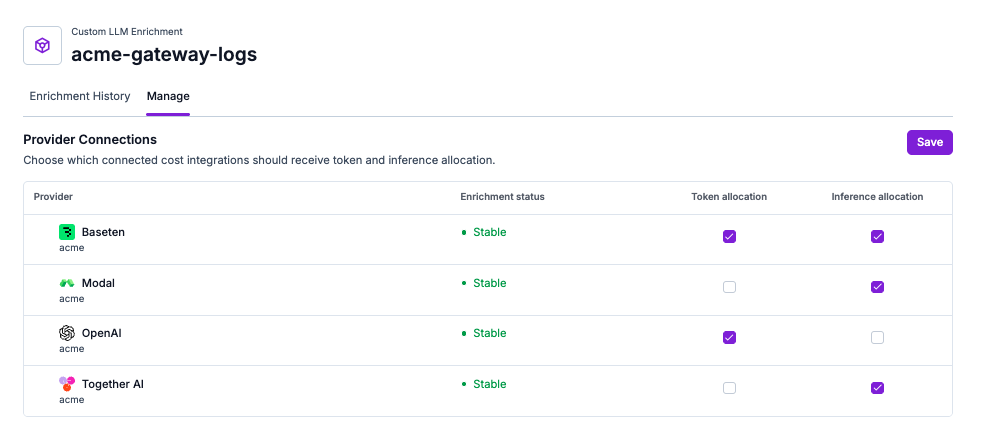
Checkboxes for allocation types a provider doesn't support are disabled. See [Allocation Types by Provider](#allocation-types-by-provider). Vantage pre-selects **Inference allocation** for Modal, Baseten, and Together AI integrations when it first scans your logs for a new source.
You can keep **Token allocation** selected for the same integration. For example, keep both selected for Baseten so Model APIs costs keep using token allocation while Dedicated Inference costs use inference allocation. When you do, add the [`inference` tag](#inference-tag-format) to the requests served by your dedicated deployments.
**2. Open Configure Inference Costs**
When you confirm a new Custom LLM Enrichment or Cloudflare AI Gateway source with **Inference allocation** selected, Vantage takes you straight to **Configure Inference Costs**.
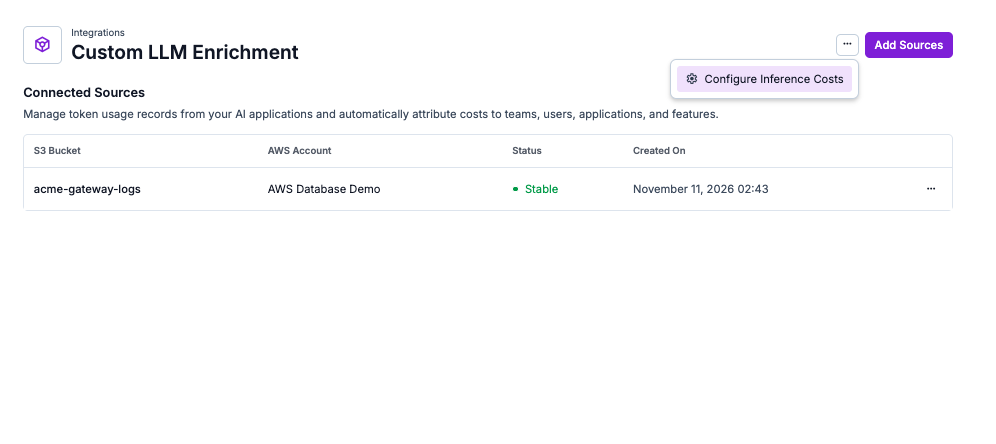
To open it later, or after saving a selection on another source, return to the integration's source list. Once at least one source has inference allocation turned on, an ellipses (**...**) menu appears next to **Add Sources** at the top of the page. Open it and select **Configure Inference Costs**.
**3. Set your token weights**
Token weights tell Vantage how much compute each token type takes on your hardware, relative to the others. Each row in the table is one period. Enter a token weight for each of the four token types: **Input** and **Output** under **Input & Output Tokens**, and **Cache read** and **Cache write** under **Cache Tokens**. Each token weight must be greater than 0. As you type, helper text below each pair shows the ratio, for example, "Output tokens carry 4x the weight of input tokens."
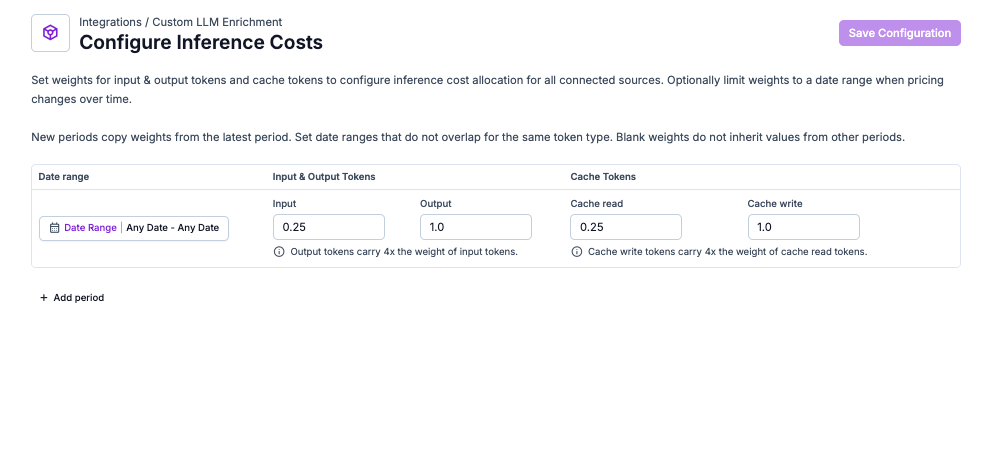
The fields start blank. If you don't know your relative costs yet, enter `1` in every field to count each token type equally, and refine later. See [Choose Token Weights](#choose-token-weights) for common starting points. Vantage re-allocates past months automatically when you change token weights.
To apply one set of token weights to all billing dates, use a single period and leave its **Date range** blank. If your costs changed over time, for example after you moved a model to different hardware, select **Add period** to add one row per period and set each row's **Date range**. A new period copies its token weights from the latest period. Date ranges for the same token type can't overlap, and a period without a date range can't be combined with other periods.
> [!WARNING]
>
> Vantage only allocates a billing date when all four token weights cover that date. Blank fields don't inherit values from other periods, so if you use dated periods, fill in every token weight and leave no gaps between periods. If any dates are missing a token weight, the page shows: "Some configured dates are missing a token weight. Inference allocation only applies on dates covered by all four token weights."
**4. Save**
Select **Save Configuration**. Vantage confirms with **Inference weights saved**. If more than one type of source has inference allocation turned on, a banner at the top of the page notes that the token weights apply to every one of them: "These weights apply to every connected source with inference, including …"
Vantage allocates costs on each provider's next data refresh, and allocates or re-allocates past billing periods in the background.
> [!NOTE]
>
> Inference allocation doesn't run until you save token weights on **Configure Inference Costs**, even if you want every token type weighted equally. Until then, costs pass through unallocated.
### Change or Turn Off Inference Allocation
Return to the source's provider selection to change which cost integrations use inference allocation:
* **Switch or remove an allocation type:** Changing the selection re-runs billing periods that already had a successful run for that source, so past costs follow the new selection.
* **Clear both allocation types:** Clearing both checkboxes for an integration pauses new allocation for it. Vantage remembers the last selection, so earlier periods can still be re-run the same way.
* **Stop a source:** Select **Stop** from the source's ellipses (**...**) menu. Costs that were already allocated stay in place, and you can select **Resume** at any time.
If you stop sending request logs, costs for days without matching requests pass through unallocated.
## View Allocated Costs on Cost Reports
Allocated inference rows appear on your provider costs in any Cost Report. Each row carries:
| Tag key | Description | Example value |
| - | - | - |
| *Your tag keys* | Every tag you attach to a request becomes a tag on the allocated rows for that tag combination. Use the same keys and values across your request logs so one dimension lines up across providers. For example, `team` and `Team` are different keys. | `team`, `customer`, `feature` |
| `inference` | Added to every allocated inference row, so you can separate inference-allocated costs from token-allocated costs. | `inference=true` |
| `vntg:ai:model` | The model from your request logs that the cost row matched. | `vntg:ai:model=gemma-3-27b` |
| `vntg:ai:model_provider` | The model family inferred from the model, added when the family is recognized. | `vntg:ai:model_provider=Google` |
| *Provider's existing tags* | Tags Vantage already puts on the provider's cost rows, such as `modal:description`, `baseten:deployment`, or `together:capacity_type`, are preserved. | — |
Allocated inference rows don't carry a `vntg:ai:token_type` tag, because each row covers compute time rather than a single token type. See [Enrichment Tags](https://docs.vantage.sh/llm_enrichment.md#enrichment-tags) for how enrichment tags work with Virtual Tags and allocation chains.
Enrichment tags behave like any other provider tag in the console:
* **To group:** open the **Group By** menu, select **Tag**, and choose the tag key, for example `vntg:ai:model`, or one of your own keys such as `team`.
* **To filter:** open the **Filters** menu, click **New Rule**, select **Tag**, choose the **Tag Key**, then pick an operator and one or more values.
The tag keys appear in the **Tag Key** dropdown once enriched costs exist. If you use a handful of keys often, mark them as [preferred tags](https://docs.vantage.sh/tagging.md#preferred-tags) so they sort to the top of these menus.
## Check How Requests Matched
Open the source that carries your request logs and select the **Enrichment History** tab. The **Enrichment Runs** table shows each run for each cost integration and billing period.
The **Enrichment Runs** table lists one row per provider cost integration and billing period that ran enrichment, newest first, with columns for the **Integration** (and its account), **Status**, **Tokens Kept**, **Log Lines Kept**, **Bill Match**, **Billing Period**, and **Last Run At**. Lifecycle changes appear as their own rows: **Added** when enrichment is first enabled for an integration, and **Paused** or **Resumed** when you stop, disable, resume, or re-enable it.
The three percentages look similar but measure different things at different stages, so a low number in one column means something very different from a low number in another:
| Metric | Stage | Counts | A Low Value Means |
| - | - | - | - |
| **Tokens Kept** | Join | Tokens | Your logs were read fine, but the usage in them did not line up with your provider bill. |
| **Log Lines Kept** | Log Scan | Log lines | Vantage could not read or index many of your log lines, usually because records are malformed or missing required fields. |
| **Bill Match** | Join | Provider cost rows | Many provider cost rows received no logged usage at all, so they passed through unsplit. Often your logs cover only part of your traffic. |
A low percentage does not change your totals. Usage Vantage cannot attribute stays on a **leftover** row, the unallocated remainder of the original cost row, so the enriched rows always add back up to what the provider billed.
Select the **Tokens Kept** percentage on any run to open **Token Metrics**, which breaks that run down by disposition across the two stages and lets you view sample records for anything that did not make it through.
> [card] [LLM Enrichment History](https://docs.vantage.sh/llm_enrichment_import_history.md)
>
> Full reference for the Enrichment History screen: every column and status, how to read the three percentages, the Log Scan and Join dispositions with a fix for each, sample record fields, and a troubleshooting table.
For inference allocation, the **Token Metrics** page also has an **Inference Join** section. It shows how your logged requests matched your time-billed inference costs, and lets you view sample records for requests that didn't match.
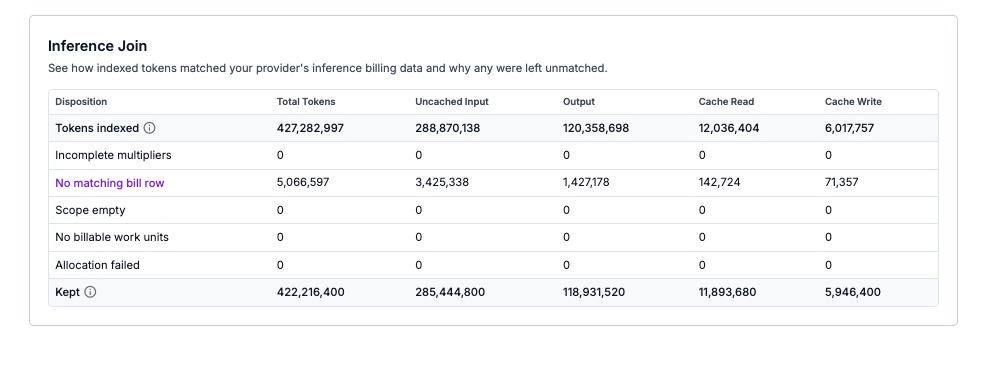
| Reason | What it means |
| - | - |
| **Incomplete multipliers** | The billing date isn't covered by all four token weights. Fill in every token weight for that date on **Configure Inference Costs**. |
| **No matching bill row** | No time-billed cost row exists for that model and day. Check that the model name on your requests resembles the App, deployment, or endpoint name on the bill. |
| **Scope empty** | The requests are limited to a different provider account than the cost row, usually by `resource_account_id`. |
| **No billable work units** | The matching requests added up to zero work units, so there was nothing to split by. |
| **Allocation failed** | Vantage couldn't split the cost row. Contact [support@vantage.sh](mailto:support@vantage.sh) if this persists. |
The **Enrichment Runs** table also records changes as their own rows, such as "Inference allocation was added for this provider," "Inference allocation was paused for this provider," and "Inference token weights were updated for this provider," marked **Updated**.
## Troubleshooting
> [accordion] My provider costs are not being split
>
> Confirm that:
>
> * **Inference allocation** is selected for the cost integration on the source's provider selection. See [Step 1](#set-up-inference-allocation).
> * You saved token weights on **Configure Inference Costs**, and all four token weights cover the billing dates you expect. Dated periods with gaps or blank fields leave the uncovered dates unallocated.
> * Your requests report a `provider` that names the cost provider, such as `modal`, `baseten`, or `together`. Requests reported under another provider, such as an OpenAI-compatible endpoint, can't match these costs.
> * The `model` on your requests resembles the Modal App name, Baseten deployment model name, Together AI endpoint name, or cloud model name on the cost row. If the names don't share an identifiable model name, Vantage can't match them.
> * There were requests for that model on the same UTC day as the cost row. Days without matching requests pass through unchanged.
> * The cost row is time-billed. Baseten Model APIs rows and per-token cloud model costs use [token allocation](https://docs.vantage.sh/llm_enrichment.md#how-cost-rows-are-split) instead, and Together AI Serverless Inference rows aren't allocated by inference.
> * If both allocation types are selected for the integration, the requests served by your dedicated deployments carry the [`inference` tag](#inference-tag-format).
> [accordion] Requests I expected to allocate were skipped
>
> Check the `inference` tag. When only **Inference allocation** is selected, requests tagged `inference` = `false` are skipped. When only **Token allocation** is selected, requests tagged `inference` = `true` are skipped. See [When Only One Type Is Selected](#when-only-one-type-is-selected).
> [accordion] Several sources share a log bucket and some requests aren't used
>
> When more than one active source for the same account and provider reads the same bucket and log path, Vantage can't tell which provider account each request belongs to. In that case, inference allocation only uses requests that include `resource_account_id`. The run shows: "Multiple cost integrations share this bucket and the logs have no resource\_account\_id." Add `resource_account_id` to your requests, or give each source its own log path.
> [accordion] Part of a cost row stays on a leftover row
>
> The leftover row holds the part of a cost row that couldn't be attributed to matching requests. This usually happens when `resource_account_id` restricts your requests to a different provider account than the cost row. Check that `resource_account_id` on your requests matches the provider account behind the cost integration, or omit it if one source only carries requests for one account.
> [accordion] Allocations changed after I updated my token weights
>
> This is expected. When you save new token weights, Vantage re-allocates every billing month whose effective token weights changed, back to the start of your data retention. Totals don't change. Only the split between tag combinations does.
> [accordion] I can't tell which costs were allocated
>
> Enrichment tags appear in the console as regular provider tags. To confirm what was enriched:
>
> * **Check coverage in Enrichment History:** Open the source's [Enrichment History](https://docs.vantage.sh/llm_enrichment_import_history.md) and review **Tokens Kept** (the share of your logged tokens Vantage attached to a cost row) and **Bill Match** (the share of eligible provider cost rows that received logged usage) for each integration and billing period.
> * **Check a Cost Report:** Filter to the provider, then group by one of your own tag keys. Costs from requests that carried that key show its values. The leftover row (the portion of the bill your usage did not cover) and any usage sent without that key appear as **Not tagged with** the key name.
>
> You can also group by the `inference` tag. Allocated inference rows carry `inference=true`.
## Frequently Asked Questions
> [accordion] Which providers are supported?
>
> Modal, Baseten Dedicated Inference, Together AI Dedicated Inference, and hour-metered costs for models you host on AWS, Azure, and Google Cloud. Request logs can come from Custom LLM Enrichment, LiteLLM Enrichment, Cloudflare AI Gateway Enrichment, or Bifrost Enrichment, or, for AWS, from AWS Bedrock LLM Enrichment.
> [accordion] Does inference allocation measure the compute each request used?
>
> No. Inference allocation estimates each tag's share of shared compute from request telemetry, using work units and your token weights. It does not measure GPU time per request.
> [accordion] Is idle time included in the allocated cost?
>
> Yes. For each model and day, Vantage splits the full compute cost across the requests that model served that day, including idle hours. If a model served no requests on a given day, that day's cost stays unallocated.
> [accordion] Can one cost integration use token and inference allocation at the same time?
>
> Yes, for providers that bill both ways, such as Baseten, AWS, Azure, and Google Cloud. Select both, and tag the requests served by your dedicated deployments with `inference` = `true`. See [Use Token and Inference Allocation Together](#use-token-and-inference-allocation-together).
> [accordion] Can I use different token weights for different sources or providers?
>
> No. Token weights apply to the whole account, so every source with inference allocation turned on uses the same token weights. You can change token weights over time with dated periods.
> [accordion] How are credits handled?
>
> Credits and other negative charges are allocated in the same proportions as positive charges for the same model and day, and keep their negative sign. If no requests match, the credit passes through unallocated.
> [accordion] What happens if I turn off inference allocation?
>
> Vantage stops allocating new costs for that integration. Costs that were already allocated stay in place, and you can turn it back on or resume a stopped source at any time. See [Change or Turn Off Inference Allocation](#change-or-turn-off-inference-allocation).
> [accordion] Can I view sources and match results through the Vantage API?
>
> Yes. The Vantage API provides read access to the sources that carry your request logs and to per-run match statistics. Inference allocation selections and token weights are set in the console. Use an API token with the read scope that belongs to a user who can manage integrations, such as an Organization Owner or Integration Owner.
>
> * `GET /v2/enrichment_sources` lists your sources.
> * `GET /v2/enrichment_sources/{enrichment_source_token}` returns a single source.
> * `GET /v2/enrichment_sources/{enrichment_source_token}/statistics` returns match statistics for each run, with optional `provider`, `page`, and `limit` query parameters. Each run includes `log_record_match_rate`, `bill_match_rate`, and `tokens_kept_rate`.
>
> ```bash theme={null}
> curl --request GET \
> --url 'https://api.vantage.sh/v2/enrichment_sources//statistics?provider=modal&limit=1' \
> --header 'Authorization: Bearer '
> ```
>
> See the [Vantage API documentation](https://docs.vantage.sh/api.md) for full details.
> [accordion] Can I view sources through Terraform?
>
> Yes. The [Vantage Terraform provider](https://registry.terraform.io/providers/vantage-sh/vantage/latest/docs) includes read-only `vantage_enrichment_sources` and `vantage_enrichment_source` data sources, which return the same source details as the API. Inference allocation selections and token weights are set in the console.
>
> ```hcl theme={null}
> data "vantage_enrichment_sources" "all" {}
>
> data "vantage_enrichment_source" "custom_llm" {
> token = ""
> }
> ```
> [accordion] How much does this cost?
>
> Enrichment through LLM Enrichment, including inference allocation, consumes your contracted [Build Hours](https://docs.vantage.sh/build_hours.md). The Build Hours consumed depend on the number of log records ingested and cost rows processed each month. As a baseline, an account with 30M cost rows and 5M log records per month would consume up to about 40 Build Hours per month with daily refreshes. If you don't have contracted Build Hours yet, contact [sales@vantage.sh](mailto:sales@vantage.sh).
> [accordion] What Vantage permissions do I need to enable this?
>
> You need the **Organization Owner** or **Integration Owner** role to connect the source. Viewing the enriched costs does not require a special role; the resulting tags follow the same access rules as other cost data. See [Role-Based Access Control](https://docs.vantage.sh/rbac.md).
> [accordion] Will this change my totals or break existing reports?
>
> No. Splits are additive and always sum to the original cost row. Existing provider-level reports continue to show the same totals; enrichment only makes new dimensions available on the underlying rows.
This documentation is built and hosted on [Mintlify](https://mintlify.com), a developer documentation platform.