> ## Documentation Index
> Fetch the complete documentation index at: https://docs.vantage.sh/llms.txt
> Use this file to discover all available pages before exploring further.
# Cost Recommendations
> Get personalized cost optimization recommendations from Vantage to reduce cloud spending across providers.
Vantage monitors your connected providers and shows cost recommendations as your infrastructure evolves and changes. You can implement these recommendations to lower your bill.
Cost recommendations are currently available for AWS, Azure, GCP, Datadog, and Kubernetes.
## Types of Recommendations
Your available recommendations depend on what services and resources are running in your account. In general, there are three types of recommendations:
Based on your connected providers, enriched in Vantage
Created by Vantage using proprietary analysis
Recommends migrating to alternative providers
## View Cost Recommendations
From the top navigation, click **Recommendations**.
The screen displays tabs for viewing recommendations: **Ready for Review**, **In Progress**, **Completed**, and **Archived**. See the [Recommendation Tabs](#recommendation-tabs) section below for details about each tab.
At the top of the page, summary widgets display key metrics about your recommendations. See the [Recommendations Summary Widgets](#recommendations-summary-widgets) section below for details.
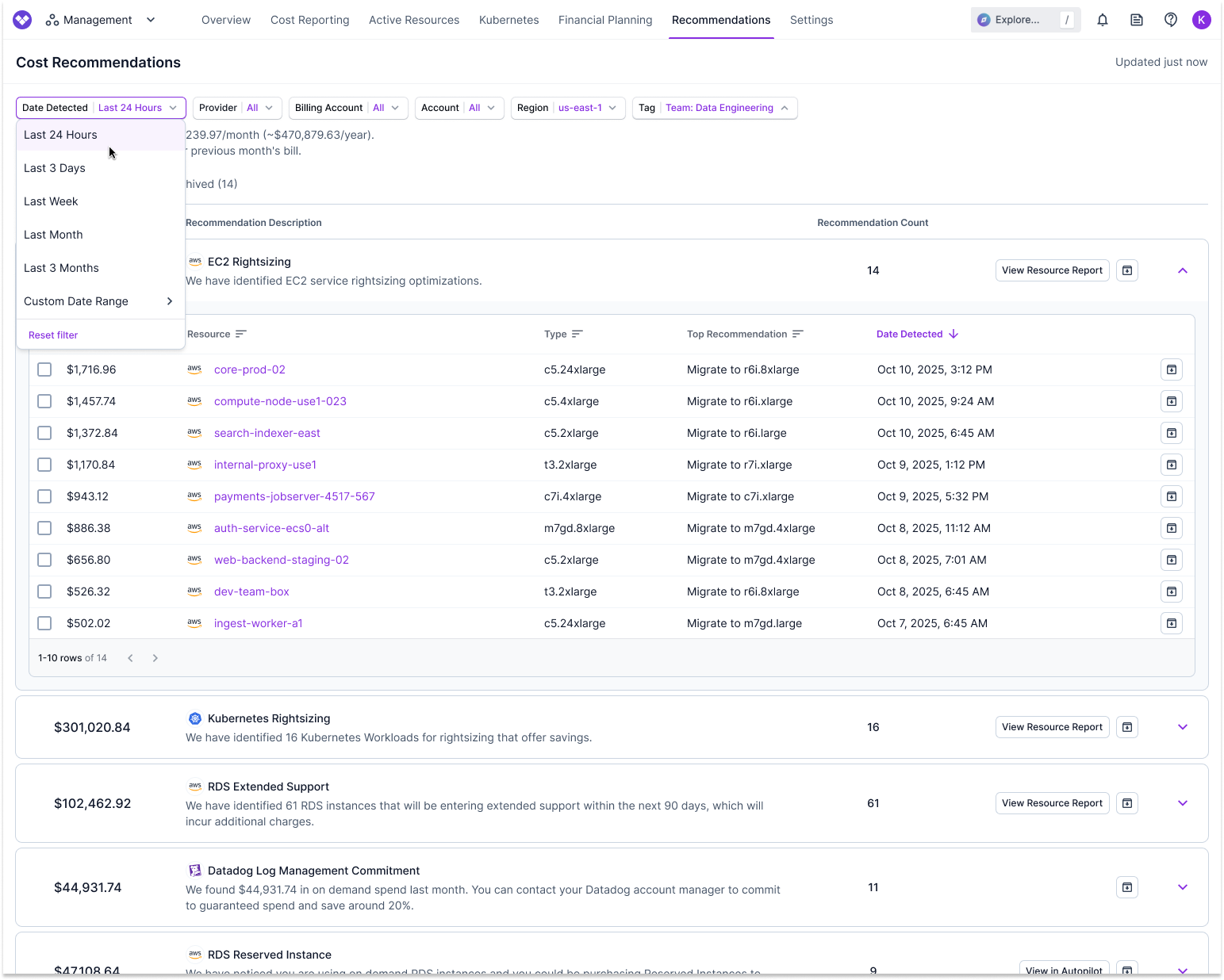
In addition, you'll see filters for Date Range, Account, Billing Account, Region, Provider, [Tag](/tagging), and Minimum Savings (to show only recommendations above a monthly savings threshold).
* Select a filter and choose one or more options to filter the results.
* Click **Reset Filter** on any filter dropdown to remove your current filter.
When you apply filters to create a specific view of recommendations, the URL updates to reflect those filters. You can share this URL with team members, and they will see the same filtered view when they access it.
Recommendation categories are shown in a list format, with each category displaying:
* The number of associated resources (Recommendation Count)
* The total potential savings if you act on all resources for that recommendation
Financial commitment recommendations, such as AWS Savings Plans, AWS Reserved Instances, and Datadog Commitments, do not display recommendation counts since they are not based on individual resources.
At the top of the page, you can save your current filter configuration as a saved view for quick access later. See the [Saved Views](#saved-views) section below for details.
 ### Recommendations Summary Widgets
At the top of the Cost Recommendations page, summary widgets display key metrics about your recommendations.
#### Potential Savings
The **Potential Savings** widget shows the total monthly savings amount if you implement all active recommendations. This value is calculated by summing the potential savings from each individual recommendation across all recommendation types.
The widget is displayed only when the total potential savings exceeds \$5 per month.
#### Savings Rate
When available, a **Savings Rate** badge appears below the Potential Savings value, showing the percentage of your previous month's tracked spend that could be saved by implementing all active recommendations. This is calculated by dividing the total potential savings by your organization's previous month's tracked spend.
$$
\text{Savings Rate} = \frac{\text{Potential Savings}}{\text{Previous Month's Tracked Spend}} \times 100\%
$$
The savings rate is only displayed when it provides meaningful context. It's hidden if:
* The rate exceeds 90% (indicating the previous month's spend may not be representative of current spend)
* The rate is below 5% and total savings are less than \$20,000
#### Savings Realized
The **Savings Realized** widget shows the total savings that have been realized from Autopilot-managed financial commitments (AWS Compute Savings Plans and Reserved Instances). This metric calculates the difference between what you would have paid for on-demand usage versus what you actually paid for the commitments managed through Autopilot, providing a cumulative view of savings over time.
The Savings Realized widget is only displayed when the realized savings amount is greater than \$0.
#### Daily Recommendation Count Chart
A bar chart displays the number of recommendations detected each day over the selected time period. This visualization helps you understand when new recommendations were identified and track trends over time.
The chart automatically adjusts the level of detail based on the available space. When the window is resized to a smaller size or when viewing longer time periods, the chart groups multiple days together into buckets. For example, instead of showing individual days, it may display "85 recommendations across 2 days" for a specific date range.
You can click any bar in the chart to filter the recommendations list below, showing only recommendations detected during that date or date range. If you click a bar representing a single day, the list filters to that day. If you click a bar representing multiple days (a bucket), the list filters to that date range. This makes it easy to focus on recommendations from a specific time period.
### Recommendation Tabs
The Recommendations page organizes recommendations into different tabs based on their status.
The **Ready for Review** tab (default view) displays all active recommendations that are available for you to review and act upon. These are recommendations that have been identified but have not yet been approved or archived.
The **In Progress** tab shows financial commitment recommendations (e.g., AWS Savings Plans, RDS Reserved Instances, etc.) that you have approved to be purchased by Vantage through [Autopilot](/autopilot), but the purchase has not yet been completed.
When you approve a financial commitment recommendation in Autopilot, it moves from **Ready for Review** to **In Progress**. The recommendation remains in this tab while Vantage processes the purchase on your behalf. Each recommendation in this tab displays:
* Monthly savings amount
* Recommendation details (instance type, region, quantity, etc.)
* Approver name
* Date approved
The **Completed** tab shows financial commitment recommendations that have been successfully purchased (or where the purchase attempt failed) through Autopilot. Once a recommendation in the **In Progress** tab has been purchased by Vantage, it moves to the **Completed** tab.
Each recommendation in this tab displays the same information as the In Progress tab, allowing you to track which recommendations have been fully processed and are now active in your AWS account.
The **Archived** tab displays recommendations that have been archived. Archived recommendations are excluded from the total savings potential displayed at the top of the Recommendations page. See the [Archive Recommendations](#archive-recommendations) section below for details on how to archive recommendations.
### Saved Views
Saved Views allow you to save and quickly access specific filter configurations on the Recommendations page. This makes it easy to return to commonly used views without manually reapplying filters each time.
#### Default View
The **All Recommendations** view is the default view that displays all recommendations without any filters applied. This view cannot be deleted, and it's always available in the view selector.
#### Create a Saved View
Apply the filters you want to save (Date Range, Account, Billing Account, Region, Provider, and/or Tag).
From the top right, click **Save As New**.
Enter a name for your saved view in the dialog that appears, then click **Save**.
You'll be redirected to your newly saved view, which will display the name you entered in the view selector.
#### Navigate Between Saved Views
At the top of the Recommendations page, click the view selector dropdown to see all available views.
Select the view you want to access from the list. The page will update to show recommendations with that view's saved filter configuration.
To return to the default view, select **All Recommendations** from the dropdown.
You can search for saved views by typing in the view selector dropdown. This is helpful when you have many saved views.
#### Modify Filters on a Saved View
When you're viewing a saved view, you can modify the filters to temporarily change what's displayed. When you make changes, the **Save** button becomes enabled, allowing you to:
* **Save changes to the current view:** Click **Save** to update the saved view with your current filter configuration.
* **Save as a new view:** Click the dropdown arrow next to **Save** and select **Save As New** to create a new saved view with the current filters, leaving the original view unchanged.
If you navigate away from a saved view without saving your changes, those changes will be lost and the view will return to its saved filter configuration.
#### Add Saved Recommendation Views to Dashboards
You can add saved recommendation views to [dashboards](/dashboards) as widgets to visualize your cost optimization recommendations alongside other cost data. Saved recommendation views can be displayed as either charts or tables on dashboards. See the [Dashboards](/dashboards) documentation for more information on adding widgets to dashboards.
The **All Recommendations** default view cannot be added to dashboards. You must create a saved view first before you can add it to a dashboard as a widget.
### View Recommendation Categories
For recommendation categories, you can take the following actions:
* **View individual resources:** If a recommendation category includes multiple resources, click the category tile to expand and view details for each resource. Each resource shows the detection date, resource-specific savings, and a description of the recommended remediation action. Click a resource link to view its detailed [Active Resource](/active_resources) view.
When you navigate to an Active Resource Report from a filtered view of the Recommendations page, your filters are applied to the Active Resource view as well, with the exception of Date Detected filters. Note that Active Resource Reports do not respect the Archived status of recommendations, so all resources are shown regardless of whether they are archived.
* **View Resource Report:** For recommendations with associated resources, the **View Resource Report** button is displayed on the recommendation category tile. Click this button to see a Resource Report that includes all affected resources. Each resource is listed with the past 30 days of accrued costs, savings if you follow the recommendation, and the recommended action. Additional metadata is also displayed. Specific remediation steps are provided at the top of the Resource Report in a recommendation card. This card contains a description of the recommendation and a remediation workflow, which can include CLI commands, links to provider console actions, a list of manual steps, and references to relevant Vantage blogs. Vantage also provides additional context on recommendation Resource Reports by displaying custom metadata columns relevant to the recommendation. CLI commands can be copied and run directly in your terminal to act on the recommendation.
* **View in Autopilot:** For some recommendations (such as financial commitments, like Savings Plans, Reserved Instances, or cross-provider migration recommendations), the **View in Autopilot** button is displayed instead. Click this button to view the recommendation details in Autopilot.
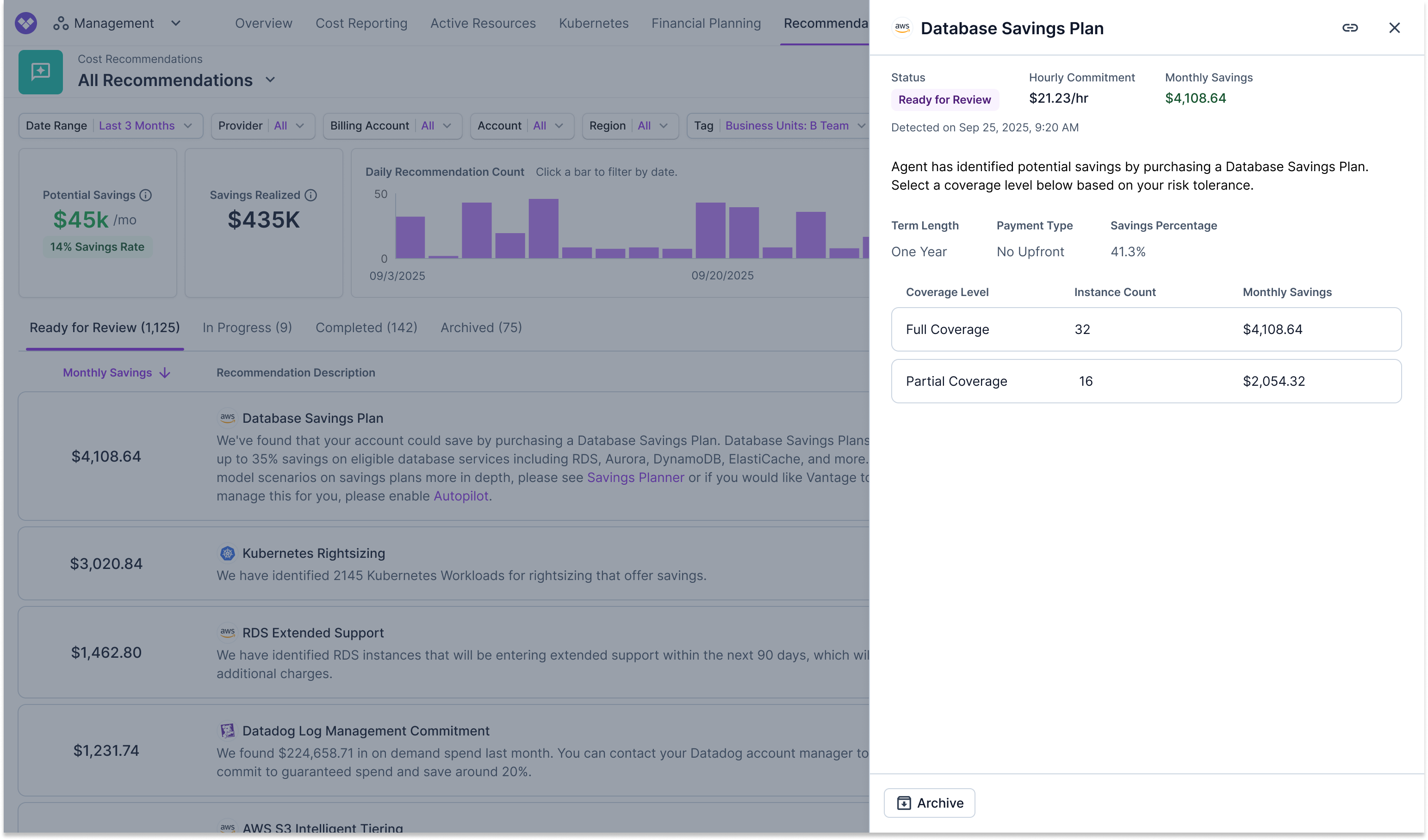
* **Details:** For financial commitment recommendations (Reserved Instances for RDS, Redshift, ElastiCache, and OpenSearch; Compute Savings Plans; and Database Savings Plans), a **View Details** button is displayed on individual recommendation items. Click this button to open a slideout panel that provides detailed information about the recommendation, including:
* Instance details (instance type, region, adjustable number of instances) for Reserved Instances, or commitment details (hourly commitment, term length, payment type, savings percentage) for Savings Plans
* Status badge and monthly savings amount
* Date the recommendation was detected
* Coverage history chart showing On-Demand usage versus committed usage over the past 60 days (Reserved Instances and Compute Savings Plans)
* Coverage level options for Savings Plans, allowing you to select a coverage level based on your risk tolerance
* Purchase options table displaying available term lengths, payment types, upfront costs, and monthly savings for each option (Reserved Instances)
* Ability to approve purchases directly from the slideout (when using the [FinOps Agent](/vantage_finops_agent))
* Ability to archive the recommendation
The slideout supports deep linking, allowing you to share direct links to specific recommendations. When you open a recommendation's details, the URL updates to include the recommendation token, making it easy to bookmark or share specific recommendations with your team.
Slideouts for Compute Savings Plans and Database Savings Plans are disabled if you do not have Autopilot or the FinOps Agent enabled. When disabled, hovering over the **View Details** button displays a tooltip indicating that Autopilot or the FinOps Agent must be enabled to view the recommendation details.
### Recommendations Summary Widgets
At the top of the Cost Recommendations page, summary widgets display key metrics about your recommendations.
#### Potential Savings
The **Potential Savings** widget shows the total monthly savings amount if you implement all active recommendations. This value is calculated by summing the potential savings from each individual recommendation across all recommendation types.
The widget is displayed only when the total potential savings exceeds \$5 per month.
#### Savings Rate
When available, a **Savings Rate** badge appears below the Potential Savings value, showing the percentage of your previous month's tracked spend that could be saved by implementing all active recommendations. This is calculated by dividing the total potential savings by your organization's previous month's tracked spend.
$$
\text{Savings Rate} = \frac{\text{Potential Savings}}{\text{Previous Month's Tracked Spend}} \times 100\%
$$
The savings rate is only displayed when it provides meaningful context. It's hidden if:
* The rate exceeds 90% (indicating the previous month's spend may not be representative of current spend)
* The rate is below 5% and total savings are less than \$20,000
#### Savings Realized
The **Savings Realized** widget shows the total savings that have been realized from Autopilot-managed financial commitments (AWS Compute Savings Plans and Reserved Instances). This metric calculates the difference between what you would have paid for on-demand usage versus what you actually paid for the commitments managed through Autopilot, providing a cumulative view of savings over time.
The Savings Realized widget is only displayed when the realized savings amount is greater than \$0.
#### Daily Recommendation Count Chart
A bar chart displays the number of recommendations detected each day over the selected time period. This visualization helps you understand when new recommendations were identified and track trends over time.
The chart automatically adjusts the level of detail based on the available space. When the window is resized to a smaller size or when viewing longer time periods, the chart groups multiple days together into buckets. For example, instead of showing individual days, it may display "85 recommendations across 2 days" for a specific date range.
You can click any bar in the chart to filter the recommendations list below, showing only recommendations detected during that date or date range. If you click a bar representing a single day, the list filters to that day. If you click a bar representing multiple days (a bucket), the list filters to that date range. This makes it easy to focus on recommendations from a specific time period.
### Recommendation Tabs
The Recommendations page organizes recommendations into different tabs based on their status.
The **Ready for Review** tab (default view) displays all active recommendations that are available for you to review and act upon. These are recommendations that have been identified but have not yet been approved or archived.
The **In Progress** tab shows financial commitment recommendations (e.g., AWS Savings Plans, RDS Reserved Instances, etc.) that you have approved to be purchased by Vantage through [Autopilot](/autopilot), but the purchase has not yet been completed.
When you approve a financial commitment recommendation in Autopilot, it moves from **Ready for Review** to **In Progress**. The recommendation remains in this tab while Vantage processes the purchase on your behalf. Each recommendation in this tab displays:
* Monthly savings amount
* Recommendation details (instance type, region, quantity, etc.)
* Approver name
* Date approved
The **Completed** tab shows financial commitment recommendations that have been successfully purchased (or where the purchase attempt failed) through Autopilot. Once a recommendation in the **In Progress** tab has been purchased by Vantage, it moves to the **Completed** tab.
Each recommendation in this tab displays the same information as the In Progress tab, allowing you to track which recommendations have been fully processed and are now active in your AWS account.
The **Archived** tab displays recommendations that have been archived. Archived recommendations are excluded from the total savings potential displayed at the top of the Recommendations page. See the [Archive Recommendations](#archive-recommendations) section below for details on how to archive recommendations.
### Saved Views
Saved Views allow you to save and quickly access specific filter configurations on the Recommendations page. This makes it easy to return to commonly used views without manually reapplying filters each time.
#### Default View
The **All Recommendations** view is the default view that displays all recommendations without any filters applied. This view cannot be deleted, and it's always available in the view selector.
#### Create a Saved View
Apply the filters you want to save (Date Range, Account, Billing Account, Region, Provider, and/or Tag).
From the top right, click **Save As New**.
Enter a name for your saved view in the dialog that appears, then click **Save**.
You'll be redirected to your newly saved view, which will display the name you entered in the view selector.
#### Navigate Between Saved Views
At the top of the Recommendations page, click the view selector dropdown to see all available views.
Select the view you want to access from the list. The page will update to show recommendations with that view's saved filter configuration.
To return to the default view, select **All Recommendations** from the dropdown.
You can search for saved views by typing in the view selector dropdown. This is helpful when you have many saved views.
#### Modify Filters on a Saved View
When you're viewing a saved view, you can modify the filters to temporarily change what's displayed. When you make changes, the **Save** button becomes enabled, allowing you to:
* **Save changes to the current view:** Click **Save** to update the saved view with your current filter configuration.
* **Save as a new view:** Click the dropdown arrow next to **Save** and select **Save As New** to create a new saved view with the current filters, leaving the original view unchanged.
If you navigate away from a saved view without saving your changes, those changes will be lost and the view will return to its saved filter configuration.
#### Add Saved Recommendation Views to Dashboards
You can add saved recommendation views to [dashboards](/dashboards) as widgets to visualize your cost optimization recommendations alongside other cost data. Saved recommendation views can be displayed as either charts or tables on dashboards. See the [Dashboards](/dashboards) documentation for more information on adding widgets to dashboards.
The **All Recommendations** default view cannot be added to dashboards. You must create a saved view first before you can add it to a dashboard as a widget.
### View Recommendation Categories
For recommendation categories, you can take the following actions:
* **View individual resources:** If a recommendation category includes multiple resources, click the category tile to expand and view details for each resource. Each resource shows the detection date, resource-specific savings, and a description of the recommended remediation action. Click a resource link to view its detailed [Active Resource](/active_resources) view.
When you navigate to an Active Resource Report from a filtered view of the Recommendations page, your filters are applied to the Active Resource view as well, with the exception of Date Detected filters. Note that Active Resource Reports do not respect the Archived status of recommendations, so all resources are shown regardless of whether they are archived.
* **View Resource Report:** For recommendations with associated resources, the **View Resource Report** button is displayed on the recommendation category tile. Click this button to see a Resource Report that includes all affected resources. Each resource is listed with the past 30 days of accrued costs, savings if you follow the recommendation, and the recommended action. Additional metadata is also displayed. Specific remediation steps are provided at the top of the Resource Report in a recommendation card. This card contains a description of the recommendation and a remediation workflow, which can include CLI commands, links to provider console actions, a list of manual steps, and references to relevant Vantage blogs. Vantage also provides additional context on recommendation Resource Reports by displaying custom metadata columns relevant to the recommendation. CLI commands can be copied and run directly in your terminal to act on the recommendation.
* **View in Autopilot:** For some recommendations (such as financial commitments, like Savings Plans, Reserved Instances, or cross-provider migration recommendations), the **View in Autopilot** button is displayed instead. Click this button to view the recommendation details in Autopilot.
* **Details:** For financial commitment recommendations (Reserved Instances for RDS, Redshift, ElastiCache, and OpenSearch; Compute Savings Plans; and Database Savings Plans), a **View Details** button is displayed on individual recommendation items. Click this button to open a slideout panel that provides detailed information about the recommendation, including:
* Instance details (instance type, region, adjustable number of instances) for Reserved Instances, or commitment details (hourly commitment, term length, payment type, savings percentage) for Savings Plans
* Status badge and monthly savings amount
* Date the recommendation was detected
* Coverage history chart showing On-Demand usage versus committed usage over the past 60 days (Reserved Instances and Compute Savings Plans)
* Coverage level options for Savings Plans, allowing you to select a coverage level based on your risk tolerance
* Purchase options table displaying available term lengths, payment types, upfront costs, and monthly savings for each option (Reserved Instances)
* Ability to approve purchases directly from the slideout (when using the [FinOps Agent](/vantage_finops_agent))
* Ability to archive the recommendation
The slideout supports deep linking, allowing you to share direct links to specific recommendations. When you open a recommendation's details, the URL updates to include the recommendation token, making it easy to bookmark or share specific recommendations with your team.
Slideouts for Compute Savings Plans and Database Savings Plans are disabled if you do not have Autopilot or the FinOps Agent enabled. When disabled, hovering over the **View Details** button displays a tooltip indicating that Autopilot or the FinOps Agent must be enabled to view the recommendation details.
 Other recommendations may not display a button if they have no associated active resources and no Autopilot link. In these cases, the recommendation description may contain links to the [Cloud Cost Handbook](https://handbook.vantage.sh/) for additional information. You can also use the archive functionality to manage the recommendation.
### Archive Recommendations
To archive recommendations, you have two options:
* **Archive an entire recommendation set:** Click the **Archive** icon (arrow pointing down) at the end of the recommendation category tile. This archives all recommendations in that set (e.g., all identified Kubernetes Workload Rightsizing recommendations).
* **Archive a specific resource recommendation:** Expand the recommendation category tile and click the **Archive** icon next to that resource.
Archived recommendations are moved to the **Archived** tab. Archived recommendations are excluded from the total savings potential displayed at the top of the Recommendations page. Only active recommendations contribute to the savings metrics.
You must be an Organization Owner, Integration Owner, or Organization Editor to archive recommendations. See the [Permissions Reference](/rbac_permissions) for more information about permissions.
## Frequently Asked Questions
If you are currently on a trial, the specific recommendations are blurred; however, the total amount of potential savings is displayed. After you activate a Vantage subscription, these recommendations are fully visible. As you make changes to your infrastructure, the recommendations are automatically updated. Recommendations are refreshed once a day.
Recommendations are updated daily based on your resource usage patterns and configurations. The "Date Detected" field shows when each specific recommendation was first identified.
Date Detected reflects when Vantage first identified the specific recommendation type for a resource. The date remains unchanged if only the savings amount changes while the recommendation type stays the same. However, if the recommendation type changes (for example, from rightsizing to deletion), the Date Detected updates to reflect when the new recommendation was first detected.
As an example, you have a GP3 EBS volume that receives a rightsizing recommendation on day 0. On day 1, the recommended throughput decreases, but it's still a rightsizing recommendation, so the Date Detected remains day 0. On day 7, Vantage detects that this volume is now idle and recommends deletion instead. The Date Detected updates to day 7 to reflect when the deletion recommendation was first detected.
Vantage started tracking detection date for any recommendation that was not tracked previously. Examples of this include:
* DynamoDB Provisioned Capacity Mode
* EBS Generational Modernization
* CloudWatch Log Retention
* S3 Intelligent Tiering Recommendations
* Azure Unattached Disk
* Unused Datadog Metrics
Each of these recommendations will have launch dates based on when Vantage added Date Detected to these resources in October 2025.
There is no limit to how long recommendations will be retained. As long as the recommendation is valid, it will be retained indefinitely.
If a recommendation is no longer valid, Vantage will remove it from the Recommendations page, regardless of whether it is a currently active recommendation or an archived recommendation.
Filtering recommendations helps you focus on specific subsets of your infrastructure. Use filters to:
* **Filter by Tag:** Focus on recommendations for resources tagged with specific values, such as filtering by `environment=production` to see only production recommendations, or by `team=engineering` to view recommendations relevant to a specific team. This is particularly useful for organizations with multiple teams, projects, or environments, allowing you to prioritize recommendations based on business context.
* **Filter by Provider, Account, or Region:** Narrow recommendations to specific cloud providers, accounts, or regions to align with your team's responsibilities or focus areas.
* **Filter by Date Range:** Review recommendations detected within a specific time period to track new optimization opportunities or review historical recommendations.
Combining multiple filters allows you to create highly targeted views of recommendations, making it easier to prioritize and act on cost optimization opportunities that are most relevant to your current needs.
Some AWS recommendations depend on [AWS Compute Optimizer](https://docs.aws.amazon.com/compute-optimizer/latest/ug/what-is-compute-optimizer.html). To surface these recommendations in Vantage, enable Compute Optimizer directly in AWS for the account you connected to Vantage. If you use AWS Organizations, you can opt in from the management account and include all member accounts.
After Compute Optimizer is enabled, AWS needs enough CloudWatch metric data and resource-specific information to generate recommendations. It can take up to 24 hours after opt-in, and recommendations appear only for resources that meet AWS's [Compute Optimizer resource requirements](https://docs.aws.amazon.com/compute-optimizer/latest/ug/requirements.html).
## Provider-Specific Recommendations
The recommendations that are available for [AWS](/cost_recommendations#aws-recommendations), [Azure](/cost_recommendations#azure-recommendations), [GCP](/cost_recommendations#gcp-recommendations), [Datadog](/cost_recommendations#datadog-recommendations), [Cloudflare](/cost_recommendations#cloudflare-recommendations), and [Kubernetes](/cost_recommendations#kubernetes-rightsizing-recommendations) in Vantage are based on the granularity of data exposed by each provider. Notes for these providers are provided below.
### AWS Recommendations
Vantage provides comprehensive cost optimization recommendations for AWS across multiple categories including financial commitments, rightsizing, idle resource identification, storage optimizations, generational upgrades, extended support management, and cross-provider migration opportunities. Click on each category below to view all available recommendation types.
To surface additional AWS rightsizing and idle recommendations in Vantage, enable [AWS Compute Optimizer](https://docs.aws.amazon.com/compute-optimizer/latest/ug/what-is-compute-optimizer.html) directly in AWS. If you use AWS Organizations, you can opt in from the management account and include all member accounts. After opt-in, AWS needs enough usage metrics to generate recommendations, and recommendations may take up to 24 hours to appear.
Vantage identifies opportunities to reduce costs through AWS financial commitments including Savings Plans and Reserved Instances across multiple services.
By default, Vantage will use 1 year, No Upfront as the purchase configuration for Reserved Instances and Savings Plans. If you have set a [default Savings Plan configuration](/autopilot#configuration-screen) using Autopilot, Vantage will override previous configurations and use this for your recommendations.
| Recommendation Type | Description |
| ----------------------------- | -------------------------------------------------------------------------------------------------------------------------------------------------------------------------------------------------------------------------------------------------------------------------------------------------------------------------------------------------------------------------------------------------------------------------------------------------------------------------------------------------------------------------------------------------------------------------------- |
| Compute Savings Plan | Vantage will look at your AWS infrastructure on a weekly basis and provide Savings Plan recommendations tailored to your actual usage of EC2, Fargate, and Lambda. |
| Database Savings Plan | Vantage analyzes your database usage across Amazon RDS, Aurora, DynamoDB, ElastiCache (Valkey), DocumentDB, Neptune, Keyspaces, Timestream, and AWS Database Migration Service to provide Database Savings Plan recommendations. Database Savings Plans automatically apply savings across a broad range of managed database services, regardless of instance family, size, engine, or region, delivering up to \~35% cost reduction for serverless workloads and meaningful savings on provisioned database usage. Database Savings Plans are only available with 1-year terms. |
| RDS Reserved Instance | Vantage will recommend Reserved Instances for RDS with specific Reserved Instances to purchase. |
| ElastiCache Reserved Instance | Vantage will recommend Reserved Instances for ElastiCache with specific Reserved Instances to purchase. |
| OpenSearch Reserved Instance | Vantage will recommend Reserved Instances for OpenSearch with specific Reserved Instances to purchase. |
| Redshift Reserved Instance | Vantage will recommend Reserved Instances for Redshift with specific Reserved Instances to purchase. |
| DynamoDB Reserved Capacity | Vantage will recommend purchasing DynamoDB Reserved Capacity for better savings on DynamoDB usage. |
| Unused AWS Commitments | Vantage will identify unused financial commitments, such as Reserved Instances or Savings Plans that are not being utilized. |
Vantage surfaces AWS Compute Optimizer recommendations for over-provisioned compute, storage, database, and serverless resources that can be rightsized for cost savings while maintaining performance.
| Recommendation Type | Description |
| --------------------------- | --------------------------------------------------------------------------------------------------------------------------------------------- |
| Amazon EC2 Rightsizing | Vantage surfaces AWS Compute Optimizer recommendations for EC2 instances that can be rightsized to offer savings. See more information below. |
| EBS Volume Rightsizing | Vantage surfaces AWS Compute Optimizer recommendations for EBS volumes that can be rightsized to offer savings. |
| Lambda Function Rightsizing | Vantage surfaces AWS Compute Optimizer recommendations for Lambda functions that can be rightsized to offer savings. |
| ECS Task Rightsizing | Vantage surfaces AWS Compute Optimizer recommendations for ECS tasks that can be rightsized to offer savings. |
| RDS Instance Rightsizing | Vantage surfaces AWS Compute Optimizer recommendations for RDS instances that can be rightsized to offer savings. |
Vantage identifies unused or idle resources that are incurring costs without providing value, helping you clean up unnecessary infrastructure. Some idle resource recommendations are sourced from AWS Compute Optimizer when it is enabled.
| Recommendation Type | Description |
| ------------------------------ | ------------------------------------------------------------------------------------------------------------------------ |
| Idle EC2 Instances | Vantage surfaces AWS Compute Optimizer recommendations for EC2 instances that are idle and can be stopped or terminated. |
| Idle RDS Instances | Vantage surfaces AWS Compute Optimizer recommendations for RDS instances that are idle and can be stopped or terminated. |
| Idle or Unattached EBS Volumes | Vantage surfaces AWS Compute Optimizer recommendations for EBS volumes that are idle or not attached to any instance. |
| Idle ECS Services | Vantage surfaces AWS Compute Optimizer recommendations for ECS services on Fargate that are idle and can be removed. |
| Unattached AWS IP Addresses | Vantage will identify Elastic IP addresses that are not attached to any resource. |
| Idle NAT Gateway | Vantage surfaces AWS Compute Optimizer recommendations for NAT Gateways that are idle and can be removed. |
| Unused Amazon Workspace | Vantage will identify Amazon Workspaces that are unused. |
| Stranded Amazon Workspace | Vantage will identify Amazon Workspaces that are stranded and can be cleaned up. |
Vantage recommends storage tier optimizations and modernization opportunities to reduce storage costs while maintaining data accessibility.
| Recommendation Type | Description |
| --------------------------------------------------- | ----------------------------------------------------------------------------------------------------------------------------------------------------------------------------------------------------------------------------------------------------------------------------------------------------------------- |
| EBS Modernization | Vantage will identify EBS volumes using GP2 that can be migrated to GP3 for cost savings. |
| Transition Amazon S3 Buckets to Intelligent Tiering | Vantage will identify S3 buckets that can benefit from Intelligent-Tiering to reduce storage costs. |
| S3 Glacier Instant Retrieval | Vantage will identify S3 buckets containing objects using Standard Storage that were not accessed in the previous month. These can be moved to Glacier Instant Retrieval for archival storage to save up to 82%. Glacier Instant Retrieval is recommended for objects that are accessed 4 times or less per year. |
Vantage identifies instances running on older generations that can be upgraded to newer generations for better performance and cost efficiency.
| Recommendation Type | Description |
| ------------------------------- | -------------------------------------------------------------------------------------------------------------------------------- |
| EC2 Generational Upgrade | Vantage will identify EC2 instances that can be upgraded to newer generations for better performance and cost efficiency. |
| RDS Generational Upgrade | Vantage will identify RDS instances that can be upgraded to newer generations for better performance and cost efficiency. |
| OpenSearch Generational Upgrade | Vantage will identify OpenSearch instances that can be upgraded to newer generations for better performance and cost efficiency. |
Vantage identifies resources currently incurring extended support costs or approaching extended support windows, helping you plan for upgrades or migrations.
| Recommendation Type | Description |
| ------------------------------------- | --------------------------------------------------------------------------------------------------------------------- |
| EKS Extended Support | Vantage will identify EKS clusters that are currently incurring extended support costs. |
| EKS Upcoming Extended Support | Vantage will identify EKS clusters that will enter extended support within the next three months. |
| ElastiCache Extended Support | Vantage will identify ElastiCache for Redis clusters that are currently incurring extended support costs. |
| ElastiCache Upcoming Extended Support | Vantage will identify ElastiCache for Redis clusters that will enter extended support within the next three months. |
| OpenSearch Extended Support | Vantage will identify OpenSearch/Elasticsearch domains that are currently incurring extended support costs. |
| OpenSearch Upcoming Extended Support | Vantage will identify OpenSearch/Elasticsearch domains that will enter extended support within the next three months. |
| RDS Extended Support | Vantage will identify RDS instances that are currently incurring extended support costs. |
| RDS Upcoming Extended Support | Vantage will identify RDS instances that will enter extended support within the next three months. |
Vantage identifies opportunities to implement lifecycle policies that automatically manage resource retention and reduce long-term storage costs.
| Recommendation Type | Description |
| ------------------------ | ----------------------------------------------------------------------------------------------------- |
| CloudWatch Log Retention | Vantage will identify CloudWatch log groups that can benefit from retention policies to reduce costs. |
#### Rightsizing Recommendations
If you have resources that are over-allocated in terms of vCPU and GB of RAM, you may be paying more than needed. Rightsizing recommendations can help you save significantly by identifying rightsizing opportunities and providing specific reasons to rightsize, such as over-provisioned CPU. Vantage surfaces AWS Compute Optimizer rightsizing recommendations for EC2, RDS, EBS, ECS, and Lambda resources. Rather than providing a single suggestion, Vantage shows several viable rightsizing options for a resource, each with projected savings and utilization tradeoffs. This allows teams to select the most appropriate option based on workload patterns and operational preferences.
Each recommendation includes existing utilization metrics, up to three recommendations, potential savings, performance risk, migration effort, and projected CPU utilization. If you want memory metrics collected and displayed for EC2, AWS requires this to be collected via an agent, either a native [CloudWatch Agent](https://docs.aws.amazon.com/compute-optimizer/latest/ug/ec2-metrics-analyzed.html#cw-agent) or [supported third-party agent](https://docs.aws.amazon.com/compute-optimizer/latest/ug/external-metrics-ingestion.html).
To view a rightsizing recommendation:
On the **Cost Recommendations** screen, click **View Resources** to view each identified resource instance that is recommended for rightsizing.
Select a resource from the list.
The [Active Resources](/active_resources) screen is displayed. Select the **Rightsizing** tab. The tab includes recommended sizes for migration (e.g., "Migrate to m5.large"), the potential monthly savings, performance risk (0 being lowest, 4 being highest), migration effort (ranging from very low to very high), and projected CPU utilization.
Click **Compare Pricing** to explore an instance pricing comparison via [ec2instances.info](https://instances.vantage.sh/). This pricing comparison evaluates the current instance type used against the proposed instance type from the recommendation.

### Azure Recommendations
Vantage provides cost optimization recommendations for Azure focusing on financial commitments, rightsizing, and idle resource identification. Click on each category below to view all available recommendation types.
Vantage identifies opportunities to reduce costs through Azure Reserved Instances and Savings Plans across compute, storage, and database services.
| Recommendation Type | Description |
| ------------------------------------ | ---------------------------------------------------------------------------------------------------------------- |
| Azure Compute Reserved Instance | Suggestions for instances with on-demand usage that could be converted to Reserved Instances for better savings. |
| Azure Compute Savings Plan | Vantage will identify potential savings from purchasing Compute Savings Plans. |
| Azure Blob Storage Commitment | Vantage will suggest purchasing Reserved Instances that can save on Blob v2 and Datalake storage Gen2 costs. |
| Azure SQL Database Reserved Instance | Vantage will suggest purchasing Reserved Instances that can save on your pay-as-you-go costs. |
| Azure SQL PaaS DB Reserved Instance | Vantage will suggest purchasing Reserved Instances that can save on your pay-as-you-go costs. |
| Azure Files Financial Commitment | Vantage will suggest purchasing Reserved Instances that can save on your on-demand costs. |
| Azure App Service Reserved Instance | Vantage will suggest purchasing Reserved Instances that provide a reduced rate. |
| Azure Cosmos DB Reserved Instance | Vantage will suggest purchasing Reserved Instances that provide a reduced rate. |
Vantage analyzes Virtual Machine utilization to identify over-provisioned resources that can be rightsized for cost savings.
| Recommendation Type | Description |
| -------------------- | ------------------------------------------------------------------------------------------------------------------------------------------------------------------------- |
| Azure VM Rightsizing | Vantage will suggest VM instances that can be rightsized to offer savings. Suggestions will be made available through the Active Resource page's Rightsizing tab as well. |
Vantage identifies unused Azure resources that are incurring costs without providing value.
| Recommendation Type | Description |
| --------------------- | -------------------------------------------------------------- |
| Unattached Azure Disk | Disks that have not been attached to a VM in the last 30 days. |
### GCP Recommendations
Vantage provides cost optimization recommendations for GCP focusing on rightsizing, idle resource identification, and financial commitments for Compute Engine and Google Kubernetes Engine (GKE). Click on each category below to view all available recommendation types.
Vantage analyzes Compute Engine instance utilization to identify over-provisioned resources that can be rightsized for cost savings.
| Recommendation Type | Description |
| ----------------------- | ------------------------------------------------------------------------------------------------------------------------------------------------------------------------------------------------------------------------------------------------------------------------------------------------- |
| GCP Compute Rightsizing | Vantage will identify GCP Compute instances that are overprovisioned and can be rightsized to offer savings. For example, *We have identified 2 Compute instances for rightsizing that offer savings.* See the next section for details on viewing resource-specific rightsizing recommendations. |
Vantage identifies unused or idle GCP resources that are incurring costs without providing value, helping you clean up unnecessary infrastructure.
| Recommendation Type | Description |
| ------------------- | ------------------------------------------------------------------------------------------------------------------------------------------------------------------------------------------------------- |
| Idle GKE Clusters | Vantage will identify Google Kubernetes Engine clusters that are idle—clusters with little or no workload activity—and recommend scaling them down or deleting them. See the section below for details. |
Vantage identifies opportunities to reduce costs through GCP Compute Commitments for predictable workloads.
| Recommendation Type | Description |
| -------------------------------- | ------------------------------------------------------------------------------------------------------------------------------------------------------------------------- |
| GCP Compute Financial Commitment | Vantage will identify potential savings from purchasing Compute Commitments. For example, *We have found that your account could save by purchasing Compute Commitments.* |
#### GCP Compute Rightsizing Recommendations
If you have GCP Compute instances that are overprovisioned, rightsizing recommendations are available. Recommendations are also provided in the case of idle instances.
Each recommendation includes potential monthly savings as well as the number of instances identified for rightsizing.
1. On the **Cost Recommendations** screen, click **View Resources** to view each identified resource that is recommended for rightsizing.
2. Select a resource from the list.
3. The [Active Resources](/active_resources) screen is displayed. Select the **Rightsizing** tab. The tab includes a recommended size for migration (e.g., "Migrate from e2-medium to e2-small."). Any available idle resource recommendations are also displayed (e.g., "Stop idle VM idle-instance-1."). The potential monthly savings for taking action on these recommendations are also displayed.
Other recommendations may not display a button if they have no associated active resources and no Autopilot link. In these cases, the recommendation description may contain links to the [Cloud Cost Handbook](https://handbook.vantage.sh/) for additional information. You can also use the archive functionality to manage the recommendation.
### Archive Recommendations
To archive recommendations, you have two options:
* **Archive an entire recommendation set:** Click the **Archive** icon (arrow pointing down) at the end of the recommendation category tile. This archives all recommendations in that set (e.g., all identified Kubernetes Workload Rightsizing recommendations).
* **Archive a specific resource recommendation:** Expand the recommendation category tile and click the **Archive** icon next to that resource.
Archived recommendations are moved to the **Archived** tab. Archived recommendations are excluded from the total savings potential displayed at the top of the Recommendations page. Only active recommendations contribute to the savings metrics.
You must be an Organization Owner, Integration Owner, or Organization Editor to archive recommendations. See the [Permissions Reference](/rbac_permissions) for more information about permissions.
## Frequently Asked Questions
If you are currently on a trial, the specific recommendations are blurred; however, the total amount of potential savings is displayed. After you activate a Vantage subscription, these recommendations are fully visible. As you make changes to your infrastructure, the recommendations are automatically updated. Recommendations are refreshed once a day.
Recommendations are updated daily based on your resource usage patterns and configurations. The "Date Detected" field shows when each specific recommendation was first identified.
Date Detected reflects when Vantage first identified the specific recommendation type for a resource. The date remains unchanged if only the savings amount changes while the recommendation type stays the same. However, if the recommendation type changes (for example, from rightsizing to deletion), the Date Detected updates to reflect when the new recommendation was first detected.
As an example, you have a GP3 EBS volume that receives a rightsizing recommendation on day 0. On day 1, the recommended throughput decreases, but it's still a rightsizing recommendation, so the Date Detected remains day 0. On day 7, Vantage detects that this volume is now idle and recommends deletion instead. The Date Detected updates to day 7 to reflect when the deletion recommendation was first detected.
Vantage started tracking detection date for any recommendation that was not tracked previously. Examples of this include:
* DynamoDB Provisioned Capacity Mode
* EBS Generational Modernization
* CloudWatch Log Retention
* S3 Intelligent Tiering Recommendations
* Azure Unattached Disk
* Unused Datadog Metrics
Each of these recommendations will have launch dates based on when Vantage added Date Detected to these resources in October 2025.
There is no limit to how long recommendations will be retained. As long as the recommendation is valid, it will be retained indefinitely.
If a recommendation is no longer valid, Vantage will remove it from the Recommendations page, regardless of whether it is a currently active recommendation or an archived recommendation.
Filtering recommendations helps you focus on specific subsets of your infrastructure. Use filters to:
* **Filter by Tag:** Focus on recommendations for resources tagged with specific values, such as filtering by `environment=production` to see only production recommendations, or by `team=engineering` to view recommendations relevant to a specific team. This is particularly useful for organizations with multiple teams, projects, or environments, allowing you to prioritize recommendations based on business context.
* **Filter by Provider, Account, or Region:** Narrow recommendations to specific cloud providers, accounts, or regions to align with your team's responsibilities or focus areas.
* **Filter by Date Range:** Review recommendations detected within a specific time period to track new optimization opportunities or review historical recommendations.
Combining multiple filters allows you to create highly targeted views of recommendations, making it easier to prioritize and act on cost optimization opportunities that are most relevant to your current needs.
Some AWS recommendations depend on [AWS Compute Optimizer](https://docs.aws.amazon.com/compute-optimizer/latest/ug/what-is-compute-optimizer.html). To surface these recommendations in Vantage, enable Compute Optimizer directly in AWS for the account you connected to Vantage. If you use AWS Organizations, you can opt in from the management account and include all member accounts.
After Compute Optimizer is enabled, AWS needs enough CloudWatch metric data and resource-specific information to generate recommendations. It can take up to 24 hours after opt-in, and recommendations appear only for resources that meet AWS's [Compute Optimizer resource requirements](https://docs.aws.amazon.com/compute-optimizer/latest/ug/requirements.html).
## Provider-Specific Recommendations
The recommendations that are available for [AWS](/cost_recommendations#aws-recommendations), [Azure](/cost_recommendations#azure-recommendations), [GCP](/cost_recommendations#gcp-recommendations), [Datadog](/cost_recommendations#datadog-recommendations), [Cloudflare](/cost_recommendations#cloudflare-recommendations), and [Kubernetes](/cost_recommendations#kubernetes-rightsizing-recommendations) in Vantage are based on the granularity of data exposed by each provider. Notes for these providers are provided below.
### AWS Recommendations
Vantage provides comprehensive cost optimization recommendations for AWS across multiple categories including financial commitments, rightsizing, idle resource identification, storage optimizations, generational upgrades, extended support management, and cross-provider migration opportunities. Click on each category below to view all available recommendation types.
To surface additional AWS rightsizing and idle recommendations in Vantage, enable [AWS Compute Optimizer](https://docs.aws.amazon.com/compute-optimizer/latest/ug/what-is-compute-optimizer.html) directly in AWS. If you use AWS Organizations, you can opt in from the management account and include all member accounts. After opt-in, AWS needs enough usage metrics to generate recommendations, and recommendations may take up to 24 hours to appear.
Vantage identifies opportunities to reduce costs through AWS financial commitments including Savings Plans and Reserved Instances across multiple services.
By default, Vantage will use 1 year, No Upfront as the purchase configuration for Reserved Instances and Savings Plans. If you have set a [default Savings Plan configuration](/autopilot#configuration-screen) using Autopilot, Vantage will override previous configurations and use this for your recommendations.
| Recommendation Type | Description |
| ----------------------------- | -------------------------------------------------------------------------------------------------------------------------------------------------------------------------------------------------------------------------------------------------------------------------------------------------------------------------------------------------------------------------------------------------------------------------------------------------------------------------------------------------------------------------------------------------------------------------------- |
| Compute Savings Plan | Vantage will look at your AWS infrastructure on a weekly basis and provide Savings Plan recommendations tailored to your actual usage of EC2, Fargate, and Lambda. |
| Database Savings Plan | Vantage analyzes your database usage across Amazon RDS, Aurora, DynamoDB, ElastiCache (Valkey), DocumentDB, Neptune, Keyspaces, Timestream, and AWS Database Migration Service to provide Database Savings Plan recommendations. Database Savings Plans automatically apply savings across a broad range of managed database services, regardless of instance family, size, engine, or region, delivering up to \~35% cost reduction for serverless workloads and meaningful savings on provisioned database usage. Database Savings Plans are only available with 1-year terms. |
| RDS Reserved Instance | Vantage will recommend Reserved Instances for RDS with specific Reserved Instances to purchase. |
| ElastiCache Reserved Instance | Vantage will recommend Reserved Instances for ElastiCache with specific Reserved Instances to purchase. |
| OpenSearch Reserved Instance | Vantage will recommend Reserved Instances for OpenSearch with specific Reserved Instances to purchase. |
| Redshift Reserved Instance | Vantage will recommend Reserved Instances for Redshift with specific Reserved Instances to purchase. |
| DynamoDB Reserved Capacity | Vantage will recommend purchasing DynamoDB Reserved Capacity for better savings on DynamoDB usage. |
| Unused AWS Commitments | Vantage will identify unused financial commitments, such as Reserved Instances or Savings Plans that are not being utilized. |
Vantage surfaces AWS Compute Optimizer recommendations for over-provisioned compute, storage, database, and serverless resources that can be rightsized for cost savings while maintaining performance.
| Recommendation Type | Description |
| --------------------------- | --------------------------------------------------------------------------------------------------------------------------------------------- |
| Amazon EC2 Rightsizing | Vantage surfaces AWS Compute Optimizer recommendations for EC2 instances that can be rightsized to offer savings. See more information below. |
| EBS Volume Rightsizing | Vantage surfaces AWS Compute Optimizer recommendations for EBS volumes that can be rightsized to offer savings. |
| Lambda Function Rightsizing | Vantage surfaces AWS Compute Optimizer recommendations for Lambda functions that can be rightsized to offer savings. |
| ECS Task Rightsizing | Vantage surfaces AWS Compute Optimizer recommendations for ECS tasks that can be rightsized to offer savings. |
| RDS Instance Rightsizing | Vantage surfaces AWS Compute Optimizer recommendations for RDS instances that can be rightsized to offer savings. |
Vantage identifies unused or idle resources that are incurring costs without providing value, helping you clean up unnecessary infrastructure. Some idle resource recommendations are sourced from AWS Compute Optimizer when it is enabled.
| Recommendation Type | Description |
| ------------------------------ | ------------------------------------------------------------------------------------------------------------------------ |
| Idle EC2 Instances | Vantage surfaces AWS Compute Optimizer recommendations for EC2 instances that are idle and can be stopped or terminated. |
| Idle RDS Instances | Vantage surfaces AWS Compute Optimizer recommendations for RDS instances that are idle and can be stopped or terminated. |
| Idle or Unattached EBS Volumes | Vantage surfaces AWS Compute Optimizer recommendations for EBS volumes that are idle or not attached to any instance. |
| Idle ECS Services | Vantage surfaces AWS Compute Optimizer recommendations for ECS services on Fargate that are idle and can be removed. |
| Unattached AWS IP Addresses | Vantage will identify Elastic IP addresses that are not attached to any resource. |
| Idle NAT Gateway | Vantage surfaces AWS Compute Optimizer recommendations for NAT Gateways that are idle and can be removed. |
| Unused Amazon Workspace | Vantage will identify Amazon Workspaces that are unused. |
| Stranded Amazon Workspace | Vantage will identify Amazon Workspaces that are stranded and can be cleaned up. |
Vantage recommends storage tier optimizations and modernization opportunities to reduce storage costs while maintaining data accessibility.
| Recommendation Type | Description |
| --------------------------------------------------- | ----------------------------------------------------------------------------------------------------------------------------------------------------------------------------------------------------------------------------------------------------------------------------------------------------------------- |
| EBS Modernization | Vantage will identify EBS volumes using GP2 that can be migrated to GP3 for cost savings. |
| Transition Amazon S3 Buckets to Intelligent Tiering | Vantage will identify S3 buckets that can benefit from Intelligent-Tiering to reduce storage costs. |
| S3 Glacier Instant Retrieval | Vantage will identify S3 buckets containing objects using Standard Storage that were not accessed in the previous month. These can be moved to Glacier Instant Retrieval for archival storage to save up to 82%. Glacier Instant Retrieval is recommended for objects that are accessed 4 times or less per year. |
Vantage identifies instances running on older generations that can be upgraded to newer generations for better performance and cost efficiency.
| Recommendation Type | Description |
| ------------------------------- | -------------------------------------------------------------------------------------------------------------------------------- |
| EC2 Generational Upgrade | Vantage will identify EC2 instances that can be upgraded to newer generations for better performance and cost efficiency. |
| RDS Generational Upgrade | Vantage will identify RDS instances that can be upgraded to newer generations for better performance and cost efficiency. |
| OpenSearch Generational Upgrade | Vantage will identify OpenSearch instances that can be upgraded to newer generations for better performance and cost efficiency. |
Vantage identifies resources currently incurring extended support costs or approaching extended support windows, helping you plan for upgrades or migrations.
| Recommendation Type | Description |
| ------------------------------------- | --------------------------------------------------------------------------------------------------------------------- |
| EKS Extended Support | Vantage will identify EKS clusters that are currently incurring extended support costs. |
| EKS Upcoming Extended Support | Vantage will identify EKS clusters that will enter extended support within the next three months. |
| ElastiCache Extended Support | Vantage will identify ElastiCache for Redis clusters that are currently incurring extended support costs. |
| ElastiCache Upcoming Extended Support | Vantage will identify ElastiCache for Redis clusters that will enter extended support within the next three months. |
| OpenSearch Extended Support | Vantage will identify OpenSearch/Elasticsearch domains that are currently incurring extended support costs. |
| OpenSearch Upcoming Extended Support | Vantage will identify OpenSearch/Elasticsearch domains that will enter extended support within the next three months. |
| RDS Extended Support | Vantage will identify RDS instances that are currently incurring extended support costs. |
| RDS Upcoming Extended Support | Vantage will identify RDS instances that will enter extended support within the next three months. |
Vantage identifies opportunities to implement lifecycle policies that automatically manage resource retention and reduce long-term storage costs.
| Recommendation Type | Description |
| ------------------------ | ----------------------------------------------------------------------------------------------------- |
| CloudWatch Log Retention | Vantage will identify CloudWatch log groups that can benefit from retention policies to reduce costs. |
#### Rightsizing Recommendations
If you have resources that are over-allocated in terms of vCPU and GB of RAM, you may be paying more than needed. Rightsizing recommendations can help you save significantly by identifying rightsizing opportunities and providing specific reasons to rightsize, such as over-provisioned CPU. Vantage surfaces AWS Compute Optimizer rightsizing recommendations for EC2, RDS, EBS, ECS, and Lambda resources. Rather than providing a single suggestion, Vantage shows several viable rightsizing options for a resource, each with projected savings and utilization tradeoffs. This allows teams to select the most appropriate option based on workload patterns and operational preferences.
Each recommendation includes existing utilization metrics, up to three recommendations, potential savings, performance risk, migration effort, and projected CPU utilization. If you want memory metrics collected and displayed for EC2, AWS requires this to be collected via an agent, either a native [CloudWatch Agent](https://docs.aws.amazon.com/compute-optimizer/latest/ug/ec2-metrics-analyzed.html#cw-agent) or [supported third-party agent](https://docs.aws.amazon.com/compute-optimizer/latest/ug/external-metrics-ingestion.html).
To view a rightsizing recommendation:
On the **Cost Recommendations** screen, click **View Resources** to view each identified resource instance that is recommended for rightsizing.
Select a resource from the list.
The [Active Resources](/active_resources) screen is displayed. Select the **Rightsizing** tab. The tab includes recommended sizes for migration (e.g., "Migrate to m5.large"), the potential monthly savings, performance risk (0 being lowest, 4 being highest), migration effort (ranging from very low to very high), and projected CPU utilization.
Click **Compare Pricing** to explore an instance pricing comparison via [ec2instances.info](https://instances.vantage.sh/). This pricing comparison evaluates the current instance type used against the proposed instance type from the recommendation.

### Azure Recommendations
Vantage provides cost optimization recommendations for Azure focusing on financial commitments, rightsizing, and idle resource identification. Click on each category below to view all available recommendation types.
Vantage identifies opportunities to reduce costs through Azure Reserved Instances and Savings Plans across compute, storage, and database services.
| Recommendation Type | Description |
| ------------------------------------ | ---------------------------------------------------------------------------------------------------------------- |
| Azure Compute Reserved Instance | Suggestions for instances with on-demand usage that could be converted to Reserved Instances for better savings. |
| Azure Compute Savings Plan | Vantage will identify potential savings from purchasing Compute Savings Plans. |
| Azure Blob Storage Commitment | Vantage will suggest purchasing Reserved Instances that can save on Blob v2 and Datalake storage Gen2 costs. |
| Azure SQL Database Reserved Instance | Vantage will suggest purchasing Reserved Instances that can save on your pay-as-you-go costs. |
| Azure SQL PaaS DB Reserved Instance | Vantage will suggest purchasing Reserved Instances that can save on your pay-as-you-go costs. |
| Azure Files Financial Commitment | Vantage will suggest purchasing Reserved Instances that can save on your on-demand costs. |
| Azure App Service Reserved Instance | Vantage will suggest purchasing Reserved Instances that provide a reduced rate. |
| Azure Cosmos DB Reserved Instance | Vantage will suggest purchasing Reserved Instances that provide a reduced rate. |
Vantage analyzes Virtual Machine utilization to identify over-provisioned resources that can be rightsized for cost savings.
| Recommendation Type | Description |
| -------------------- | ------------------------------------------------------------------------------------------------------------------------------------------------------------------------- |
| Azure VM Rightsizing | Vantage will suggest VM instances that can be rightsized to offer savings. Suggestions will be made available through the Active Resource page's Rightsizing tab as well. |
Vantage identifies unused Azure resources that are incurring costs without providing value.
| Recommendation Type | Description |
| --------------------- | -------------------------------------------------------------- |
| Unattached Azure Disk | Disks that have not been attached to a VM in the last 30 days. |
### GCP Recommendations
Vantage provides cost optimization recommendations for GCP focusing on rightsizing, idle resource identification, and financial commitments for Compute Engine and Google Kubernetes Engine (GKE). Click on each category below to view all available recommendation types.
Vantage analyzes Compute Engine instance utilization to identify over-provisioned resources that can be rightsized for cost savings.
| Recommendation Type | Description |
| ----------------------- | ------------------------------------------------------------------------------------------------------------------------------------------------------------------------------------------------------------------------------------------------------------------------------------------------- |
| GCP Compute Rightsizing | Vantage will identify GCP Compute instances that are overprovisioned and can be rightsized to offer savings. For example, *We have identified 2 Compute instances for rightsizing that offer savings.* See the next section for details on viewing resource-specific rightsizing recommendations. |
Vantage identifies unused or idle GCP resources that are incurring costs without providing value, helping you clean up unnecessary infrastructure.
| Recommendation Type | Description |
| ------------------- | ------------------------------------------------------------------------------------------------------------------------------------------------------------------------------------------------------- |
| Idle GKE Clusters | Vantage will identify Google Kubernetes Engine clusters that are idle—clusters with little or no workload activity—and recommend scaling them down or deleting them. See the section below for details. |
Vantage identifies opportunities to reduce costs through GCP Compute Commitments for predictable workloads.
| Recommendation Type | Description |
| -------------------------------- | ------------------------------------------------------------------------------------------------------------------------------------------------------------------------- |
| GCP Compute Financial Commitment | Vantage will identify potential savings from purchasing Compute Commitments. For example, *We have found that your account could save by purchasing Compute Commitments.* |
#### GCP Compute Rightsizing Recommendations
If you have GCP Compute instances that are overprovisioned, rightsizing recommendations are available. Recommendations are also provided in the case of idle instances.
Each recommendation includes potential monthly savings as well as the number of instances identified for rightsizing.
1. On the **Cost Recommendations** screen, click **View Resources** to view each identified resource that is recommended for rightsizing.
2. Select a resource from the list.
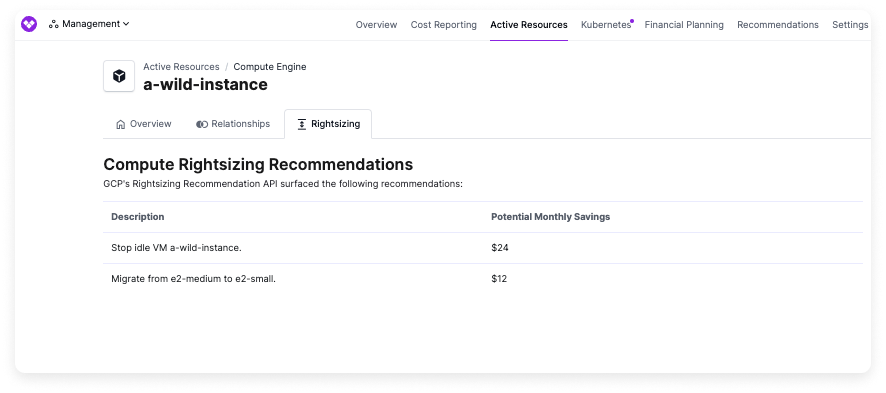
3. The [Active Resources](/active_resources) screen is displayed. Select the **Rightsizing** tab. The tab includes a recommended size for migration (e.g., "Migrate from e2-medium to e2-small."). Any available idle resource recommendations are also displayed (e.g., "Stop idle VM idle-instance-1."). The potential monthly savings for taking action on these recommendations are also displayed.
 #### GCP Idle GKE Cluster Recommendations
Vantage surfaces idle Google Kubernetes Engine (GKE) cluster recommendations sourced from the [GCP Diagnosis Recommender](https://cloud.google.com/recommender/docs/insights/gke-diagnosis-insights). Clusters with little or no workload activity are flagged so you can scale them down or delete them to reduce idle compute, networking, and control plane costs.
1. On the **Cost Recommendations** screen, click **View Resources** next to the Idle GKE Clusters recommendation to see each identified cluster.
2. Select a cluster from the list.
3. On the [Active Resources](/active_resources) screen, select the **Idle GKE Cluster** tab to view the recommended remediation (for example, deleting the cluster or reducing its node pool) along with the potential monthly savings.
### Datadog Recommendations
Vantage provides cost optimization recommendations for Datadog focusing on financial commitments and identifying unused resources. Click on each category below to view all available recommendation types.
Vantage identifies opportunities to reduce costs through Datadog committed use discounts based on your actual usage patterns.
| Recommendation Type | Description |
| ---------------------------- | -------------------------------------------------------------------------------------------------------------------------------------------------------------------------------------------------------------------------------------------------------------------------------------------------------------- |
| Datadog Financial Commitment | Vantage provides recommendations about making commitments for Datadog services where [committed use discounts](https://handbook.vantage.sh/datadog/committed-use-discounts/) are offered. These recommendations are based on your actual usage of Datadog services to assist with making the right commitment. |
Vantage identifies unused Datadog resources that are incurring costs without providing value.
| Recommendation Type | Description |
| --------------------- | --------------------------------------------------------------------------------------------------------------------------------------------- |
| Unused Custom Metrics | Vantage identifies unused custom metrics that are no longer providing value to reduce observability costs. See the section below for details. |
#### Unused Custom Metrics
Vantage identifies unused custom metrics that are no longer providing value to reduce observability costs. These recommendations help teams identify metrics that may have been created for projects that have ended or are no longer tied to dashboards, monitors, notebooks, or Service Level Objectives (SLOs).
Vantage monitors custom metrics across connected Datadog accounts and surfaces metrics that are going unused with no required configuration changes. Vantage flags metrics with:
* No queries in the past 30 days
* No associations with dashboards, monitors, notebooks, or SLOs
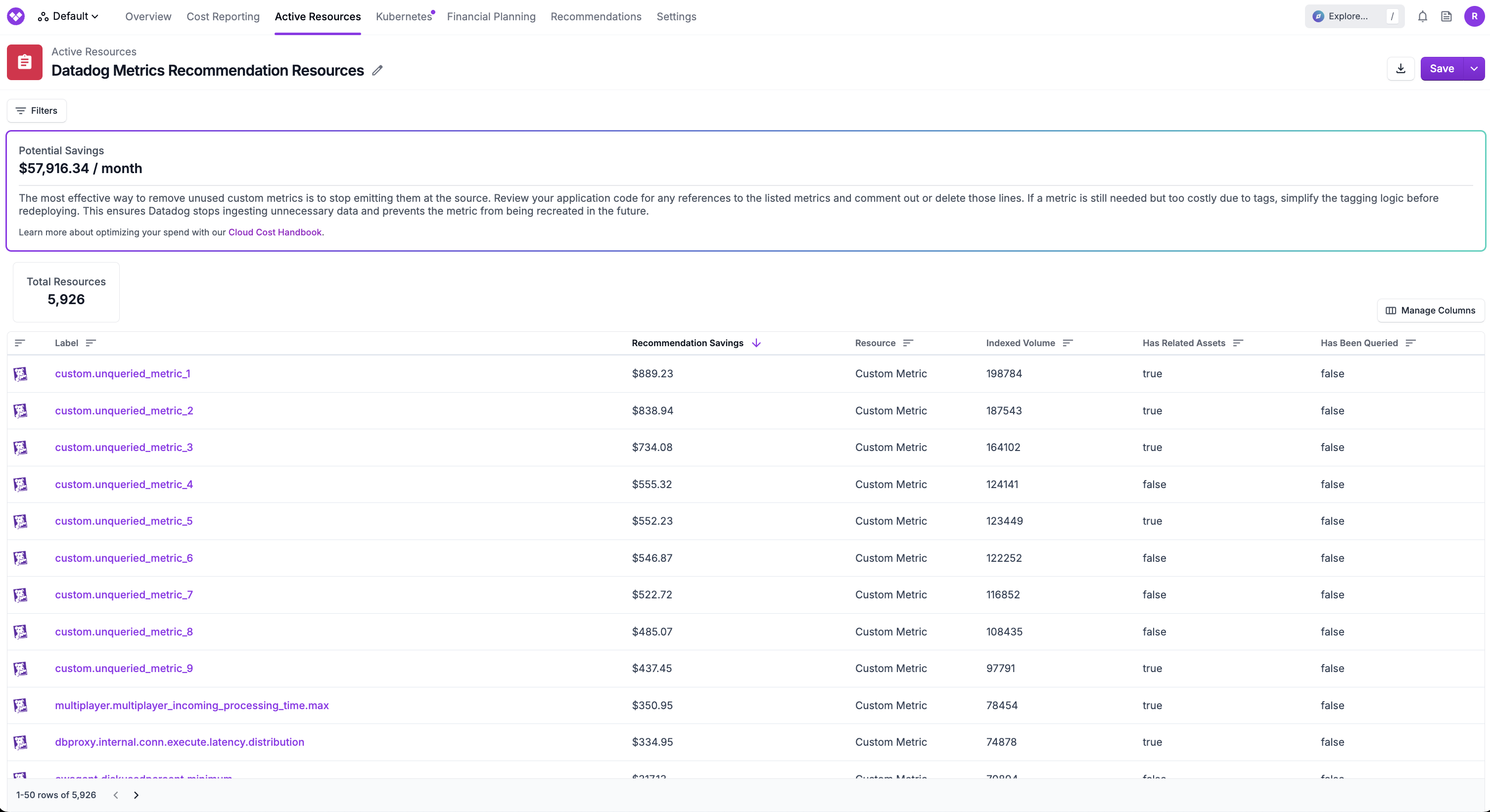
Each unused custom metric is shown under [Active Resources](/active_resources#datadog-custom-metrics) with metadata such as tags, creation date, and indexed volume before taking action.
From the **Cost Recommendations** screen, click **View Resources** next to the Datadog unused metrics recommendation to see each identified unused custom metric.
Select a metric from the list to view detailed information, including:
* Metric name and description
* Associated tags and metadata
* Indexed volume and cost information
* Whether the metric has been queried recently
* Whether the metric is referenced by any dashboards, monitors, notebooks, or SLOs
Click the **Metric Cleanup** tab to see recommended actions for remediation.
Vantage calculates the associated cost and savings estimate for each metric by finding the proportion of the metric volume to all ingested volume, and applies that proportion to the ingested timeseries metric costs.
**Understanding Datadog Custom Metrics Billing**
Datadog bills for custom metrics in two ways:
* **Ingested costs**: You are billed for the data that is sent to Datadog.
* **Indexed costs**: You are billed based on the average indexed volume over the billing period for a metric, which includes the number of unique tags associated with the metric.
Savings from removing unused metrics are based on indexed costs, meaning the metric is available for querying. It's important to track metrics since users can easily add tags to metrics, which increases the indexed volume and associated costs.
### Cloudflare Recommendations
Vantage provides cross-provider recommendations that suggest migrating from AWS services to Cloudflare to reduce costs. These recommendations are based on your actual usage and spending patterns. Click on the category below to view all available recommendation types.
Vantage identifies opportunities to migrate from AWS services to Cloudflare services that may offer better pricing models for specific use cases.
| Recommendation Type | Description |
| ---------------------------- | --------------------------------------------------------------------------------------------------------------------------------------------------------------------------------------------------------------------------------------------------------------------------------------------------------------------------------------------------------------------------------------------- |
| CloudFront to Cloudflare CDN | Vantage will identify when you have significant costs from AWS CloudFront and recommend migrating to Cloudflare CDN. Cloudflare offers self-service plans with flat-rate pricing (Free, \$20/month, and \$200/month) with no bandwidth caps rather than metered pricing. Customers who spend more than \$200/month on CloudFront can cap their CDN delivery costs by switching to Cloudflare. |
| S3 to Cloudflare R2 | Vantage will identify when you have significant S3 egress costs and recommend migrating to Cloudflare R2. Cloudflare R2 offers zero egress fees and competitive storage pricing, making it an attractive alternative for workloads with high outbound data transfer. |
### Kubernetes Rightsizing Recommendations
Without proper resource allocation, Kubernetes clusters can become overprovisioned, leading to wasted resources and idle costs. Vantage provides Kubernetes rightsizing recommendations to help you identify affected resources.
These recommendations are focused on [managed workloads](https://kubernetes.io/docs/concepts/workloads/controllers/) within Kubernetes clusters. For Kubernetes Node rightsizing recommendations, you can utilize the recommendations against the node types themselves, such as EC2 Rightsizing Recommendations, and filter for the Node Label within the Active Resource report of the recommendation.
For a full guide on understanding rightsizing and how to rightsize Kubernetes resources, see the following article in the [Cloud Cost Handbook](https://handbook.vantage.sh/kubernetes/kubernetes-rightsizing/).
#### View Kubernetes Rightsizing Recommendations
Rightsizing recommendations require version 1.0.24 or later of the Vantage Kubernetes agent. See the [Kubernetes agent documentation](/kubernetes_agent#upgrade-agent) for information on how to upgrade the agent. Once the upgrade is complete, the agent will begin uploading the data needed to generate rightsizing recommendations. After the agent is upgraded or installed, recommendations will become available within 48 hours. This step is required to ensure there is enough data to make a valid recommendation. Historical data is not available before the agent upgrade, so it is recommended that you recognize cyclical resource usage patterns, such as a weekly spike when you first review recommendations.
From the **Cost Recommendations** screen, click **View resources** to view each identified Kubernetes workload that is recommended for rightsizing.
Select a workload from the list. The workload is displayed within the [Active Resources](/active_resources) screen.
Select the **Rightsizing** tab. A section for each container that's identified for rightsizing is included.
* Each recommendation includes a high-fidelity graph of CPU and RAM used within the container in the past month, usage statistics for mCPU and memory, and recommendations for how to rightsize your configuration. The chart includes a per-day average usage. For single-point datasets or when viewing today's data, point markers are displayed to ensure visibility. The table provides a 30-day **Average**, an **Average Max Memory** (the average of each window's maximum usage), and a **Highest Peak** (the single highest CPU and memory value observed over the lookback period). The Average Max Memory and Highest Peak values differ because the former smooths out individual spikes, while the latter captures the true peak.
mCPU refers to milliCPU, which is a fractional representation of CPU, where 1 CPU is equal to 1000 milliCPU. **Current Configuration** comes from the currently configured requests for the pod template within the controller spec. This is collected by the Kubernetes agent hourly and updated when the cost data is imported, roughly once per 24 hours.
* The **Potential Monthly Savings** are also provided to indicate your estimated savings once these recommendations are implemented on your Kubernetes resources.
#### GCP Idle GKE Cluster Recommendations
Vantage surfaces idle Google Kubernetes Engine (GKE) cluster recommendations sourced from the [GCP Diagnosis Recommender](https://cloud.google.com/recommender/docs/insights/gke-diagnosis-insights). Clusters with little or no workload activity are flagged so you can scale them down or delete them to reduce idle compute, networking, and control plane costs.
1. On the **Cost Recommendations** screen, click **View Resources** next to the Idle GKE Clusters recommendation to see each identified cluster.
2. Select a cluster from the list.
3. On the [Active Resources](/active_resources) screen, select the **Idle GKE Cluster** tab to view the recommended remediation (for example, deleting the cluster or reducing its node pool) along with the potential monthly savings.
### Datadog Recommendations
Vantage provides cost optimization recommendations for Datadog focusing on financial commitments and identifying unused resources. Click on each category below to view all available recommendation types.
Vantage identifies opportunities to reduce costs through Datadog committed use discounts based on your actual usage patterns.
| Recommendation Type | Description |
| ---------------------------- | -------------------------------------------------------------------------------------------------------------------------------------------------------------------------------------------------------------------------------------------------------------------------------------------------------------- |
| Datadog Financial Commitment | Vantage provides recommendations about making commitments for Datadog services where [committed use discounts](https://handbook.vantage.sh/datadog/committed-use-discounts/) are offered. These recommendations are based on your actual usage of Datadog services to assist with making the right commitment. |
Vantage identifies unused Datadog resources that are incurring costs without providing value.
| Recommendation Type | Description |
| --------------------- | --------------------------------------------------------------------------------------------------------------------------------------------- |
| Unused Custom Metrics | Vantage identifies unused custom metrics that are no longer providing value to reduce observability costs. See the section below for details. |
#### Unused Custom Metrics
Vantage identifies unused custom metrics that are no longer providing value to reduce observability costs. These recommendations help teams identify metrics that may have been created for projects that have ended or are no longer tied to dashboards, monitors, notebooks, or Service Level Objectives (SLOs).
Vantage monitors custom metrics across connected Datadog accounts and surfaces metrics that are going unused with no required configuration changes. Vantage flags metrics with:
* No queries in the past 30 days
* No associations with dashboards, monitors, notebooks, or SLOs
Each unused custom metric is shown under [Active Resources](/active_resources#datadog-custom-metrics) with metadata such as tags, creation date, and indexed volume before taking action.
From the **Cost Recommendations** screen, click **View Resources** next to the Datadog unused metrics recommendation to see each identified unused custom metric.
Select a metric from the list to view detailed information, including:
* Metric name and description
* Associated tags and metadata
* Indexed volume and cost information
* Whether the metric has been queried recently
* Whether the metric is referenced by any dashboards, monitors, notebooks, or SLOs
Click the **Metric Cleanup** tab to see recommended actions for remediation.

Vantage calculates the associated cost and savings estimate for each metric by finding the proportion of the metric volume to all ingested volume, and applies that proportion to the ingested timeseries metric costs.
**Understanding Datadog Custom Metrics Billing**
Datadog bills for custom metrics in two ways:
* **Ingested costs**: You are billed for the data that is sent to Datadog.
* **Indexed costs**: You are billed based on the average indexed volume over the billing period for a metric, which includes the number of unique tags associated with the metric.
Savings from removing unused metrics are based on indexed costs, meaning the metric is available for querying. It's important to track metrics since users can easily add tags to metrics, which increases the indexed volume and associated costs.
### Cloudflare Recommendations
Vantage provides cross-provider recommendations that suggest migrating from AWS services to Cloudflare to reduce costs. These recommendations are based on your actual usage and spending patterns. Click on the category below to view all available recommendation types.
Vantage identifies opportunities to migrate from AWS services to Cloudflare services that may offer better pricing models for specific use cases.
| Recommendation Type | Description |
| ---------------------------- | --------------------------------------------------------------------------------------------------------------------------------------------------------------------------------------------------------------------------------------------------------------------------------------------------------------------------------------------------------------------------------------------- |
| CloudFront to Cloudflare CDN | Vantage will identify when you have significant costs from AWS CloudFront and recommend migrating to Cloudflare CDN. Cloudflare offers self-service plans with flat-rate pricing (Free, \$20/month, and \$200/month) with no bandwidth caps rather than metered pricing. Customers who spend more than \$200/month on CloudFront can cap their CDN delivery costs by switching to Cloudflare. |
| S3 to Cloudflare R2 | Vantage will identify when you have significant S3 egress costs and recommend migrating to Cloudflare R2. Cloudflare R2 offers zero egress fees and competitive storage pricing, making it an attractive alternative for workloads with high outbound data transfer. |
### Kubernetes Rightsizing Recommendations
Without proper resource allocation, Kubernetes clusters can become overprovisioned, leading to wasted resources and idle costs. Vantage provides Kubernetes rightsizing recommendations to help you identify affected resources.
These recommendations are focused on [managed workloads](https://kubernetes.io/docs/concepts/workloads/controllers/) within Kubernetes clusters. For Kubernetes Node rightsizing recommendations, you can utilize the recommendations against the node types themselves, such as EC2 Rightsizing Recommendations, and filter for the Node Label within the Active Resource report of the recommendation.
For a full guide on understanding rightsizing and how to rightsize Kubernetes resources, see the following article in the [Cloud Cost Handbook](https://handbook.vantage.sh/kubernetes/kubernetes-rightsizing/).
#### View Kubernetes Rightsizing Recommendations
Rightsizing recommendations require version 1.0.24 or later of the Vantage Kubernetes agent. See the [Kubernetes agent documentation](/kubernetes_agent#upgrade-agent) for information on how to upgrade the agent. Once the upgrade is complete, the agent will begin uploading the data needed to generate rightsizing recommendations. After the agent is upgraded or installed, recommendations will become available within 48 hours. This step is required to ensure there is enough data to make a valid recommendation. Historical data is not available before the agent upgrade, so it is recommended that you recognize cyclical resource usage patterns, such as a weekly spike when you first review recommendations.
From the **Cost Recommendations** screen, click **View resources** to view each identified Kubernetes workload that is recommended for rightsizing.
Select a workload from the list. The workload is displayed within the [Active Resources](/active_resources) screen.
Select the **Rightsizing** tab. A section for each container that's identified for rightsizing is included.
* Each recommendation includes a high-fidelity graph of CPU and RAM used within the container in the past month, usage statistics for mCPU and memory, and recommendations for how to rightsize your configuration. The chart includes a per-day average usage. For single-point datasets or when viewing today's data, point markers are displayed to ensure visibility. The table provides a 30-day **Average**, an **Average Max Memory** (the average of each window's maximum usage), and a **Highest Peak** (the single highest CPU and memory value observed over the lookback period). The Average Max Memory and Highest Peak values differ because the former smooths out individual spikes, while the latter captures the true peak.
mCPU refers to milliCPU, which is a fractional representation of CPU, where 1 CPU is equal to 1000 milliCPU. **Current Configuration** comes from the currently configured requests for the pod template within the controller spec. This is collected by the Kubernetes agent hourly and updated when the cost data is imported, roughly once per 24 hours.
* The **Potential Monthly Savings** are also provided to indicate your estimated savings once these recommendations are implemented on your Kubernetes resources.
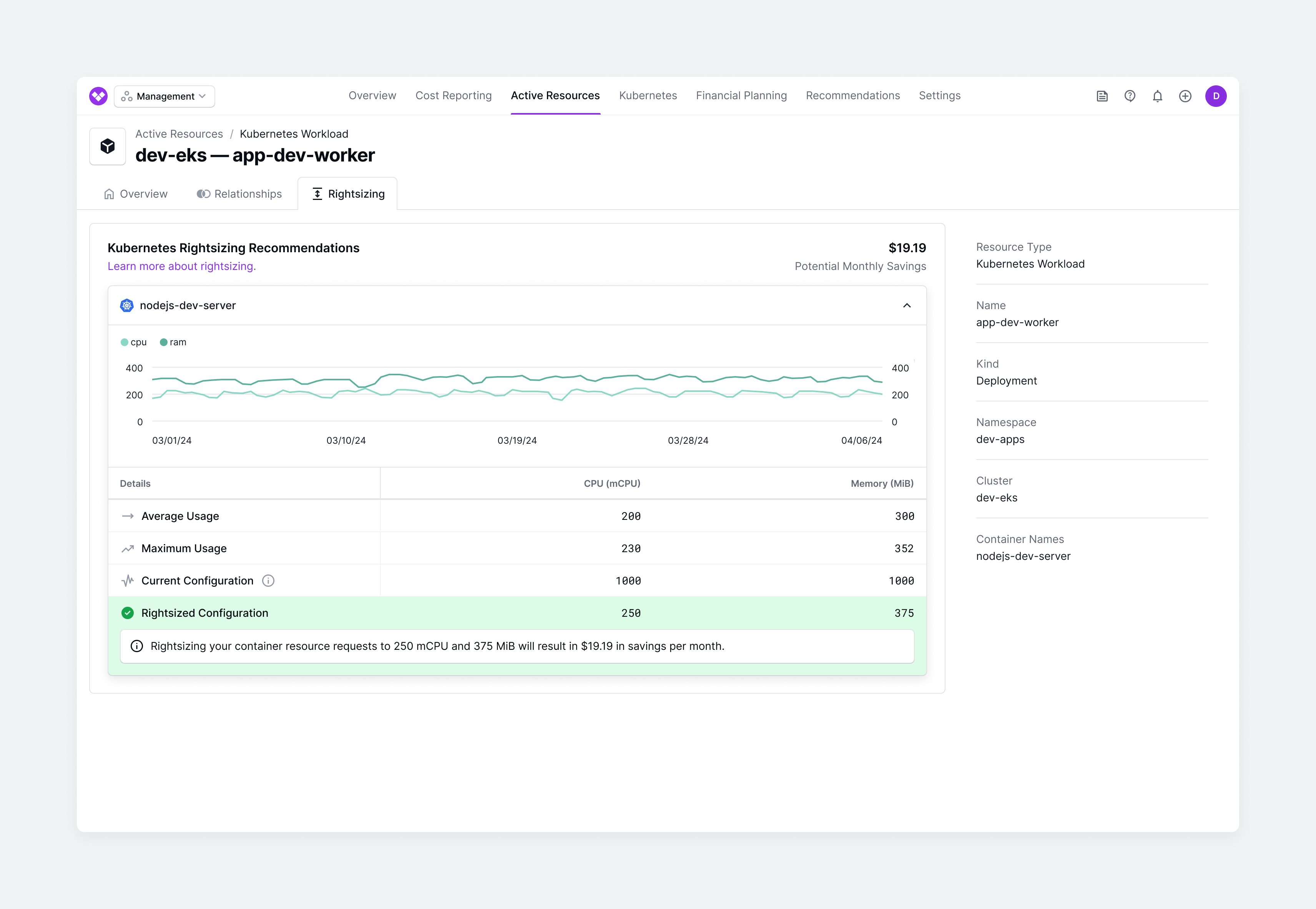 If a container shows zero CPU and memory usage over the lookback period, Vantage displays the message: "This container appears to be unused. Decommissioning it will result in \$X in savings per pod per hour." This indicates that the container's resource requests are allocated but no usage has been recorded. Consider verifying whether the container is still needed before decommissioning.
#### How Vantage Calculates Kubernetes Rightsizing Recommendations
Vantage takes the following steps to calculate Kubernetes rightsizing recommendations.
* Controllers running below an efficiency level of 80% over the last 30 days are identified.
* Efficiency is calculated as the percentage of the average CPU or memory utilization divided by the amount allocated for that resource.
* CPU usage is determined using `container_cpu_usage_seconds_total`, converted from CPU seconds to cores using $\frac{(\text{current} - \text{previous})}{\text{elapsed}}$.
* Memory usage is determined using `container_memory_working_set_bytes`.
* The Vantage agent scrapes metrics at scheduled intervals based on your `pollingInterval` (default to 60 seconds), whereas Prometheus defaults to a 15-second interval. This can smooth out short-term resource usage spikes.
* The agent reports on an hourly interval, capturing three values—average, min, and max—for both CPU and memory:
* **Average:** $\frac{\sum \text{datapoints}}{\text{count(datapoints)}}$
* **CPU (Average):** $\text{avg\_over\_time}(\text{irate}(\text{container\_cpu\_usage\_seconds\_total[1m]})[1h])$
* **Memory (Average):** $\text{avg\_over\_time}(\text{container\_memory\_working\_set\_bytes[1h]})$
* **Min:** $\min(\text{datapoints})$
* **CPU (Min):** $\text{min\_over\_time}(\text{irate}(\text{container\_cpu\_usage\_seconds\_total[1m]})[1h])$
* **Memory (Min):** $\text{min\_over\_time}(\text{container\_memory\_working\_set\_bytes[1h]})$
* **Max:** $\max(\text{datapoints})$
* **CPU (Max):** $\text{max\_over\_time}(\text{irate}(\text{container\_cpu\_usage\_seconds\_total[1m]})[1h])$
* **Memory (Max):** $\text{max\_over\_time}(\text{container\_memory\_working\_set\_bytes[1h]})$
* The lookback period for recommendations is 30 days, aggregating data by workload controller (e.g., Deployment).
* The target amount is calculated by dividing the average usage by the efficiency target of 80%. For example, if your average usage is 100, and the efficiency target is 80%, then Vantage determines the right size to be $\frac{100}{.8}$, or $125$.
* This target amount might exceed the maximum observed usage, which is acceptable to provide room for potential spikes in resource usage. This also prevents containers from being terminated due to resource exhaustion.
* The following values are produced for each container within a workload over the lookback period:
* `avg`: The average usage across all pods of a workload.
* `min`: The average minimum usage across all pods (not the absolute minimum).
* `max`: The average maximum usage across all pods (not the absolute maximum).
* For memory, the average memory value is the average of all recorded average memory usage values over the lookback period. The max memory value is the average of all recorded max memory usage values.
* Every minute, the agent queries node metrics from the Kubernetes control plane, tracking both the total memory used and the highest recorded memory usage. These values are then aggregated over the hour.
* A similar methodology is used for CPU, where `container_cpu_usage_seconds_total` is used to track CPU usage per second, and averages/max values are derived accordingly.
* Savings is the difference between current configuration and target configuration multiplied by a standard hourly base rate.
* For Deployments and StatefulSets, these savings are further multiplied by the number of replicas configured for each controller.
* The calculated amount of savings must be at least \$5 to be considered for rightsizing recommendations.
If you make a configuration change to a pod, the Vantage Kubernetes agent will upload the new configuration for the pod within the hour that it is available. Vantage reruns recommendations once the next Kubernetes ingestion is processed, which is every 24 hours.
If a container shows zero CPU and memory usage over the lookback period, Vantage displays the message: "This container appears to be unused. Decommissioning it will result in \$X in savings per pod per hour." This indicates that the container's resource requests are allocated but no usage has been recorded. Consider verifying whether the container is still needed before decommissioning.
#### How Vantage Calculates Kubernetes Rightsizing Recommendations
Vantage takes the following steps to calculate Kubernetes rightsizing recommendations.
* Controllers running below an efficiency level of 80% over the last 30 days are identified.
* Efficiency is calculated as the percentage of the average CPU or memory utilization divided by the amount allocated for that resource.
* CPU usage is determined using `container_cpu_usage_seconds_total`, converted from CPU seconds to cores using $\frac{(\text{current} - \text{previous})}{\text{elapsed}}$.
* Memory usage is determined using `container_memory_working_set_bytes`.
* The Vantage agent scrapes metrics at scheduled intervals based on your `pollingInterval` (default to 60 seconds), whereas Prometheus defaults to a 15-second interval. This can smooth out short-term resource usage spikes.
* The agent reports on an hourly interval, capturing three values—average, min, and max—for both CPU and memory:
* **Average:** $\frac{\sum \text{datapoints}}{\text{count(datapoints)}}$
* **CPU (Average):** $\text{avg\_over\_time}(\text{irate}(\text{container\_cpu\_usage\_seconds\_total[1m]})[1h])$
* **Memory (Average):** $\text{avg\_over\_time}(\text{container\_memory\_working\_set\_bytes[1h]})$
* **Min:** $\min(\text{datapoints})$
* **CPU (Min):** $\text{min\_over\_time}(\text{irate}(\text{container\_cpu\_usage\_seconds\_total[1m]})[1h])$
* **Memory (Min):** $\text{min\_over\_time}(\text{container\_memory\_working\_set\_bytes[1h]})$
* **Max:** $\max(\text{datapoints})$
* **CPU (Max):** $\text{max\_over\_time}(\text{irate}(\text{container\_cpu\_usage\_seconds\_total[1m]})[1h])$
* **Memory (Max):** $\text{max\_over\_time}(\text{container\_memory\_working\_set\_bytes[1h]})$
* The lookback period for recommendations is 30 days, aggregating data by workload controller (e.g., Deployment).
* The target amount is calculated by dividing the average usage by the efficiency target of 80%. For example, if your average usage is 100, and the efficiency target is 80%, then Vantage determines the right size to be $\frac{100}{.8}$, or $125$.
* This target amount might exceed the maximum observed usage, which is acceptable to provide room for potential spikes in resource usage. This also prevents containers from being terminated due to resource exhaustion.
* The following values are produced for each container within a workload over the lookback period:
* `avg`: The average usage across all pods of a workload.
* `min`: The average minimum usage across all pods (not the absolute minimum).
* `max`: The average maximum usage across all pods (not the absolute maximum).
* For memory, the average memory value is the average of all recorded average memory usage values over the lookback period. The max memory value is the average of all recorded max memory usage values.
* Every minute, the agent queries node metrics from the Kubernetes control plane, tracking both the total memory used and the highest recorded memory usage. These values are then aggregated over the hour.
* A similar methodology is used for CPU, where `container_cpu_usage_seconds_total` is used to track CPU usage per second, and averages/max values are derived accordingly.
* Savings is the difference between current configuration and target configuration multiplied by a standard hourly base rate.
* For Deployments and StatefulSets, these savings are further multiplied by the number of replicas configured for each controller.
* The calculated amount of savings must be at least \$5 to be considered for rightsizing recommendations.
If you make a configuration change to a pod, the Vantage Kubernetes agent will upload the new configuration for the pod within the hour that it is available. Vantage reruns recommendations once the next Kubernetes ingestion is processed, which is every 24 hours.