> ## Documentation Index
> Fetch the complete documentation index at: https://docs.vantage.sh/llms.txt
> Use this file to discover all available pages before exploring further.
# Anomaly Detection
> Detect and alert on unusual cloud cost spikes with Vantage's machine learning–powered anomaly detection.
Cost anomalies notify teams of unexpected daily cost spikes so engineers can fix misconfigurations or runaway workloads before they become expensive. Vantage automatically detects anomalies on every [Cost Report](/cost_reports) and lets you send alerts via email, Slack, Microsoft Teams, or Jira.
Anomaly Detection is one of several ways Vantage notifies you about cost changes. For a side-by-side comparison with [Cost Alerts](/cost_alerts), [Report Notifications](/report_notifications), [Budget Alerts](/budgets#budget-alerts), and the [FinOps Agent](/vantage_finops_agent), see [Anomaly Detection vs. Other Alert Types](#anomaly-detection-vs-other-alert-types).
## How Anomaly Detection Works
Anomaly detection runs on every Cost Report in your account. For each report, Vantage:
1. Groups the report's filtered cost data into time series by **provider**, **service**, and **cost category** (for example, **AWS > Amazon EC2 > Data Transfer** or **Azure > Virtual Machines > Compute**).
2. Trains a machine learning forecast on each series using up to the most recent **6 months** of daily cost data for that report. (Newer accounts train on whatever history is available. Each series needs more than 12 days of data before it can be evaluated.)
3. Flags days where the actual cost exceeds the forecast's upper bound as candidate anomalies.
4. Applies noise filters to remove tiny or expected fluctuations (see [Noise Filters Applied to Candidates](#noise-filters-applied-to-candidates)).
5. Records each surviving anomaly on the Cost Report and, when configured, sends an external notification the first time the anomaly's trend exceeds your Alert Threshold.
```mermaid theme={null}
flowchart TD
Report[Cost Report's
filtered daily costs]
Report --> Series["Group by series:
provider × service ×
cost category"]
Series --> Forecast["ML forecast on
up to 6 months"]
Forecast --> Upper{"Day exceeds
forecast upper bound?"}
Upper -->|No| Normal[Not an anomaly]
Upper -->|Yes| Filters{"Passes all
noise filters?"}
Filters -->|No| Suppressed[Suppressed]
Filters -->|Yes| Record[Anomaly recorded]
```
See [What Counts as an Anomaly](#what-counts-as-an-anomaly) for the exclusion and noise-filter rules.
To get started with cost anomaly detection and alerts, you can also view a video demo on [Vantage University](/vantage_university_observability) .
## What Counts as an Anomaly
Two things determine whether a daily cost spike becomes a recorded anomaly: whether the underlying line item is in scope for detection at all, and whether the candidate survives Vantage's noise filters. Both rules are intentional and uniform across all accounts to keep the anomalies list actionable rather than noisy.
### Excluded from Detection
To keep the model focused on usage signals, Vantage excludes a few categories of line items from detection entirely:
| Excluded | Why | Matched by |
| ------------------------------------------------------------------------ | ----------------------------------------------------------------------- | -------------------------------------------------------------------------------------------------------------------- |
| Marketplace charges across AWS, Azure, and GCP | Marketplace purchases are not usage-driven and would skew the forecast. | The `AWS Marketplace` and `Marketplace` category labels. |
| Datadog commitment line items | These are flat, predictable charges that obscure usage spikes. | The Datadog `Commitment` cost subcategory. |
| Reservation and Savings Plan fees, upfront purchases, and amortized fees | These are commitment-driven charges rather than usage signals. | The `Purchase`, `SavingsPlanRecurringFee`, `SavingsPlanUpfrontFee`, `Fee`, `RIFee`, and `AmortizedFee` charge types. |
Detection uses the same cost amount the report displays, with the excluded fee types above removed. Discounts, credits, refunds, tax, and amortization all follow the report's settings.
### Noise Filters Applied to Candidates
After the model identifies a candidate anomaly (a day where cost exceeds the forecast's upper bound), Vantage applies several noise filters before recording it:
| Filter | A candidate is suppressed when... |
| --------------------------- | ----------------------------------------------------------------------------------------------------------------------------------------------------------------------------------------------------------------------------- |
| Static floor | The cost on the anomalous day is below **\$5**. |
| Report-level threshold | The cost on the anomalous day is below **0.5%** of the report's total daily cost. The threshold scales with the report's size, so the same dollar increase that surfaces on a narrow report may be suppressed on a broad one. |
| Recent average | The cost on the anomalous day is **not more than 20% above** the trailing 7-day average for that series (a series gradually trending up will not be flagged). |
| Not increasing day-over-day | The cost on the anomalous day is **not greater** than the previous day. |
| Back-to-back suppression | Another anomaly was already detected for the same (provider, service, cost category) series in the **previous 7 days**. |
| Insufficient history | The series has **12 days or fewer** of data in the training window. |
These filters mean that the same underlying cost spike can surface as an anomaly on a narrower Cost Report and be suppressed on a broader one. See the [FAQ](#frequently-asked-questions) for examples.
## Anomaly Detection vs. Other Alert Types
Vantage offers several ways to notify you about cost changes. Choose based on whether you want unsupervised outlier detection, fixed thresholds, or scheduled summaries.
| Feature | What it does | When it fires | Best for |
| --------------------------------------------- | ---------------------------------------------------------------------------------------------------------------------------------------- | ----------------------------------------------------------------------------------------------- | ------------------------------------------------------------------------------------------------------ |
| **Cost Anomaly Alerts** | ML forecast per provider, service, and cost category on a Cost Report; flags days that exceed the forecast's upper bound. | After Vantage refreshes the report and detects the anomaly. | Catching unexpected, single-day spikes you didn't know to set a threshold for. |
| [Cost Alerts](/cost_alerts) | Fixed-threshold comparisons (day-over-day, week-over-week, month-over-month, quarter-over-quarter) per binned grouping on a Cost Report. | Whenever a grouping crosses your configured % or \$ threshold. | Gradual ramps, recurring patterns, or any case where you know the exact threshold you want to monitor. |
| [Report Notifications](/report_notifications) | Scheduled digests of Cost Reports or dashboards. | Daily, weekly, or monthly on a fixed schedule. | Routine spend reviews regardless of whether anything is anomalous. |
| [Budget Alerts](/budgets#budget-alerts) | Notify when a percentage of a budget is reached for a designated period. | When actual spend crosses the configured percentage. | Tracking spend against a target. |
| [FinOps Agent](/vantage_finops_agent) | On-demand AI investigation of a specific anomaly, cost report, or question. | When you trigger it (for example, by clicking **Investigate Anomaly** in a Slack notification). | Root-causing an alert after it fires, not scheduled detection. |
For a complete delivery matrix (which alert types support which channels), see [Alert Notifications](#alert-notifications) below.
## View Cost Anomalies
To view cost anomalies for a Cost Report, navigate to that report and select the **Anomalies** tab on the top left of the report.
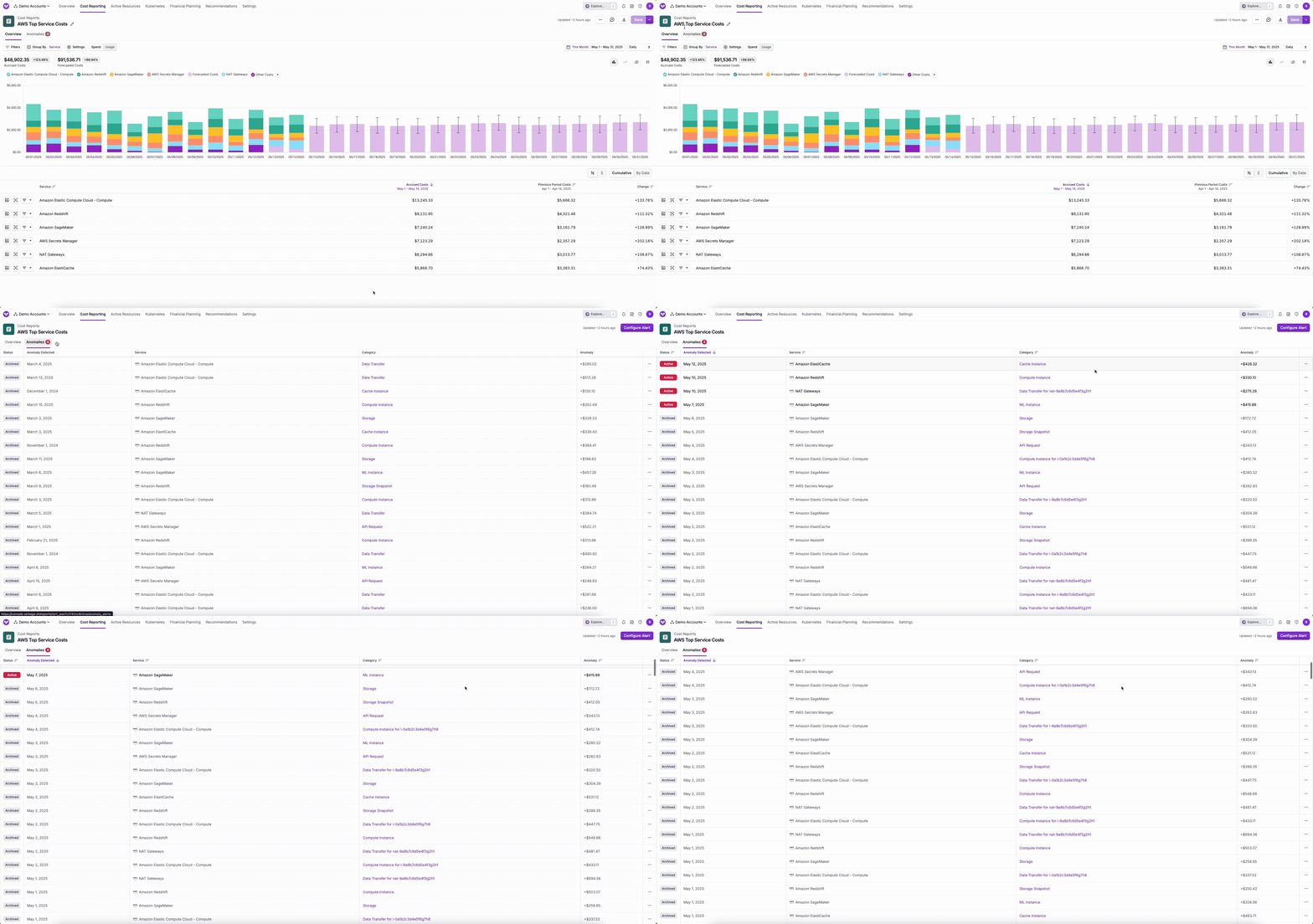
Anomalies are considered **Active** for the first 7 days after they occur. Once that window passes, they automatically move to an **Archived** state. Historical anomalies remain visible in the Cost Report.
The **Anomaly Detected** column shows the date the cost anomaly occurred. Alerts are sent **only the first time** a given anomaly is detected. If the same (provider, service, cost category) series remains elevated for several days, you will not receive duplicate alerts in that window.
## Take Action on an Anomaly
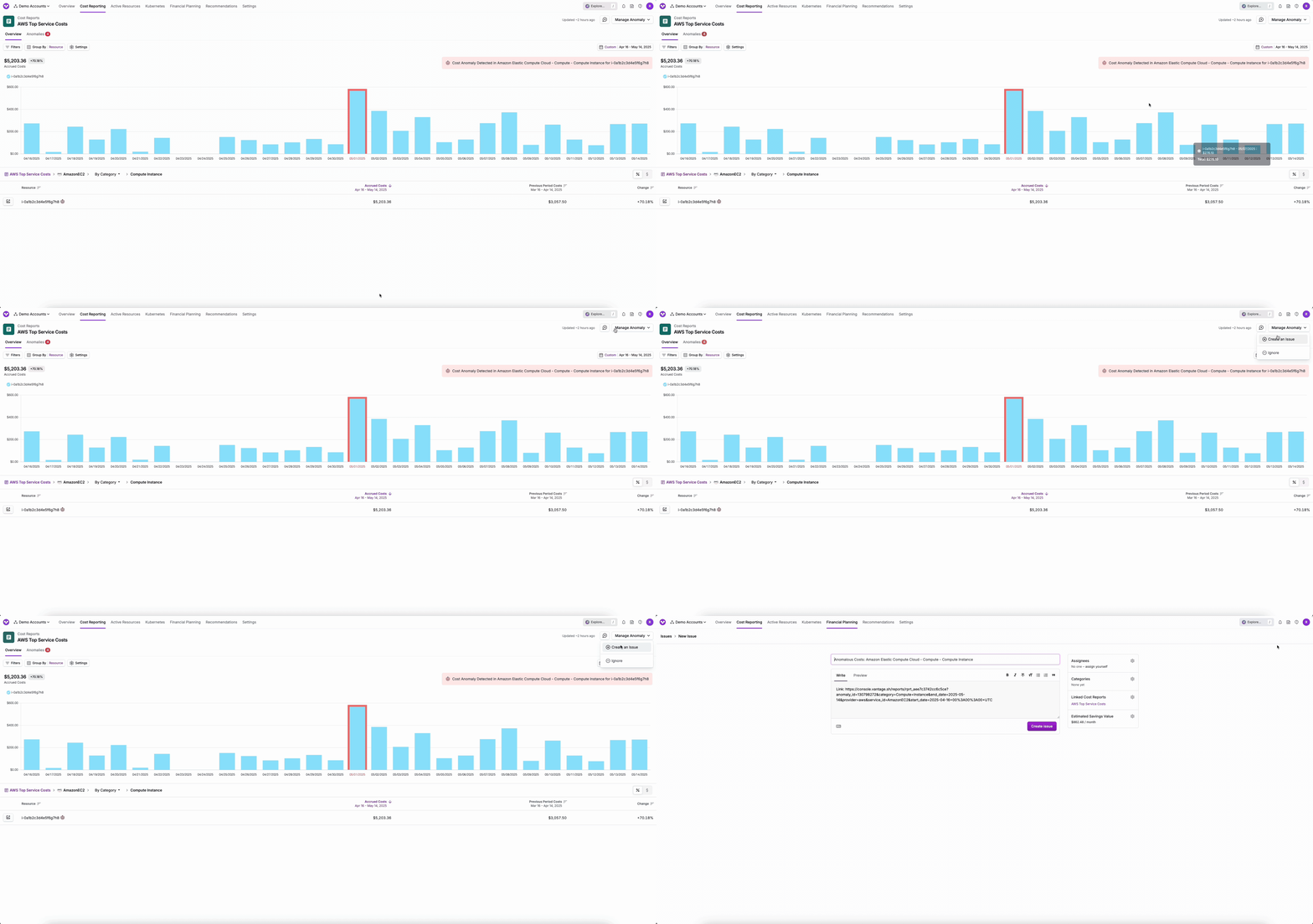
From the **Anomalies** tab, click the link in the **Category** column to open the anomaly in its Cost Report.
The bar for the anomalous day is visually highlighted. Hover over it to view details. If Vantage identified a single resource as the likely cause, the resource is shown alongside the anomaly category (for example, *Compute for production-cluster*). When the Cost Report is grouped so that the attributed resource appears as a row, that row is also marked. In the top right of the report header, click **Manage Anomaly**.
Select one of the following actions:
* **Create an Issue**: Open a new [issue](/issues) pre-populated with a link back to this Cost Report and anomaly. Assign it to yourself or a teammate.
* **Mark as Archived**: Move the anomaly out of the Active list.
* **Ignore**: Remove the anomaly from the list entirely. You can provide optional feedback about why you ignored it.
**Ignoring, archiving, or creating an issue for an anomaly does not train, tune, or suppress the detection model.** The model has no feedback loop from these actions. Detection always re-runs on the report's filtered cost data within the last 6 months, with the excluded charge types and categories listed above removed.
### Resource Attribution
Vantage attempts to identify the resource responsible for an anomaly. When one is identified, the resource is appended to the anomaly's category (for example, *Compute for production-cluster*) and, if the Cost Report is grouped so that the resource appears as a row, that row is also marked. Attribution is best-effort:
* Vantage attributes **at most one** resource per anomaly. The resource is selected when a single resource accounts for **more than 50%** of the cost change in the affected (provider, service, cost category) series.
* When no single resource exceeds the 50% threshold, no resource is attributed. The anomaly may instead be caused by multiple resources, by a category without resource-level granularity, or by a provider that does not expose per-resource identifiers.
* When a resource is attributed, it is a directional starting point for investigation rather than a definitive root cause. Inspect groupings and drilldowns on the Cost Report to confirm.
## Configure Cost Anomaly Alerts
Anomaly alerts can be delivered to email, Slack, Microsoft Teams, and Jira. To use Slack, Teams, or Jira, first configure the [Slack](/slack), [Microsoft Teams](/microsoft_teams), or [Jira](/jira) integration. (Slack and Microsoft Teams are mutually exclusive: you can connect one or the other, not both.)
To receive alerts for any detected cost anomalies on a Cost Report:
From the top of the **Anomalies** tab on a Cost Report, click **Configure Alert**.
Select email recipients from your Vantage users.
Enter an **Alert Threshold** (dollar amount). See [Understanding the Alert Threshold](#understanding-the-alert-threshold) below.
**(Optional)** If you have Slack, Microsoft Teams, or Jira configured, select channels or a Jira project in the corresponding fields.
Click **Save**.
To change recipients or the threshold, click **Configure Alert** again and update the settings.
At this time, you cannot configure an anomaly alert for a specific [resource](/active_resources). To monitor a particular workload, create a Cost Report filtered to its tag, account, region, or service and configure an alert on that report.
### Understanding the Alert Threshold
The **Alert Threshold** is a notification threshold, not a detection sensitivity. It does not change which anomalies Vantage detects. It only controls which detected anomalies are sent externally.
Vantage compares the threshold against an anomaly's **trend** value, where:
```
trend = anomaly amount − trailing 7-day average for that series
```
If `trend >= threshold`, the alert is delivered to the configured recipients. Anomalies below the threshold are still recorded on the **Anomalies** tab. They just don't fire an external notification.
Two threshold behaviors to be aware of:
* **A blank Alert Threshold has no filtering effect.** If you leave the field empty when you configure an alert, Vantage sends a notification for **every** detected anomaly with a positive trend, which can result in a high volume of alerts on a busy Cost Report. Enter a dollar amount that represents a deviation worth acting on.
* **Lowering the threshold afterward does not backfill notifications.** The threshold is evaluated when an anomaly is first processed for alerting. Anomalies that were already evaluated and skipped will not be sent if you later lower the threshold. Only newly detected anomalies are compared against the updated value.
## Alert Notifications
When an anomaly fires above your Alert Threshold, Vantage sends a single notification per delivery channel. Notifications include the report title, the affected service and cost category, and the trend amount. Notifications also display amounts in your workspace's configured [currency](/vantage_account#currency-conversion).
### Delivery Channels
Cost Anomaly Alerts support email, Slack, Microsoft Teams, and Jira. The matrix below also covers the other Vantage alert types so you can quickly compare.
| Alert Type | Email | Slack | Microsoft Teams | Jira | Configured From |
| ------------------------------------------------------------------------------- | :---: | :---: | :-------------: | :--: | -------------------------------------------------------------------------------------------------------------------------------------------------- |
| [Cost Anomaly Alerts](/cost_anomaly_alerts) | Yes | Yes | Yes | Yes | A Cost Report's **Anomalies** tab > **Configure Alert** |
| [Cost Alerts](/cost_alerts) | Yes | Yes | Yes | Yes | A Cost Report's **...** menu > **Create Cost Alert**, or **Notifications** > **Cost Alerts** > **Configure Cost Alert** |
| [Budget Alerts](/budgets#budget-alerts) | Yes | Yes | Yes | Yes | A Budget's **Manage** tab > **Manage Alerts** > **Configure Alert** |
| [Report Notifications](/report_notifications) (Cost Reports) | Yes | Yes | Yes | — | The **Notifications** page > **New Notification** > **Cost Report Notification**, or a Cost Report's **...** menu > **Create Report Notification** |
| [Dashboard Notifications](/report_notifications#set-up-dashboard-notifications) | Yes | — | — | — | The **Notifications** page > **New Notification** > **Dashboard Notification** |
Slack and Microsoft Teams are mutually exclusive at the integration level: you can connect either Slack or Microsoft Teams, not both. See the [Slack](/slack) and [Microsoft Teams](/microsoft_teams) integration docs for setup. Jira delivery requires the [Jira integration](/jira).
### Detected On vs. Occurred On
Slack notifications surface two dates:
* **Occurred On**: the date the costs were accrued in your cloud provider.
* **Detected On**: the date Vantage detected the anomaly.
These dates can differ when:
* The cloud provider released or updated the billing data for **Occurred On** after the fact. Some providers refine the previous day's data over the next 24–48 hours.
* A series only became anomalous once additional history filled in around it. The model evaluates each day in the context of the surrounding days; a spike on day N may not look anomalous until day N+2's data is available.
If a Slack alert arrives several days after the Occurred On date, that's almost always one of the two scenarios above rather than a delivery delay.
## Investigate Anomalies with the FinOps Agent
If the [FinOps Agent](/vantage_finops_agent) is enabled for your account, anomaly notifications sent to Slack include an **Investigate Anomaly** button. Clicking it starts a guided investigation: the Agent fetches the anomaly, queries the surrounding daily costs, gathers resource details, and posts a structured summary back in the Slack thread.
Vantage Slack notifications also include the report token and anomaly tokens as metadata, so the Agent has full context when responding to follow-up questions in the same thread. See [Investigate Cost Anomalies](/vantage_finops_agent#investigate-cost-anomalies) for details.
## Frequently Asked Questions
The default All Resources Cost Report covers your full account spend. The detector's [report-level noise threshold](#what-counts-as-an-anomaly) is **0.5% of the report's total daily cost**, which means a service-level spike that is significant on its own can fall below the threshold once it's compared to your entire daily cloud bill.
If you want anomaly coverage for a specific provider, service, tag, account, or team, create a narrower Cost Report scoped to those filters and configure an alert on that report. Each report runs its own detection, so the same spike that's suppressed on All Resources can surface on a focused report.
A few reasons a narrow Cost Report can fail to flag a spike that looks obvious by eye:
* **The series has limited history in the report's scope:** Each (provider, service, cost category) series needs more than 12 days of data within the report's 6-month training window to be evaluated.
* **Prior spikes have widened the forecast's upper bound:** If the same series spiked previously, the forecast's upper bound is wider in response to that volatility, so a new spike of similar size can fall inside the widened range without being flagged. Recurring monthly or quarterly spikes can become "expected" to the model.
* **One of the [noise filters](#what-counts-as-an-anomaly) suppressed it:** Most commonly, the new value is not more than 20% above the trailing 7-day average, the day-over-day change wasn't positive, or another anomaly was already detected in the previous 7 days.
If you believe a real anomaly is being missed, [contact support](mailto:support@vantage.sh) with the report token and the affected date.
Anomaly Detection is built around **daily outliers**. If costs ramp up smoothly over weeks or months without any single day standing out, no day on its own is anomalous and the detector does not flag the trend.
For gradual ramps and sustained growth, [Cost Alerts](/cost_alerts) are the right tool. Cost Alerts let you compare day-over-day, week-over-week, month-over-month, or quarter-over-quarter changes against a percentage or dollar threshold you choose.
The anomaly amount is the net cost change **within the Cost Report's filters**. A spike that contributes \$3,000 to one report can contribute \$8 to another report whose filters exclude most of the underlying costs. Both numbers are correct for their respective scope.
If you follow an anomaly link and the amount looks unexpected, check whether you're viewing it on the report it was detected on or on a different report. Anomalies are scoped to the report that detected them.
Anomaly detection is not perfectly deterministic. Detection runs on its own schedule per Cost Report, and two runs that fall on different days see slightly different cost windows—one extra day at the end and one fewer day at the start—which can shift what each run considers anomalous.
For two workspaces with the same integrations, expect minor day-by-day differences in counts. The underlying anomalies surface in both reports over time.
Each anomaly is evaluated in isolation against your Alert Threshold. Vantage does not sum across consecutive days. If a \$60 anomaly is detected on day 1 with a \$100 threshold, no alert fires. If costs continue to climb on day 2, back-to-back suppression typically prevents a new anomaly from being detected in the same series for 7 days.
For threshold-based monitoring of sustained cost growth, use [Cost Alerts](/cost_alerts) with a comparison interval (day-over-day, week-over-week, month-over-month, or quarter-over-quarter).
The Alert Threshold is evaluated when an anomaly is first processed for alerting. Once a detected anomaly has been evaluated against the threshold—even if it was below the threshold and no notification was sent—it is marked as processed and will not be re-evaluated.
Lowering the threshold only affects anomalies that are **newly detected** after the change. To monitor sustained cost growth that may have already been detected, use a [Cost Alert](/cost_alerts) with a comparison interval instead.
No. The detection model has no feedback loop from these actions. Ignoring or archiving an anomaly only changes what you see on the **Anomalies** tab; the model will still evaluate the same (provider, service, cost category) series with the same logic the next time detection runs.
A series's recent variance directly affects how wide the forecast's expected range is. When the same series has spiked repeatedly at a similar magnitude, the forecast's upper bound widens to reflect that variability, and a new spike of similar size can fall inside the wider range without being flagged as an outlier.
If you want to monitor a recurring increase regardless of whether the model considers it expected, use a [Cost Alert](/cost_alerts) with a month-over-month threshold.
Anomaly detection trains on up to the most recent **6 months** of the Cost Report's filtered data, regardless of how much history you have imported. Newer accounts train on whatever is available, and each (provider, service, cost category) series needs more than 12 days of data to be evaluated.
Vantage preserves anomaly history within your account's cost retention window so older anomalies remain searchable on the Cost Report. Two cleanup rules apply:
* **Recent anomalies that are no longer detected are removed.** When detection re-runs, anomalies from roughly the last 3 months that are no longer present in the report's data (for example, after a backfill correction or filter change) are deleted. Older anomalies are preserved as history.
* **Anomalies past your account's cost retention window are deleted.** Anything outside the retention window is removed during cleanup.
## Troubleshooting
A few common causes:
* **The spike is suppressed by a [noise filter](#what-counts-as-an-anomaly):** Most commonly, the spike is below \$5, below 0.5% of the report's total daily cost, or not more than 20% above the trailing 7-day average for that series.
* **The series doesn't have enough history:** A series needs more than 12 days of data within the 6-month training window before it is evaluated.
* **The report is broad and the spike is small relative to the total.** Create a narrower Cost Report scoped to the affected provider, service, tag, or account, and check the Anomalies tab on that report.
* **The series is already volatile:** Past spikes or high variance widen the forecast's expected range, so a new spike can fall inside the wider range and not register as an outlier.
In Slack, compare the **Detected On** and **Occurred On** dates in the notification (see [Detected On vs. Occurred On](#detected-on-vs-occurred-on) for why they can differ). Microsoft Teams notifications show a single date, so this comparison isn't available there. In both cases, the delay is most often caused by the underlying provider releasing or updating billing data after the fact, or by a series only becoming anomalous once additional surrounding days were available to evaluate.
If you believe the delay is not explained by either case, [contact support](mailto:support@vantage.sh) with the report token, anomaly date, and the date the alert was received.
Vantage attributes at most one resource per anomaly, and only when that resource accounts for more than 50% of the cost change in the affected (provider, service, cost category) series. When multiple resources contribute, or when the cost category contains resources moving in opposite directions, the heuristic can attribute a misleading resource (or none).
Treat the attributed resource as a starting point. Use the Cost Report's groupings and drilldowns (for example, group by resource ID, region, or a tag) to confirm what actually drove the spike.
Anomalies are point-in-time records. The link can become stale when:
* The Cost Report's filters were changed after the anomaly was detected.
* A [Virtual Tag](/tagging) that the report depends on was updated.
* The underlying provider data was reprocessed or corrected.
The anomaly was valid at the time it was detected. To investigate a current spike, open the Cost Report directly and inspect the relevant date range.
The alert amount is the anomaly's **trend** value: the cost on the anomalous day minus the trailing 7-day average for that series. It is not the day-over-day delta and it is not the total cost for the day. Use it as a measure of how much the day deviated from recent normal, not as the spike's absolute size.
If you want to monitor the day-over-day or week-over-week dollar increase directly, use a [Cost Alert](/cost_alerts) instead.