> ## Documentation Index
> Fetch the complete documentation index at: https://docs.vantage.sh/llms.txt
> Use this file to discover all available pages before exploring further.
# Vercel
> Learn how to integrate Vantage with Vercel.
Vantage connects to Vercel through a Vercel Community Integration to ingest cost and usage data. Vantage retrieves data using the Vercel [FOCUS Billing Charges API](https://docs.vercel.com/docs/rest-api/reference/endpoints/billing/list-focus-billing-charges) and [FOCUS Contract Commitments API](https://docs.vercel.com/docs/rest-api/reference/endpoints/billing/list-focus-contract-commitments), allowing you to track costs across Vercel services such as Functions, Delivery Network, and Observability. [Usage data](/usage_based_reporting) is available for Vercel, measured in units such as Gigabytes, Events, and Invocations, depending on the service.
The Vercel integration requires a Vercel [Enterprise](https://vercel.com/docs/plans/enterprise) or [Pro](https://vercel.com/docs/plans/pro) plan. The [Billing Role](https://vercel.com/docs/rbac/access-roles#billing-role) needed to install the integration is only available on these plans. Accounts with the [Owner role](https://vercel.com/docs/rbac/access-roles#owner-role) can also install the integration.
## Vercel Permissions
The Vantage application uses the `read:billing` scope and cannot deploy, modify, or delete projects, settings, or resources in Vercel. The integration requires the following permissions:
* **Read**
* Installation
* Team
* User
* Billing
* Projects
* **Read and Write**
* Integration Resources
For more information on integration permissions, see the [Vercel documentation](https://vercel.com/docs/integrations/install-an-integration/manage-integrations-reference).
## Connect Your Vercel Account
### Prerequisites
* You must have the [Owner role](https://vercel.com/docs/rbac/access-roles#owner-role) or [Billing role](https://vercel.com/docs/rbac/access-roles#billing-role) in Vercel to install the Vantage community integration.
* Your Vercel account must be on an [Enterprise](https://vercel.com/docs/plans/enterprise) or [Pro](https://vercel.com/docs/plans/pro) plan.
* You must have a Vantage **Organization Owner** or **Integration Owner** role to add or remove this integration. See the [Role-Based Access Control](/rbac) documentation for details.
* [Create a free Vantage account](https://console.vantage.sh/signup), then follow the steps below to integrate Vercel costs.
### Create the Connection
From the top navigation in Vantage, click **Settings**.
On the left navigation, select **Integrations** > **Vercel**.
The Vercel integrations page is displayed. Ensure you are on the **Connect** tab.
At the bottom of the page, click **Connect with Vercel**.
The Vercel integration page opens in a new window. Click **Connect Account**.
* Select a Vercel team to install the integration on.
* Select all or specific projects.
* Review the permissions and click **Connect Account** to authorize the integration.
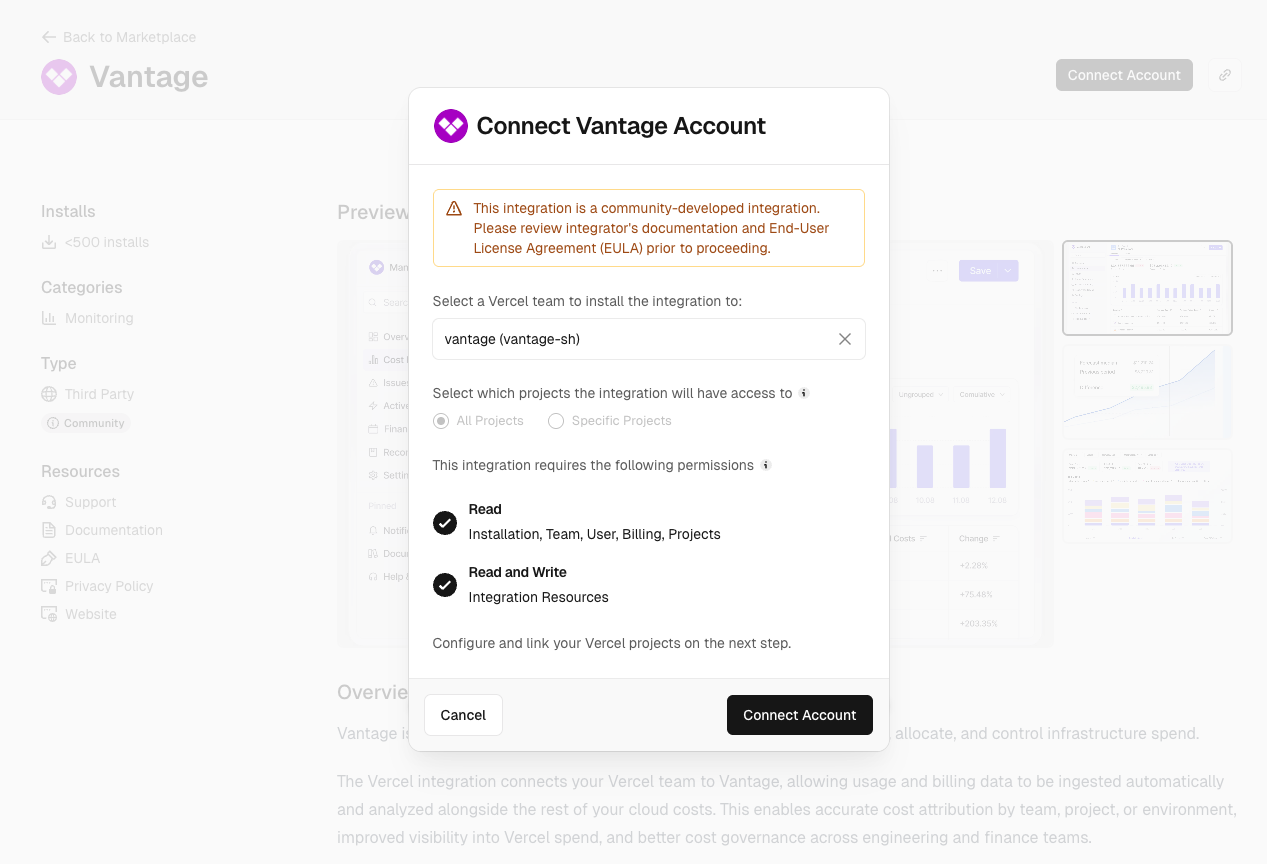
Once complete, you can return to the Vantage console.
After completing the authorization, you will see the status of your integration change to **Importing** within the Vantage console. This status indicates that Vantage is actively importing your Vercel cost data. Vercel provides up to one year of historical data through the Billing APIs, and Vantage will ingest this data and retain it to match your retention period. See the [Integration Status](/vantage_account#integration-status) documentation for details on integration statuses.
As soon as costs are processed, they will be available on your **All Resources** Cost Report. If you decide to remove your Vercel integration from Vantage, all costs associated with that community integration will be removed from the Vantage console.
### Next Steps - Manage Workspace Access
Once the import is complete and the integration status changes to **Stable**, you can select which workspaces this integration is associated with. See the [Workspaces](/workspaces#manage-workspace-provider-integrations) documentation for information.
### Edit Project Access
You can specify which projects to include in a team's integration via Vercel's Manage Access UI. To add or remove specific projects:
In the top navigation of your Vercel dashboard, select **Integrations**.
Select the Vantage integration.
On the top right, click **Manage Access**.
Edit the projects the integration has access to and click **Save**.
## Data Refresh
See the [provider data refresh documentation](/provider_data_refresh) for information on when data for each provider refreshes in Vantage.
## Vercel Reporting Dimensions
On Vercel [Cost Reports](/cost_reports), you can filter and group across several dimensions:
* Billing Account (Team)
* Account (Project ID)
* Service (e.g., Vercel Functions, Delivery Network, Observability)
* Category (e.g., Function Invocations)
* Charge Type (e.g., Usage)
* Region (e.g., `iad1`)
* Tags: Includes [Virtual Tags](/tagging) created in Vantage for this provider. The following provider tags are automatically created by Vantage from Vercel data and are available for filtering and grouping:
* `vercel:region_name`: The human-readable region name (e.g., Washington, D.C., USA), allowing you to filter and group costs by region name.
* `vercel:ProjectName`: The Vercel project name, allowing you to filter and group costs by project.
## Vercel Commitments
If your Vercel account has contract commitments (typically associated with Enterprise plans), Vantage will automatically sync these commitments and display them on the [Commitments](/commitments) screen. Vercel commitments are synced daily and include details such as the commitment amount, term, purchase date, and expiration date.
## Active Resources
At this time, there are no active resources for Vercel within Vantage. Vercel billing data is exposed on a project/service basis and not on a per-resource basis.