> ## Documentation Index
> Fetch the complete documentation index at: https://docs.vantage.sh/llms.txt
> Use this file to discover all available pages before exploring further.
# Grafana Cloud
> Learn how to integrate Vantage with Grafana Cloud.
Vantage connects to your Grafana Cloud account via a customer-generated read-only token attached to a cloud access policy, which allows Vantage to ingest Grafana Cloud usage costs. Vantage displays Grafana Cloud costs and associated [usage metrics](/usage_based_reporting), like GB of Traces, Log Retention GB-Month, or number of Incident Response and Management Users, directly in line with other infrastructure costs.
You can integrate multiple Grafana Cloud integrations by providing read-only tokens for multiple organizations.
## Connect Your Grafana Cloud Account
### Prerequisites
* You must have a Vantage **Organization Owner** or **Integration Owner** role to add or remove this integration. See the [Role-Based Access Control](/rbac) documentation for details.
* [Create a free Vantage account](https://console.vantage.sh/signup), then follow the steps below to integrate Grafana Cloud costs.
Vantage cannot perform writes to your Grafana Cloud organization. Vantage is only able to see metadata associated with your usage.
### Create the Connection
Navigate to [grafana.com](https://grafana.com/) and log in to your account.
On the left, under **SECURITY**, select **Access Policies**.
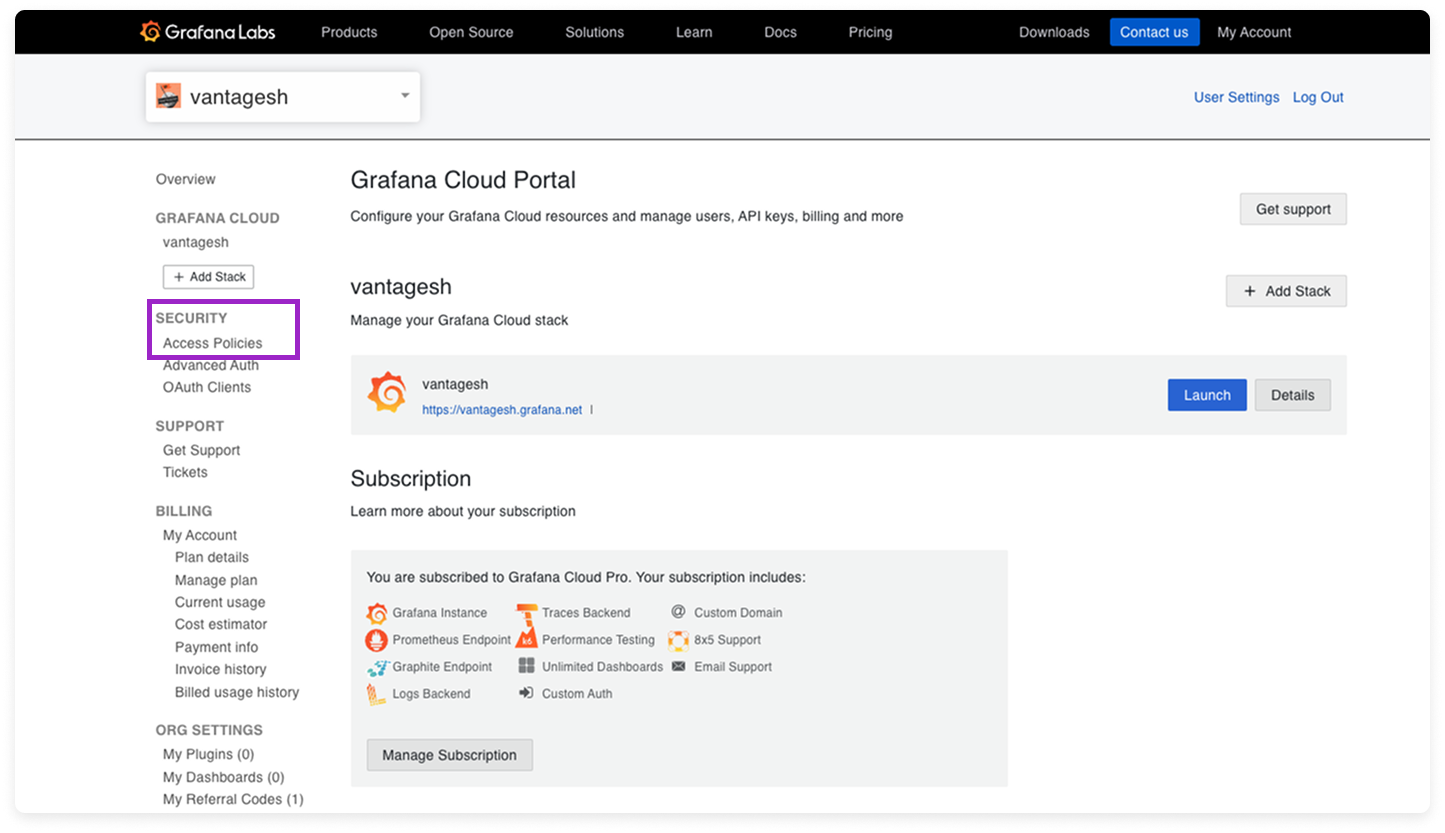
At the top of the page, click **Create access policy**.
For **Display name** and **Name**, enter *vantage*.
For **Realms**, select **all stacks**, or select individual stacks if you want only certain stacks associated with the integration.
Under **Scopes**, add the `billing-metrics:read` and `orgs:read` scopes. (You may need to search for these scopes in the **Add scope** search box below the checklist.)
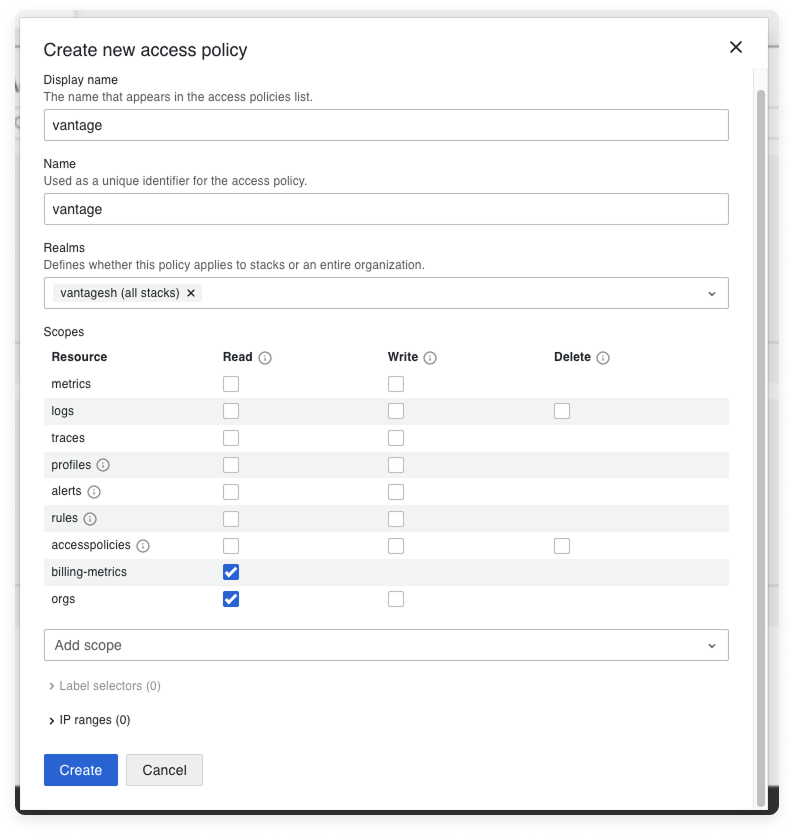
If you have any IP restrictions on this instance, ensure you allow the following IP addresses for Vantage:
* `54.87.66.45`
* `3.95.43.133`
* `54.162.3.72`
* `44.199.143.63`
* `3.218.103.23`
Click **Create**.
The new access policy is created. On the access policy tile, click **Add token**.
Give the token a name and select an expiration date. If the key expires, you will need to update your integration in Vantage with a new API token.
Click **Create**, then copy the new token.
From the top navigation in Vantage, click **Settings**.
On the left navigation, select **Integrations** and select **Grafana Cloud**.
The Grafana Cloud integrations page is displayed. Ensure you are on the **Connect** tab.
At the bottom of the page, click **Add API Key** and paste your newly generated token.
For **Organization slug**, enter the organization name that appears in your Grafana organization URL (e.g., in `https://grafana.com/orgs/vantagesh`, enter only `vantagesh`).
Click **Connect Account**.
After clicking **Connect Account**, you will see the status of your integration change to **Importing** within the Vantage console. This status indicates that Vantage is actively importing your Grafana Cloud cost data. See the [Integration Status](/vantage_account#integration-status) documentation for details on integration statuses.
As soon as costs are processed, they will be available on your All Resources Cost Report. If you decide to remove your Grafana Cloud integration from Vantage, all costs associated with your Grafana Cloud API key will be removed from the Vantage console.
### Next Steps - Manage Workspace Access
Once the import is complete and the integration status changes to **Stable**, you can select which workspaces this integration is associated with. See the [Workspaces](/workspaces#manage-workspace-provider-integrations) documentation for information.
## Data Refresh
See the [provider data refresh documentation](/provider_data_refresh) for information on when data for each provider refreshes in Vantage.
## Grafana Costs on Cost Reports
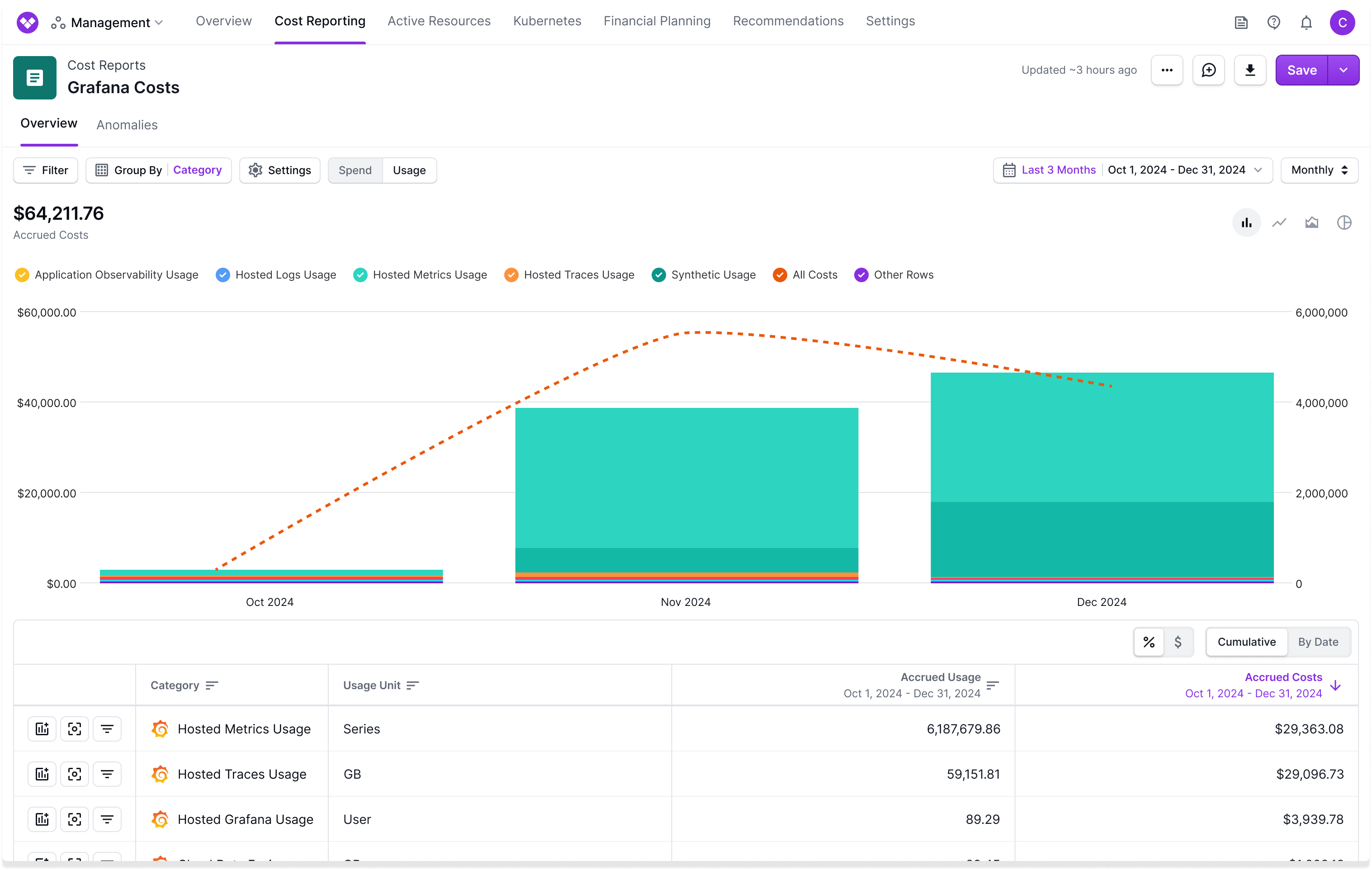
Due to Grafana’s billing process, billing data for the current month becomes available only on the 1st of the following month. Grafana Cloud costs are not amortized across the month; therefore, it is recommended that you view Grafana costs and usage using the **Monthly** date binning.
### Grafana Cloud Billed Through AWS Marketplace
If you purchase your Grafana Cloud subscription through the AWS Marketplace, the same usage can appear in Vantage from two sources:
* The direct Grafana Cloud integration described above.
* Your AWS Cost and Usage Report (CUR), where the Grafana Cloud subscription appears as Marketplace charges on the AWS provider.
Vantage does not automatically deduplicate costs across providers, so leaving both sources unfiltered will double-count your Grafana spend on the All Resources Cost Report and any cross-provider Cost Reports.
To avoid double-counting, exclude AWS Marketplace charges that correspond to your Grafana Cloud subscription from your AWS-scoped reports.
## Grafana Reporting Dimensions
On Grafana [Cost Reports](/cost_reports), you can filter across several dimensions:
* Service (e.g., Metrics, Traces, Logs)
* Category (Specific usage category, like Hosted Metrics Usage or Hosted Logs Usage)
* Organization
* Account ID (Grafana stack)
* Tags ([Virtual Tags](/tagging) created in Vantage)
* Charge Type (e.g., usage)