> ## Documentation Index
> Fetch the complete documentation index at: https://docs.vantage.sh/llms.txt
> Use this file to discover all available pages before exploring further.
# Elastic
> Learn how to integrate Vantage with Elastic Cloud.
Vantage connects to your Elastic Cloud account using a billing API key. Vantage uses the [Elastic Cloud Billing API](https://www.elastic.co/docs/api/doc/cloud-billing/) (including the [Billing Costs Analysis API](https://www.elastic.co/docs/api/doc/cloud/group/endpoint-billingcostsanalysis)) to ingest cost and usage data for your Elastic organizations. Vantage displays Elastic Cloud costs and associated [usage metrics](/usage_based_reporting), such as Hours (Elasticsearch), Gigabytes (Data Transfer), and API Calls (Storage), in line with other infrastructure costs.
You can connect multiple Elastic integrations by adding separate API keys; each integration can include one or more Elastic organizations that the API key can access. To create an API key, you must have the **Organization Owner** or **Billing Admin** role in Elastic. The longest expiration for an Elastic API key is one year, so you will need to rotate the key in Vantage when it expires. It's best practice to use a dedicated API key for Vantage and rotate it per your security policy.
This integration is for **Elastic Cloud** only. It is not compatible with self-hosted Elastic (Elastic Cloud Enterprise).
## Connect Your Elastic Cloud Account
### Prerequisites
* You must have a Vantage **Organization Owner** or **Integration Owner** role to add or remove this integration. See the [Role-Based Access Control](/rbac) documentation for details.
* An Elastic Cloud account with access to create API keys with billing permissions.
* [Create a free Vantage account](https://console.vantage.sh/signup), then follow the steps below to integrate Elastic Cloud costs.
Vantage cannot perform writes to your Elastic Cloud organization. Vantage uses the [Billing Admin](https://www.elastic.co/docs/deploy-manage/users-roles/cloud-organization/user-roles) role to read cost and usage data only; it cannot manage organization or deployment settings.
### Create the Connection
Log in to the [Elastic Cloud console](https://cloud.elastic.co/login).
Click your user avatar on the top right. Select **Organization**.
Select the **API Keys** tab.
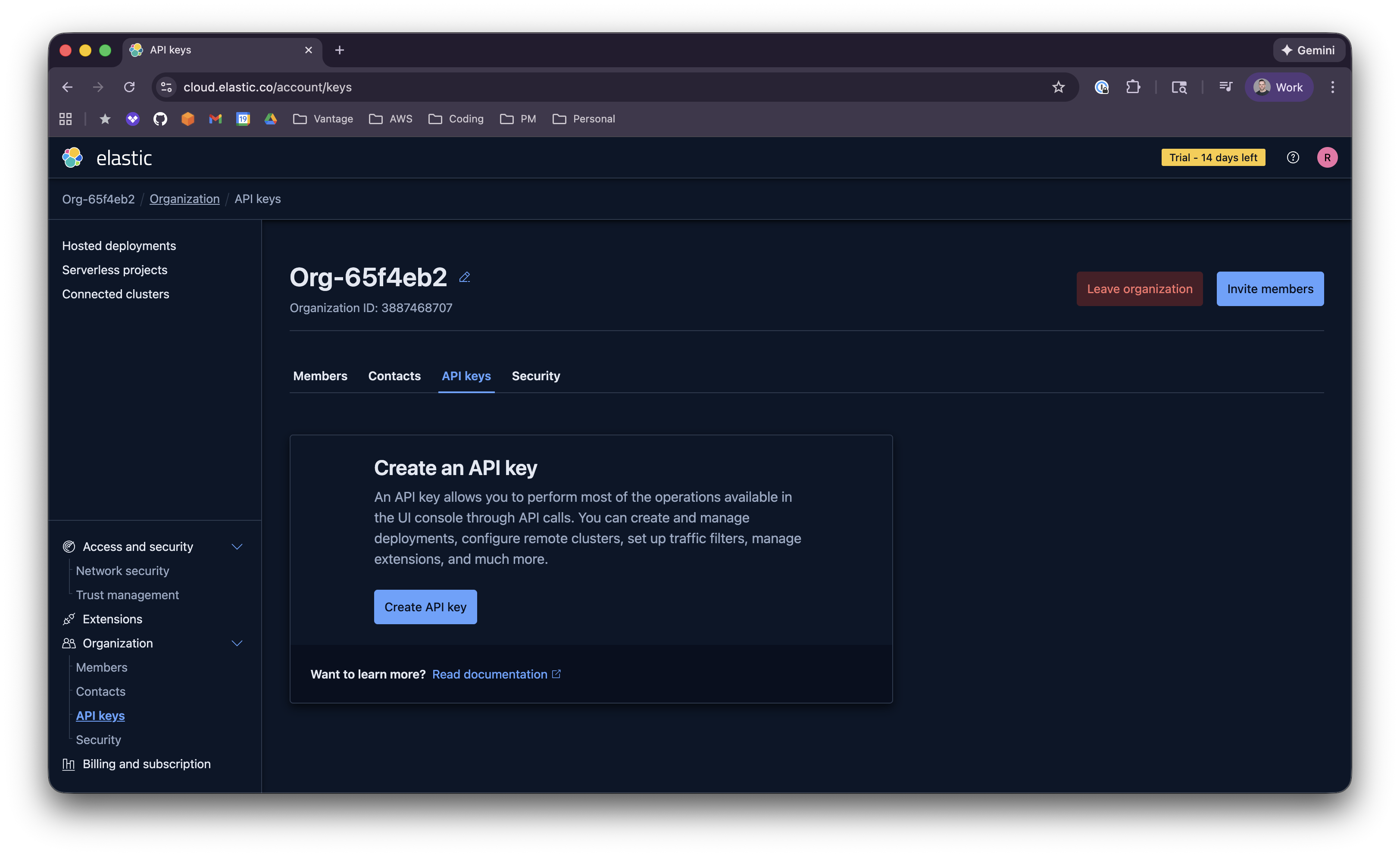
Create a new API key:
* Enter a name.
* Set the expiration (max one year). If the key expires, you'll need to update the integration in Vantage with a new API key.
* For **Assign roles**, select the **Billing Admin** permissions.
Click **Create API key** and copy the API key.
In Vantage, from the top navigation click **Settings**.
On the left navigation, select **Integrations** and select **Elastic**. Ensure you are on the **Connect** tab.
On the Elastic integrations page, click **Add API Key**.
Enter a **Description** (e.g., a name for this connection) and paste the API key. Click **Connect Account**.
If you are an AWS GovCloud user, check the **Uses AWS GovCloud** box and select your region from the dropdown. This ensures Vantage uses the relevant APIs for GovCloud.
After connecting, the integration status will show **Importing** while Vantage ingests your Elastic cost data. Once the import is complete, the status changes to **Stable**. See [Integration Status](/vantage_account#integration-status) for details.
When the integration is first connected, Vantage ingests up to **six months** of historical Elastic cost data. Data is retained according to your Vantage retention period. If you remove the Elastic integration from Vantage, all associated costs will be removed from the Vantage console.
### Next Steps - Manage Workspace Access
Once the integration status is **Stable**, you can choose which workspaces can use this integration. See [Workspaces](/workspaces#manage-workspace-provider-integrations) for how to manage workspace provider integrations.
## Data Refresh
See the [provider data refresh documentation](/provider_data_refresh) for when Elastic data refreshes in Vantage.
## Elastic Reporting Dimensions
On [Cost Reports](/cost_reports), you can filter and group Elastic costs by:
* **Organization** (Account/Billing Account) – Elastic organization ID (each organization accessible by the API key is synced as an account)
* **Service** – Normalized service name (e.g., Elastic Cloud, Elasticsearch, Kibana, Data Transfer, Storage, Synthetics, APM, Machine Learning; serverless products may appear with a "Serverless" suffix)
* **Category** – Cost type from Elastic (e.g., capacity, data\_in, data\_out, storage\_bytes)
* **Subcategory** – Product kind from Elastic (e.g., elasticsearch, kibana, apm)
* **Region** – Derived from the line item SKU when available (e.g., aws-us-east-2, azure-eastus)
* **Resource** – When daily cost breakdown is available, deployment or resource name may appear
* **Charge Type** – e.g., Usage
* **Tag** – [Virtual Tags](/tagging) created in Vantage for this provider (Elastic does not supply tags in billing data)